GUIKit Example: GraphEditor
GUIKit Example: GraphEditor
The functionality provided by GUIKit has been superseded by the interface construction and controls functions native to the built-in Wolfram Language.
Needs["GUIKit`"]GraphEdit[expr_] := GUIRunModal[PrepareInterfaceReference[expr]]GraphEditNonModal[expr_] := GUIRun[PrepareInterfaceReference[expr]]PrepareInterfaceReference[expr_] := Module[{ref},
ref = GUILoad["Graph/GraphEditor"];
ref @ InvokeMethod[{"graphFrame", "pack"}];
JavaShow[ref @ WidgetReference["graphFrame"]];
ref @ SetPropertyValue[{"graphPanel", "expr"}, CreateGraphExpr[expr]];
ref]CreateGraphExpr[gr_Graph] := grCreateGraphExpr[mat_SparseArray] := ArrayRules[mat]CreateGraphExpr[mat_ ? MatrixQ] := ArrayRules[mat]CreateGraphExpr[r : {___Rule}] := rCreateGraphExpr[x___] := {}Examples
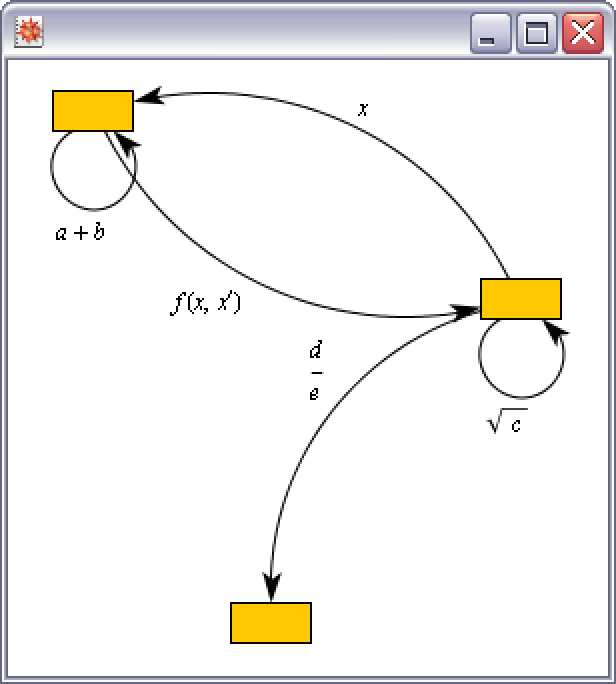
This example demonstrates the benefit of supplementing Wolfram Language functionality with GUIKit user interface elements leveraging existing third-party graph model and editing libraries. GraphEdit widgets take advantage of the Graph expression supported by Combinatorica` and also SparseArray ArrayRules.
The user interface of the graph editing canvas allows you to do the following.
mat = {{a + b, f[x, x'], 0}, {x, Sqrt[c], (d/e)}}MatrixForm[mat]outRules = GraphEdit[mat]Normal[SparseArray[outRules]] // MatrixFormmat = SparseArray[{{i_, i_} :> -(1/i), {i_, j_} /; Mod[Abs[i - j], 5] == 1 -> 1}, {6, 6}]mat // MatrixFormoutRules = GraphEdit[mat]Normal[SparseArray[outRules]] //MatrixFormgr = GraphEdit[ Graph[{}, {}, EdgeDirection -> True]]ShowGraph[gr]Here is another version run in a modeless session where you can interact with and change the displayed graph.
ref = GraphEditNonModal[{{a, b, 0}, {0, c, d}}]ref @ SetPropertyValue[{"graphPanel", "expr"}, ArrayRules[{{e, f, g, n}, {h, i, j, m}}]]ref @ PropertyValue[{"graphPanel", "expr"}]