GUIKit Example: Hello World
GUIKit Example: Hello World
The functionality provided by GUIKit has been superseded by the interface construction and controls functions native to the built-in Wolfram Language.
Needs["GUIKit`"]HelloWorld[] := GUIRunModal[
Widget["Panel", {
Widget["Label", {"text" -> "Hello World!"}]
} ]
]Example
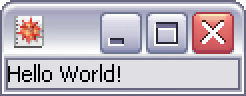
This example displays the classic simple "Hello World" application using the GUIKit framework.
HelloWorld[]The following are other variants on the basic theme of specifying the user interface definition.
Here you choose to pass arguments to the constructor of the label widget instead of setting the "text" property.
GUIRunModal[
	 Widget["Panel", {
	  Widget["Label",   InitialArguments -> { "Hello World!"}]
	    } ]   ]
Technically, even this version will work since frame and content panes will be automatically wrapped if not included.
GUIRunModal[
	 Widget["Label", {"text" -> "Hello World!"}]
	   ]
You could add extra layout options to center the text.
GUIRunModal[
	 Widget["Label", {"text" -> "Hello World!",
	 "horizontalAlignment" -> PropertyValue["Center"]}]
	   ]
The "Panel" and "Label" widget controls simply wrap the Java Swing controls, which you can also call directly through either the Swing or AWT versions.
GUIRunModal[
	 Widget["class:javax.swing.JPanel", {
	     Widget["class:javax.swing.JLabel",   { "text" -> "Hello World!"}]
} ] ]GUIRunModal[
Widget["class:java.awt.Panel", {
Widget["class:java.awt.Label", { "text" -> "Hello World!"}]
} ] ]Here we also try this using an XML definition equivalent.
GUIRunModal[ImportString["
<widget src='Panel'>
  <group>
    <widget src='Label'>
    <property name='text'>
    <string value='Hello World!'/>
    </property>
    </widget>
  </group>
</widget>
", "GUIKitXML"]]