GUIKit Example: PlotGroup
GUIKit Example: PlotGroup
The functionality provided by GUIKit has been superseded by the interface construction and controls functions native to the built-in Wolfram Language.
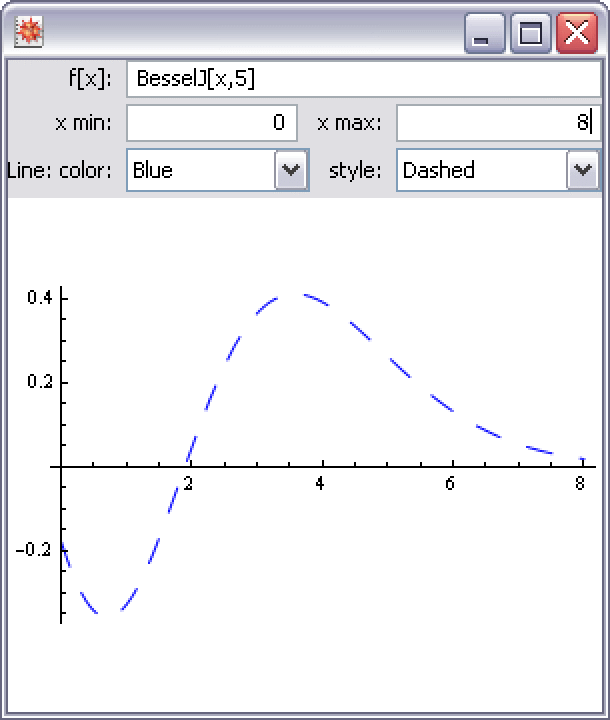
Needs["GUIKit`"]PlotGroupDialog[] := GUIRunModal["Wolfram/Example/PlotGroup"];def = Block[{$Path = $GUIPath},
Get["Wolfram/Example/PlotGroup.m"]]Example
This example demonstrates how to create a reusable GUIKit` widget for wrapping Plot and some of its options.
PlotGroupDialog[]You can easily treat the PlotGroup example as a single reusable user interface element within other panels and even use multiple instances.
GUIRunModal[
	Widget["Panel", {
	Widget["Label", {"text" -> "Multiple Plot
sessions"}],
	{Widget["Wolfram/Example/PlotGroup", ExposeWidgetReferences -> {"canvas" -> "canvas1"}],
	Widget["Wolfram/Example/PlotGroup", ExposeWidgetReferences -> {"canvas" -> "canvas2"}]},
	BindEvent["endModal",
	Script[ Show[ GraphicsGrid[
	 Partition[
	ToExpression[PropertyValue[{#, "mathCommand"}]]& /@
	Select[ "WidgetNames" /. GUIInformation[], StringMatchQ[#, "canvas*"]&],
	2]]]  ]]
	}]
	]