

ElementMeshRegionProduct
ElementMeshRegionProduct[mesh1,mesh2]
represents the Cartesian product of the ElementMesh mesh1 and mesh2.
Details and Options
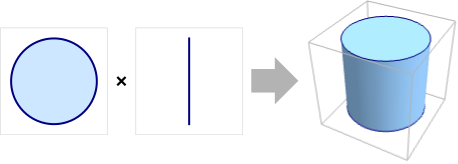
- ElementMeshRegionProduct is also known as outer product region or region extrusion.
- ElementMeshRegionProduct[mesh1,mesh2] represents the region
 .
. - The embedding dimension of the product region is the sum of embedding dimensions, and the geometric dimension is the sum of geometric dimensions.
- The highest product dimension supported is 3.
- ElementMeshRegionProduct has the same options as ToElementMesh, with the following additions and changes:
-
"RegionMarkerFunction" None specify region markers
Examples
open all close allBasic Examples (2)
Needs["NDSolve`FEM`"]Create an ElementMesh:
mesh = ToElementMesh[Line[{{0}, {1}}]]Compute the ElementMesh region product:
productMesh = ElementMeshRegionProduct[mesh, mesh]Visualize the region product mesh:
productMesh["Wireframe"]Create three ElementMesh instances:
meshX = ToElementMesh[Line[{{0}, {2}}]];
meshY = ToElementMesh[Line[{{0}, {1}}]];
meshZ = ToElementMesh[Line[{{0}, {3}}]];
Compute the ElementMesh region product:
productMesh = ElementMeshRegionProduct[meshX, meshY, meshZ]Visualize the region product mesh:
productMesh["Wireframe"]Scope (1)
Create two ElementMesh instances:
meshXY = ToElementMesh[Disk[], MaxCellMeasure -> 0.1];
meshZ = ToElementMesh[Line[{{0}, {3}}]];
Extrude the first ElementMesh with the second by forming a region product:
productMesh = ElementMeshRegionProduct[meshXY, meshZ]Visualize the region product mesh:
productMesh["Wireframe"]Options (2)
"RegionMarkerFunction" (2)
Create a marker association and a region member function:
regs = <|"solid" -> 10, "fluid" -> 20|>;
rmf = RegionMember[Rectangle[{1.2, 0}, {1.8, 3}]];
Define a region marker function:
myRegionMarkerFunction = With[{rmf = rmf, rs = regs["solid"], rf = regs["fluid"]}, If[rmf[#], rs, rf]&];Create ElementMesh that is used in each direction:
mesh = ToElementMesh[Line[{{0.}, {3.}}]];Compute the ElementMesh region product:
mesh = ElementMeshRegionProduct[mesh, mesh, "RegionMarkerFunction" -> myRegionMarkerFunction]Inspect the "MeshElementMarkerUnion" of the generated mesh:
mesh["MeshElementMarkerUnion"]Visualize the region product mesh with the region markers:
Show[mesh["Wireframe"["MeshElementStyle" -> {Directive[FaceForm[Red]], Directive[FaceForm[Green]]}]], AspectRatio -> 1]Create a marker association and a region member function:
regs = <|"left" -> 1, "central" -> 3, "right" -> 2|>;
rLeft = RegionMember[Cuboid[{0, 0, 0}, {0.8, 2, 2}]];
rCentral = RegionMember[Cuboid[{0.8, 0, 0}, {1.2, 2, 2}]];
rRight = RegionMember[Cuboid[{1.2, 0, 0}, {2, 2, 2}]];
Define a region marker function:
myRegionMarkerFunction = With[{rmf = rmf, rl = regs["left"], rc = regs["central"], rr = regs["right"]}, If[rLeft[#], rl, If[rCentral[#], rc, rr]]&];Create ElementMesh that is used in each direction:
mesh = ToElementMesh[Line[{{0.}, {2.}}]];Compute the ElementMesh region product:
mesh = ElementMeshRegionProduct[mesh, mesh, mesh, "RegionMarkerFunction" -> myRegionMarkerFunction]Inspect the "MeshElementMarkerUnion" of the generated mesh:
mesh["MeshElementMarkerUnion"]Visualize the region product mesh with the region markers:
Show[Map[mesh["Wireframe"[ElementMarker == #[[1]], "MeshElement" -> "MeshElements", "ElementMeshDirective" -> Directive[EdgeForm[], FaceForm[#[[2]]]]]]&, {{1, Green}, {2, Orange}, {3, Red}}]
	, PlotRange -> {All, {1, 2}, All}]
Applications (2)
Create a 2D graded mesh from a product of two 1D graded meshes:
mesh = ToGradedMesh[Line[{{0}, {2}}], <| "Alignment" -> "Left"|>];
productMesh = ElementMeshRegionProduct[mesh, mesh];
productMesh["Wireframe"]
Create a 1D graded mesh with a "Central" point distribution:
meshX = ToGradedMesh[Line[{{0}, {2}}], <|"Alignment" -> "Central"|>];Create a second 1D graded mesh with a "Central" point distribution and 50 elements:
meshY = ToGradedMesh[Line[{{0}, {1}}], <|"Alignment" -> "Central", "ElementCount" -> 50|>];productMesh = ElementMeshRegionProduct[meshX, meshY]Visualize the region product of the anisotropic mesh:
productMesh["Wireframe"]Create a third 1D graded mesh with a "BothEnds" point distribution, 50 elements and an endpoint distance of 1/200:
meshZ = ToGradedMesh[Line[{{0}, {1}}], <| "Alignment" -> "BothEnds", "ElementCount" -> 50, "MinimalDistance" -> 1 / 200|>]productMesh = ElementMeshRegionProduct[productMesh, meshZ]productMesh["Wireframe"]Text
Wolfram Research (2021), ElementMeshRegionProduct, Wolfram Language function, https://reference.wolfram.com/language/FEMDocumentation/ref/ElementMeshRegionProduct.html (updated 2023).
CMS
Wolfram Language. 2021. "ElementMeshRegionProduct." Wolfram Language & System Documentation Center. Wolfram Research. Last Modified 2023. https://reference.wolfram.com/language/FEMDocumentation/ref/ElementMeshRegionProduct.html.
APA
Wolfram Language. (2021). ElementMeshRegionProduct. Wolfram Language & System Documentation Center. Retrieved from https://reference.wolfram.com/language/FEMDocumentation/ref/ElementMeshRegionProduct.html