How to | Create a Matrix
Matrices are represented in the Wolfram Language with lists. They can be entered directly with the { } notation, constructed from a formula, or imported from a data file. The Wolfram Language also has commands for creating diagonal matrices, constant matrices, and other special matrix types.
A matrix can be entered directly with {} notation:
mat = {{1, 2, 3}, {4, 5, 6}, {7, 8, 9}}You can show the result in matrix notation with MatrixForm:
mat//MatrixFormexpr//fun is another way of entering fun[expr]. It can be convenient to use it when fun is a formatting function.
This uses Table to create a grid of values in  and
and  :
:
hx = 0.5;hy = 0.7;
mat = Table[x hx + y hy, {x, 4}, {y, 5}];mat//MatrixFormNote that matrices in the Wolfram Language are not restricted to contain numbers; they can contain symbolic entries such as formulas:
mat = Table[x^i + x^j, {i, 1, 4}, {j, 1, 3}];
mat//MatrixForm
When you create a matrix and save it with an assignment, take care not to combine this with formatting using MatrixForm. Use parentheses:
(mat = {{1, 2}, {3, 4}})//MatrixFormYou can use mat in further calculations:
mat.mat//MatrixFormSuppose you do not use parentheses:
mat = {{1, 2}, {3, 4}}//MatrixFormThen mat will print like a matrix but will not work in calculations like a matrix. For example, the following does not carry out matrix multiplication:
mat.matYou can check the value of mat by using FullForm:
mat//FullFormThis shows that mat also includes the formatting wrapper MatrixForm, which stops it from working as a matrix.
There are functions to create a variety of special types of matrices.
This creates a 4×5 matrix of real values that fall between  and
and  :
:
RandomReal[{-10, 10}, {4, 5}]//MatrixFormThis creates a matrix that only has nonzero entries on the diagonal:
DiagonalMatrix[{1, 2, 3, 4}]//MatrixFormThis creates a matrix whose entries are all the same:
ConstantArray[3, {2, 4}]//MatrixFormThis creates a 4×4 Hilbert matrix; each entry is of the form 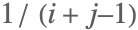 :
:
HilbertMatrix[4]//MatrixFormMany linear algebra and other functions return matrices.
Here, the QR decomposition of a random 3×3 matrix is calculated:
mat = RandomReal[{-10, 10}, {3, 3}];
{qMat, rMat} = QRDecomposition[mat];qMat//MatrixFormWhen Wolfram Language functions return matrices they often use an optimized storage format called packed arrays.
You can apply many common operations in the Wolfram Language to a list, and get back another list with the function mapped onto each element. This also works for matrices, which are lists of lists.
Here is a 2×2 matrix of squares:
mat = {{16, 25}, {9, 36}};
mat//MatrixForm
This applies Sqrt to each element of the matrix:
Sqrt[mat]//MatrixFormThis behavior of Sqrt is called listability, and it makes very readable and efficient code.
If a function that is not listable is used, it does not map onto each element:
fun[mat]You can make the function listable; now it will map onto each element:
SetAttributes[ fun, Listable];
fun[mat]//MatrixForm
Another important way to create a matrix is to import a data file. This can be done with tabular formats such as Table (.dat), CSV (.csv), and TSV (.tsv). A matrix can also be read from an Excel spreadsheet (.xls).
Here, ImportString is used to import a CSV formatted string into a matrix. Importing from a file is done with Import:
mat = ImportString["1.2,4.5
6.7,1.2", "CSV"]
The Wolfram Language also supports a number of other formats including scientific and medical data formats such as HarwellBoeing, MAT, HDF, NASACDF, and FITS.
The way that you create a matrix can have an important impact on the efficiency of your programs. For the best efficiency, avoid appending to a matrix, avoid unnecessary creation operations, and use listable operations when you can.
This example repeatedly adds a new row to a matrix:
mat = {};
For[i = 1, i ≤ 10000, i++, mat = Append[mat, {i, i ^ 2, i ^ 3}]];//AbsoluteTiming
It is much faster to create the matrix in one computation. Whenever you see a For loop, try to replace it with some other construct, like Table:
mat = Table[{i, i ^ 2, i ^ 3}, {i, 10000}];//AbsoluteTimingThe following example creates a  matrix of zeros and then fills it in with a loop. The creation of a zero matrix here is completely unnecessary:
(n = 10000;
	mat = Table[0.0, {2}, {n}];
	For[i = 1, i ≤ n, i++, mat[[1, i]] = Sin[2.0 Pi i / n];
	mat[[2, i]] = Cos[2.0 Pi i / n]];)//AbsoluteTiming
It is much faster to create data for each row of the matrix once, and then use a listable operation:
(n = 10000;
	v = 2.0 Pi Range[1., n] / n;
	mat1 = {Sin[v], Cos[v]};)//AbsoluteTiming
If your matrices are large and have many elements that are the same (for example, zero), then you should consider working with sparse matrices formed with SparseArray.