

AstroBackground
is an option that specifies the background style of an AstroGraphics map.
Details
- The astro background of an AstroGraphics[prims,…] output is the actual map that appears underneath the primitives prims. A map like AstroGraphics[{},…] with no primitives will only show the astro background, and possibly auxiliary elements like astro grid lines.
- AstroBackground values can be given as AstroBackgroundAstroStyling[skystyle] for any valid AstroStyling sky style. For named sky styles, such as "BlackSky" or "GalacticSky", AstroBackgroundAstroStyling["skystyle"] may also be given as AstroBackground"skystyle".
- Possible sky styles include:
-
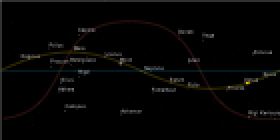
"BlackSky" stars and planets on black background 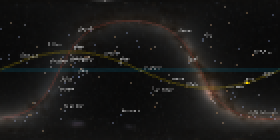
"GalacticSky" stars and planets on Milky Way image 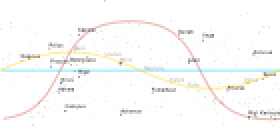
"WhiteSky" stars and planets on white background - AstroBackgroundAutomatic uses the "BlackSky" sky style by default.
- AstroBackgroundNone specifies that no astro background should be used, meaning no background regions are displayed.
- AstroBackground takes precedence over Background in astro graphics.
Examples
open all close allBasic Examples (3)
Sky map with the default astro background:
AstroGraphics[Entity["Star", "Betelgeuse"], AstroRange -> Quantity[20, "AngularDegrees"], AstroReferenceFrame -> "Equatorial"]Use a background showing the Milky Way:
AstroGraphics[Entity["Star", "Shaula"], AstroRange -> Quantity[20, "AngularDegrees"], AstroBackground -> "GalacticSky", AstroReferenceFrame -> "Ecliptic"]Show constellation illustrations and remove the equatorial, ecliptic and galactic planes:
AstroGraphics[Entity["Star", "Betelgeuse"], AstroRange -> Quantity[30, "AngularDegrees"], AstroReferenceFrame -> "Equatorial", AstroBackground -> AstroStyling[{"BlackSky", "ShowConstellationIllustrations" -> True, "ShowMainPlanes" -> False}]]Scope (4)
Use the default background sky:
AstroGraphics[AstroReferenceFrame -> "Equatorial"]Use a background showing the Milky Way:
AstroGraphics[AstroReferenceFrame -> "Equatorial", AstroBackground -> "GalacticSky"]Use a white background sky in AstroGraphics:
AstroGraphics[AstroReferenceFrame -> "Equatorial", AstroBackground -> "WhiteSky"]Specify styling directives for constellation:
style = {
	"ShowConstellationIllustrations" -> True,
	"ShowConstellationRegions" -> True, "ConstellationRegionStyle" -> Darker[Blue, .2], "ConstellationLineStyle" -> Opacity[0.6, LightBlue],
	"ShowConstellationBoundaries" -> True, "ConstellationBoundaryStyle" -> Directive[Dashing[{0, Tiny}], Yellow], "ConstellationNameStyle" -> GrayLevel[0.7]
};AstroGraphics[Entity["Constellation", "Scorpius"], AstroBackground -> AstroStyling[{"GalacticSky", "HideObjects" -> {"Sun"}, "ShowConstellations" -> {Entity["Constellation", "Scorpius"]}, style}], AstroReferenceFrame -> "J2000"]Text
Wolfram Research (2022), AstroBackground, Wolfram Language function, https://reference.wolfram.com/language/ref/AstroBackground.html.
CMS
Wolfram Language. 2022. "AstroBackground." Wolfram Language & System Documentation Center. Wolfram Research. https://reference.wolfram.com/language/ref/AstroBackground.html.
APA
Wolfram Language. (2022). AstroBackground. Wolfram Language & System Documentation Center. Retrieved from https://reference.wolfram.com/language/ref/AstroBackground.html