

AudioDelay
AudioDelay[audio,delay]
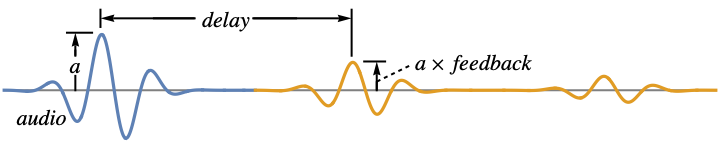
creates audio by adding repeated decaying echos to audio spaced by the specified delay.
AudioDelay[audio,delay,feedback]
uses the specified feedback as the amount of signal to preserve during each repetition.
AudioDelay[audio,delay,feedback,mix]
uses mix to control the ratio between original and delayed audio.
AudioDelay[video,…]
add delay to the first audio track in video.
Details and Options
- AudioDelay simulates the effect of a decaying echo. »
- AudioDelay[audio,delay] is equivalent to AudioDelay[audio,delay,0,.5].
- The mixing parameter mix can be any real number between 0 and 1.
- With mix=0, only the original signal is returned; with mix=1, only the delayed signal is returned.
- The feedback parameter can be any real number between
 and 1.
 - The AudioType of the returned object is either "Real32" or "Real".
- The following options can be given:
-
Method Automatic the method to use PaddingSize Automatic amount of padding on the right - By default, the input signal is lowpass filtered using an automatic cutoff frequency. Use Method->{"LowpassCutoff"->ω} to specify the cutoff frequency. Using Method->{"LowpassCutoff"->None}, no filtering is performed.
- Use PaddingSize->pad to add pad seconds of padding to the right of the audio signal.
Examples
open all close allBasic Examples (2)
Scope (5)
Specify the amount of delay using a time quantity:
AudioDelay[\!\(\*AudioBox[""]\), Quantity[1, "Seconds"]]AudioPlot[%, PlotRange -> All]The feedback controls the amount of decay:
a = \!\(\*AudioBox[""]\);AudioDelay[a, .5, .7]//AudioPlotA value of 0 will result in a single repetition:
AudioDelay[a, .5, 0]//AudioPlotA negative feedback will alternate the phase:
AudioPlot[AudioDelay[a, .5, -.7]//AudioNormalize]A value of 1 will cause the repetitions to not decay:
AudioPlot[AudioDelay[a, .5, 1]//AudioNormalize]The mix parameter controls the ratio between the original signal and the delayed signal:
a = \!\(\*AudioBox[""]\);Use a mix value of 0 to return the original signal ("dry"):
AudioDelay[a, .5, .5, 0]//AudioPlotUse a value of 1 to return the delayed signal ("wet") only:
AudioDelay[a, .5, .5, 1]//AudioPlotUse a value between 0 and 1 to control the ratio between the "dry" and "wet" signals:
AudioDelay[a, .5, .5, .5]//AudioPlotAudioDelay returns a "Real32" audio signal:
a = ExampleData[{"Sound", "BalloonPop"}, "Audio"];
a//AudioTypeAudioDelay[a, .1]//AudioTypeProcess the audio track of a video:
AudioDelay[\!\(\*VideoBox[""]\), .5]Options (1)
Applications (1)

Neat Examples (1)
Use Karplus–Strong synthesis (resonating delay lines excited by short bursts of noise) to simulate the sound of a vibrating string:
freq = 60;
feedback = 0.99;
AudioDelay[AudioGenerator["Pink", .01], 1 / freq, feedback, 1, PaddingSize -> 5, Method -> {"LowpassCutoff" -> Quantity[8000, "Hertz"]}]
Simulate the strumming of a chord:
chord = {130.81, 164.81, 196, 261.62};Table[AudioDelay[AudioPad[AudioGenerator["Pink", .01], {RandomReal[.2], 0}], 1 / chord[[i]], feedback, 1, PaddingSize -> 5, Method -> {"LowpassCutoff" -> Quantity[8000, "Hertz"]}], {i, Length[chord]}]//MeanText
Wolfram Research (2016), AudioDelay, Wolfram Language function, https://reference.wolfram.com/language/ref/AudioDelay.html (updated 2024).
CMS
Wolfram Language. 2016. "AudioDelay." Wolfram Language & System Documentation Center. Wolfram Research. Last Modified 2024. https://reference.wolfram.com/language/ref/AudioDelay.html.
APA
Wolfram Language. (2016). AudioDelay. Wolfram Language & System Documentation Center. Retrieved from https://reference.wolfram.com/language/ref/AudioDelay.html