



CellularAutomaton
CellularAutomaton[rule,init,t]
generates a list representing the evolution of the cellular automaton with the specified rule from initial condition init for t steps.
CellularAutomaton[rule,init]
gives the result of evolving init for one step.
CellularAutomaton[rule,init,{tspec,xspec,…}]
gives only those parts of the evolution specified by tspec, xspec, etc.
CellularAutomaton[rule,init,{t,All,…}]
includes at each step all cells that could be affected over the course of t steps.
CellularAutomaton[rule]
is an operator form of CellularAutomaton that represents one step of evolution.
Details
- Possible forms for rule are:
-
n  ,
,  , elementary rule with rule number n
{n,k} general nearest‐neighbor rule with k colors {n,k,r} general rule with k colors and range r {n,k,{r1,r2,…,rd}} d‐dimensional rule with  neighborhood
 {n,k,{{off1},{off2},…,{offs}}} rule with neighbors at specified offsets {n,k,rspec,s} order‐s rule {n,{k,1}} k‐color nearest‐neighbor totalistic rule {n,{k,1},r} k‐color range-r totalistic rule {n,{k,{wt1,wt2,…}},rspec} rule in which neighbor i is assigned weight wti {lhs1->rhs1,lhs2->rhs2,…} explicit replacements for lists of neighbors {fun,{},rspec} general function fun to apply to each list of neighbors bfun Boolean function to apply to collections of neighbors CellularAutomaton[rule] operator form of a rule <"key1"val1,"key2"val2,…> rule specification by an association "name" named rule - CellularAutomaton[{n,k},…] is equivalent to CellularAutomaton[{n,{k,{k^2,k,1}}},…].
- The following keys can be used to specify a rule given as an association:
-
"RuleNumber" n rule number "TotalisticCode" n totalistic code "OuterTotalisticCode" n outer totalistic code "GrowthCases" {g1,g2,…} make a cell 1 when gi of its neighbors are 1 "GrowthSurvivalCases" {{g1,…},{s1,…}} 1 for gi neighbors; unchanged for si "GrowthDecayCases" {{g1,…},{d1,…}} 1 for gi neighbors; 0 for di "Dimension" d overall dimension "Colors" k number of colors "Range" r range of rule "Neighborhood" type neighborhood type - With "GrowthCases"->{g1,g2,…}, a cell goes from value 0 to value 1 if it has gi neighbors that are 1; otherwise it stays the same as before.
- With "GrowthSurvivalCases"->{{g1,…},{s1,…}}, a cell goes from value 0 to value 1 if it has gi neighbors that are 1, maintains value 1 if it has si neighbors that are 1, and otherwise gets value 0.
- With "GrowthDecayCases"->{{g1,…},{d1,…}}, a cell goes from value 0 to value 1 if it has gi neighbors that are 1, gets value 0 if it has di neighbors that are 1, and otherwise stays the same.
- Possible settings for "Neighborhood" in 2D include:
-
5 or "VonNeumann" CrossMatrix[1] 9 or "Moore" BoxMatrix[1] - For dimension d, "Neighborhood" supports "VonNeumann" and "Moore", as well as the integers
 and
and  .
. - Possible named cellular automaton rules given as CellularAutomaton["name",…] include:
-
"Rule30" 30 "Rule90" 90 "Rule110" 110 "Code1599" {1599,{3,1}} "GameOfLife" {224,{2,{{2,2,2},{2,1,2},{2,2,2}}},{1,1}} - Common explicit forms for 2D cellular automaton rules include:
-
{n,{k,1},{1,1}} 9‐neighbor totalistic rule {n,{k,{{0,1,0},{1,1,1},{0,1,0}}},{1,1}} 5‐neighbor totalistic rule {n,{k,{{0,k,0},{k,1,k},{0,k,0}}},{1,1}} 5‐neighbor outer totalistic rule - The number of possible cellular automaton rules is as follows:
-
elementary rules 256 1D general rules 
1D totalistic rules 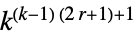
2D general rules 
2D 9‐neighbor totalistic rules 
2D 5‐neighbor totalistic rules 
2D 5‐neighbor outer totalistic rules 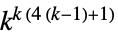
- Normally, all elements in init and the evolution list are integers between 0 and
 .
. - When a general function or a replacement list is used, the elements of init and the evolution list can be any expressions. »
- Explicit replacement rules lhsi->rhsi can contain patterns.
- In a 1D cellular automaton, replacement rules or an explicit function fun are always taken to apply to a 1D list of neighbors. If the neighbors are specified by explicit offsets, they are given in the order of the offsets.
- When the neighborhood in a multidimensional cellular automaton is defined by a range specification such as {r1,r2,…}, the list of neighbors is taken to be a full array with dimensions 2{r1,r2,…}+1.
- If the neighbors in a multidimensional cellular automaton are specified by an explicit list of offsets, the neighbors are supplied in a one-dimensional list in the order of the offsets.
- If an explicit function fun is given, the first argument supplied to it is the list of neighbors. The second argument is the step number starting at 0.
- A complete rule specification is considered to be a pure Boolean function bfun if BooleanVariables[bfun] yields an integer v. In this case, bfun is applied to neighborhoods of v cells at each step. The neighborhoods extend Ceiling[v/2] cells to the left.
- In an order‐s cellular automaton, specified by {rule,kspec,rspec,s}, each step depends on s preceding steps.
- Initial conditions are constructed from init as follows:
-
{a1,a2,…} explicit list of values ai, assumed cyclic {{a1,a2,…},b} values ai superimposed on a b background {{a1,a2,…},{b1,b2,…}} values ai superimposed on a background of repetitions of b1, b2, … {{{{a11,a12,…},off1}, {{a21,…},off2},…},bspec} values aij at offsets offi on a background {{a11,a12,…},{a21,…},…} explicit list of values in two dimensions {aspec,bspec} values in d dimensions with d‐dimensional padding - The first element of aspec is superimposed on the background at the first position in the positive direction in each coordinate relative to the origin. This means that bspec[[1,1,…]] is aligned with aspec[[1,1,…]].
- CellularAutomaton[rule,init,t] generates an evolution list of length
 .
. - For an order‐s cellular automaton, init is a list giving the initial s steps in the evolution of the system.
- Time specifications tspec in {tspec,xspec,…} can be as follows:
-
t all steps 0 through t {t} a list containing only step t {{t}} step t alone {t1,t2} steps t1 through t2 {t1,t2,dt} steps t1, t1+dt, … - The initial condition is considered to be at step 0.
- CellularAutomaton[rule,init,{tspec}] uses the default Automatic for xspec.
- Space specifications xspec can be as follows:
-
All all cells that can be affected by the specified initial condition Automatic all cells in the region that differs from the background 0 cell aligned with beginning of aspec x cells at offsets up to x on the right -x cells at offsets up to x on the left {x} cell at offset x to the right {-x} cell at offset x to the left {x1,x2} cells at offsets x1 through x2 {x1,x2,dx} cells x1, x1+dx, … - In one dimension, the first element of aspec is taken by default to have space offset 0.
- In any number of dimensions, aspec[[1,1,1,…]] is taken by default to have space offset {0,0,0,…}.
- Each element of the evolution list produced by CellularAutomaton is always the same size.
- With an initial condition specified by an aspec of width
 , the region that can be affected after
  steps by a cellular automaton with a rule of range
  has width
  .
. - If no bspec background is specified, space offsets of All and Automatic will include every cell in aspec.
- A space offset of All includes all cells that can be affected by the initial condition.
- A space offset of Automatic can be used to trim off background from the sides of a cellular automaton pattern.
- In working out how wide a region to keep, Automatic only looks at results on steps specified by offt.
- CellularAutomaton[rule][init] is equivalent to CellularAutomaton[rule,init].
Examples
open all close allBasic Examples (3)
Scope (91)
One-Dimensional Rules (26)
CellularAutomaton[73, {{1}, 0}, 4]//GridArrayPlot[CellularAutomaton[73, {{1}, 0}, 50]]Generate the same result using RulePlot:
RulePlot[CellularAutomaton[73], {{1}, 0}, 50]ArrayPlot[CellularAutomaton[{679458, 3}, {{1}, 0}, 50]]ArrayPlot[CellularAutomaton[{679458, 3}, {{1}, 0}, 50], ColorRules -> {1 -> Pink, 2 -> Blue}]RulePlot[CellularAutomaton[{679458, 3}], ColorRules -> {1 -> Pink, 2 -> Blue}]3-color totalistic rule with code 867:
ArrayPlot[CellularAutomaton[{867, {3, 1}}, {{1}, 0}, 50]]2-color range- (two neighbors on the left and one on the right) rule 23898:
ArrayPlot[CellularAutomaton[{23898, 2, 3 / 2}, {{1}, 0}, 40]]
ArrayPlot[CellularAutomaton[{39421042, 2, 2}, {{1}, 0}, 40]]
ArrayPlot[CellularAutomaton[{10, {2, 1}, 2}, {{1}, 0}, 40]]Rule 30 specified by giving explicit offsets for cells in its neighborhood:
ArrayPlot[CellularAutomaton[{30, 2, {{-1}, {0}, {1}}}, {{1}, 0}, 50]]An analog of rule 30 with modified offsets:
ArrayPlot[CellularAutomaton[{30, 2, {{-1}, {0}, {2}}}, {{1}, 0}, 50]]ArrayPlot[CellularAutomaton[{9, 2, {{-1}, {2}}}, {{1}, 0}, 50]]Rule 30 specified by giving explicit weights for cells in its neighborhood:
ArrayPlot[CellularAutomaton[{30, {2, {4, 2, 1}}}, {{1}, 0}, 50]]ArrayPlot[CellularAutomaton[{2049, {3, 1}}, {{1}, 0}, 50]]Totalistic rules have weight 1 for each offset in the neighborhood:
ArrayPlot[CellularAutomaton[{2049, {3, {1, 1, 1}}}, {{1}, 0}, 50]]A 3-color outer totalistic rule:
ArrayPlot[CellularAutomaton[{50257, {3, {3, 1, 3}}}, {{1}, 0}, 50]]Specify rule 90 by giving explicit replacements for neighborhoods:
ArrayPlot[CellularAutomaton[{{1, _, 1} -> 0, {1, _, 0} -> 1, {0, _, 1} -> 1, {0, _, 0} -> 0}, {{1}, 0}, 50]]Specify rule 90 by giving a single "algebraic" replacement rule:
ArrayPlot[CellularAutomaton[{{x_, _, y_} :> Mod[x + y, 2]}, {{1}, 0}, 50]]Use an explicit Boolean formula for rule 30, operating on True and False states:
CellularAutomaton[{{p_, q_, r_} -> Xor[p, Or[q, r]]}, {{True}, False}, 2]ArrayPlot[Boole[%]]Values in a cellular automaton can be any symbolic expression:
CellularAutomaton[{{a, _, b} -> a, {b, _, a} -> b, {x_, _, x_} -> a}, {{b}, a}, 4]Use an arbitrary symbolic function f as the rule to apply to range-1 neighbors:
CellularAutomaton[{f[#]&, {}, 1}, {a, b, c}, 1]Apply the function to neighbors with offsets  and
and  :
:
CellularAutomaton[{f[#]&, {}, {{-1}, {0}}}, {{1}, 0}, 2]Grid[%]Set up a "Pascal's triangle cellular automaton":
CellularAutomaton[{Total[#]&, {}, 1 / 2}, {{1}, 0}, 3]Specify rule 90 as an explicit function:
ArrayPlot[CellularAutomaton[{Mod[#[[1]] + #[[3]], 2]&, {}, 1}, {{1}, 0}, 50]]Additive cellular automaton modulo 4:
ArrayPlot[CellularAutomaton[{Mod[Total[#], 4]&, {}, 1}, {{1}, 0}, 50]]The second argument to the function is the step number:
CellularAutomaton[{f[#1, #2]&, {}, 1}, {a, b, c}, 1]CellularAutomaton[{f, {}, 1}, {a, b, c}, 1]Change the rule at successive steps; #2 gives the step number:
ArrayPlot[CellularAutomaton[{Mod[Total[#] + #2, 4]&, {}, 1}, {{1}, 0}, 30]]Use continuous values for cells:
ArrayPlot[CellularAutomaton[{Mod[Total[#] / 2, 1]&, {}, 1}, {{1}, 0}, 50]]ArrayPlot[CellularAutomaton[{Mod[Total[#] / 2, 1]&, {}, 1}, {{1}, 0}, 50], ColorFunction -> Hue]Specify rule 90 as a pure Boolean function:
ArrayPlot[CellularAutomaton[Xor[#1, #3]&, {{1}, 0}, 50]]ArrayPlot[CellularAutomaton[BooleanFunction[90, 3], {{1}, 0}, 50]]An  analog of rule 90 specified using a pure Boolean function:
ArrayPlot[CellularAutomaton[Xor[#1, #5]&, {{1}, 0}, 50]]Rules Specified by Associations (5)
Specify rule 30 using an association:
ArrayPlot[CellularAutomaton[<|"RuleNumber" -> 30|>, {{1}, 0}, 30]]ArrayPlot[CellularAutomaton[<|"RuleNumber" -> 679458, "Colors" -> 3|>, {{1}, 0}, 40], ColorRules -> {1 -> Pink, 2 -> Blue}]2-color range-3/2 cellular automaton:
ArrayPlot[CellularAutomaton[<|"RuleNumber" -> 23898, "Range" -> 3 / 2|>, {{1}, 0}, 40]]3-color totalistic cellular automaton:
ArrayPlot[CellularAutomaton[<|"TotalisticCode" -> 867, "Colors" -> 3|>, {{1}, 0}, 50]]3-color outer totalistic cellular automaton:
ArrayPlot[CellularAutomaton[<|"OuterTotalisticCode" -> 50257, "Colors" -> 3|>, {{1}, 0}, 50]]Initial Conditions (8)
Explicit initial conditions are assumed cyclic:
CellularAutomaton[30, {1, 0, 0, 0, 0, 0}, 2]CellularAutomaton[30, {1, 0, 0, 0, 0, 0}, 2]//GridThe left neighbor of the leftmost cell is the rightmost cell, and vice versa:
CellularAutomaton[{f[#]&, {}, 1}, {a, b, c, d}, 1]ArrayPlot[CellularAutomaton[30, RandomInteger[1, 100], 50]]Start with a "seed" consisting of the block 11101 surrounded by 0s:
ArrayPlot[CellularAutomaton[126, {{1, 1, 1, 0, 1}, 0}, 20]]Start from a single 0 surrounded by 1s:
ArrayPlot[CellularAutomaton[150, {{0}, 1}, 20]]Start from 111 on a background of repeated 10 blocks:
ArrayPlot[CellularAutomaton[22, {{1, 1, 1}, {1, 0}}, 20]]Specify the "seed" as a sparse array:
ArrayPlot[CellularAutomaton[150, {SparseArray[{1 -> 1, 10 -> 1}], 0}, 20]]Use a SparseArray to give the complete cyclic initial condition:
ArrayPlot[CellularAutomaton[150, SparseArray[{1 -> 1, 10 -> 1}, 50], 20]]Start from block 101 at offset  and block
  at offset
  :
:
ArrayPlot[CellularAutomaton[150, {{{{1, 0, 1}, {-8}}, {{1, 1}, {9}}}, 0}, 20]]Time Steps (6)
CellularAutomaton[30, {{1}, 0}, 2]CellularAutomaton[30, {{1}, 0}, {2}]A list containing only the second step:
CellularAutomaton[30, {{1}, 0}, {{2}}]The second step, not in a list:
CellularAutomaton[30, {{1}, 0}, {{{2}}}]ArrayPlot[CellularAutomaton[30, {{1}, 0}, {{50, 80}}]]The initial condition is step 0:
CellularAutomaton[30, {{1}, 0}, {{0, 2}}]Show every third step from 0 to 100:
ArrayPlot[CellularAutomaton[30, {{1}, 0}, {{0, 100, 3}}]]Region Specifications (11)
By default, CellularAutomaton automatically cuts off the region not covered by the pattern:
ArrayPlot[CellularAutomaton[110, {{1}, 0}, 50]]ArrayPlot[CellularAutomaton[110, {{1}, 0}, {50, Automatic}]]Include all cells that could possibly be affected given the structure of the rule:
ArrayPlot[CellularAutomaton[110, {{1}, 0}, {50, All}]]Include only the region that differs from the background:
ArrayPlot[CellularAutomaton[45, {{1}, 0}, 50]]Include all cells that could possibly be affected:
ArrayPlot[CellularAutomaton[45, {{1}, 0}, {50, All}]]By default, different rules give regions of different widths:
Table[ArrayPlot[CellularAutomaton[n, {{1}, 0}, 40], ImageSize -> {Automatic, 60}], {n, 57, 60}]Force all rules of the same type to give regions of the same width:
Table[ArrayPlot[CellularAutomaton[n, {{1}, 0}, {40, All}], ImageSize -> {Automatic, 60}], {n, 57, 60}]The region that can possibly be affected depends on the range of the rule:
ArrayPlot[CellularAutomaton[{10008, 2, 3 / 2}, {{1}, 0}, {50, All}]]Show only the region from cell 0 (the position of the initial 1) to cell 40:
ArrayPlot[CellularAutomaton[30, {{1}, 0}, {50, {0, 40}}]]Negative positions are on the left:
ArrayPlot[CellularAutomaton[30, {{1}, 0}, {50, {-20, 40}}]]Give the region consisting just of cell 0 at each step:
CellularAutomaton[30, {{1}, 0}, {15, {0}}]Include only the value of cell 0, not in a list:
CellularAutomaton[30, {{1}, 0}, {15, {{0}}}]Show every other cell in time and space:
ArrayPlot[CellularAutomaton[45, {{1}, 0}, {{0, 100, 2}, {-100, 100, 2}}]]Cell 0 is always the leftmost cell in the explicit part of the initial condition:
ArrayPlot[CellularAutomaton[30, {{1, 1, 0, 1}, 0}, {10, {0, 15}}], Mesh -> True]Repeat a finite block to fill the region of initial conditions from positions  to
to  :
:
ArrayPlot[CellularAutomaton[30, {1, 1, 0, 1, 0, 0, 1}, {30, {-40, 40}}]]Multidimensional Rules (13)
Evolve range-1 2D (9-neighbor) totalistic code 14 for 2 steps:
CellularAutomaton[{14, {2, 1}, {1, 1}}, {{{1}}, 0}, 2]Give only the result after 2 steps:
CellularAutomaton[{14, {2, 1}, {1, 1}}, {{{1}}, 0}, {{{2}}}]Show the result after 30 steps:
ArrayPlot[CellularAutomaton[{14, {2, 1}, {1, 1}}, {{{1}}, 0}, {{{30}}}]]Show the mean color of each cell:
ArrayPlot[Mean[CellularAutomaton[{14, {2, 1}, {1, 1}}, {{{1}}, 0}, 30]]]Show the space-time history as a 3D image:
ArrayPlot3D[CellularAutomaton[{14, {2, 1}, {1, 1}}, {{{1}}, 0}, 10]]Show a cube at the position of each 1 cell:
Graphics3D[Cuboid /@ Position[CellularAutomaton[{14, {2, 1}, {1, 1}}, {{{1}}, 0}, 10], 1], ViewVertical -> {-1, 0, 0}]Graphics3D[{Opacity[.2], EdgeForm[], Cuboid /@ Position[CellularAutomaton[{14, {2, 1}, {1, 1}}, {{{1}}, 0}, 10], 1]}, ViewVertical -> {-1, 0, 0}]A spacetime slice for 50 steps across all  values at
  offset 0:
ArrayPlot[CellularAutomaton[{14, {2, 1}, {1, 1}}, {{{1}}, 0}, {50, All, {{0}}}]]Mean colors of all cells with particular  positions:
ArrayPlot[Mean /@ CellularAutomaton[{14, {2, 1}, {1, 1}}, {{{1}}, 0}, 30]]Use RulePlot to visualize the totalistic rule specification:
RulePlot[CellularAutomaton[{14, {2, 1}, {1, 1}}]]ArrayPlot[CellularAutomaton[{26, {2, {{0, 1, 0}, {1, 1, 1}, {0, 1, 0}}}, {1, 1}}, {{{1}}, 0}, {{{100}}}]]5-neighbor outer totalistic rule:
ArrayPlot[CellularAutomaton[{110, {2, {{0, 2, 0}, {2, 1, 2}, {0, 2, 0}}}, {1, 1}}, {{{1}}, 0}, {{{100}}}]]Use RulePlot to visualize the outer totalistic rule specification:
RulePlot[CellularAutomaton[{110, {2, {{0, 2, 0}, {2, 1, 2}, {0, 2, 0}}}, {1, 1}}]]Use an initial condition with two black cells, specified in a sparse array:
ArrayPlot[CellularAutomaton[{110, {2, {{0, 2, 0}, {2, 1, 2}, {0, 2, 0}}}, {1, 1}}, {SparseArray[{{1, 1}, {1, 100}} -> 1], 0}, {{{100}}}]]3D nearest-neighbor totalistic cellular automaton:
ArrayPlot3D[CellularAutomaton[{14, {2, 1}, {1, 1, 1}}, {{{{1}}}, 0}, {{{10}}}]]Multidimensional Rules Specified by Associations (8)
Specify 2D totalistic code 14 using an association (with a 9-cell neighborhood assumed):
ArrayPlot[CellularAutomaton[<|"TotalisticCode" -> 14, "Dimension" -> 2|>, {{{1}}, 0}, {{{30}}}]]5-neighbor totalistic code 26:
ArrayPlot[
	CellularAutomaton[<|"TotalisticCode" -> 26, "Dimension" -> 2, "Neighborhood" -> 5|>, {{{1}}, 0}, {{{30}}}]]
Describe the neighborhood using the string "VonNeumann":
ArrayPlot[
	CellularAutomaton[<|"TotalisticCode" -> 26, "Dimension" -> 2, "Neighborhood" -> "VonNeumann"|>, {{{1}}, 0}, {{{30}}}]]
5-neighbor outer totalistic code 110:
ArrayPlot[CellularAutomaton[<|"OuterTotalisticCode" -> 110, "Dimension" -> 2, "Neighborhood" -> 5|>, {{{1}}, 0}, {{{40}}}]]Growth rule in which cells get value 1 when they have 1 or 2 neighbors (of 9) with value 1:
ArrayPlot[CellularAutomaton[<|"Dimension" -> 2, "GrowthCases" -> {1, 2}|>, {{{1}}, 0}, {{{50}}}]]ArrayPlot3D[CellularAutomaton[<|"Dimension" -> 2, "GrowthCases" -> {1, 2}|>, {{{1}}, 0}, 50]]Growth-decay rule in which cells get value 1 when they have 1 or 2 neighbors with value 1, and get value 0 if they have 6 or 7 neighbors with value 1:
ArrayPlot[CellularAutomaton[<|"Dimension" -> 2, "GrowthDecayCases" -> {{1, 2}, {6, 7}}|>, {{{1}}, 0}, {{{50}}}]]Rule in which cells get value 1 when they have 1 or 2 neighbors with value 1, keep their value if they have 6 or 7 neighbors with value 1, and get value 0 otherwise:
ArrayPlot[CellularAutomaton[<|"Dimension" -> 2, "GrowthSurvivalCases" -> {{1, 2}, {6, 7}}|>, {{{1}}, 0}, {{{50}}}]]Rule in which cells get value 1 when they have 1 neighbor (of 7) with value 1:
ArrayPlot3D[CellularAutomaton[
	<|"GrowthCases" -> {1}, "Dimension" -> 3, "Neighborhood" -> 7|>, {{{{1}}}, 0}, {{{5}}}]]
Rule in which cells get value 1 when they have 1 neighbor (of 27) with value 1:
ArrayPlot3D[CellularAutomaton[
	<|"GrowthCases" -> {1}, "Dimension" -> 3, "Neighborhood" -> 27|>, {{{{1}}}, 0}, {{{6}}}]]
Higher-Order Rules (6)
Rule 30 written out explicitly as a "first-order rule":
CellularAutomaton[{30, 2, 1, 1}, {{1, 0, 1, 1}}, 4]A second-order analog of rule 30, involving two steps of initial conditions:
CellularAutomaton[{30, 2, 1, 2}, {{1, 0, 1, 1}, {1, 1, 0, 1}}, 4]Include both initial-condition steps in the output:
CellularAutomaton[{30, 2, 1, 2}, {{1, 0, 1, 1}, {1, 1, 0, 1}}, {{-1, 4}}]Second-order rule 1008, starting with a single 1 in both initial condition steps:
ArrayPlot[CellularAutomaton[{1008, 2, 1, 2}, {{{1}, {1}}, 0}, 40]]Include both steps in the initial conditions:
ArrayPlot[CellularAutomaton[{1008, 2, 1, 2}, {{{1}, {1}}, 0}, {{-1, 10}}]]Second-order totalistic rule 10 with 2 colors and range 1:
ArrayPlot[CellularAutomaton[{10, {2, 1}, 1, 2}, {{{1}, {1}}, 0}, 50]]A  -order version of the same rule:
ArrayPlot[CellularAutomaton[{10, {2, 1}, 1, 12}, {Table[{1}, {12}], 0}, 50]]Rule 150R—the second-order reversible mod 2 rule:
ArrayPlot[CellularAutomaton[{Mod[Total[Flatten[#]], 2]&, {}, {{-1, 0}, {0, -1}, {0, 0}, {0, 1}}, 2}, {{{1}, {1}}, 0}, 127]]A spacetime slice of a second-order totalistic rule with 2 colors and range 1:
ArrayPlot[First /@ CellularAutomaton[{97852, {2, 1}, {1, 1}, 2}, {{{{1}}, {{1}}}, 0}, {50, {0}, All}]]ArrayPlot[First@CellularAutomaton[{97852, {2, 1}, {1, 1}, 2}, {{{{1}}, {{1}}}, 0}, {{50}, All, All}]]Functional Versions (6)
Give the result of one step of rule 30 evolution:
CellularAutomaton[30, {0, 0, 1, 0, 0}]CellularAutomaton[30][{0, 0, 1, 0, 0}]Iterate a single step 3 times:
NestList[CellularAutomaton[30, #]&, {0, 0, 1, 0, 0}, 3]NestList[CellularAutomaton[30], {0, 0, 1, 0, 0}, 3]Give the result of 3 steps of evolution:
CellularAutomaton[30, {{1}, 0}, {{{3}}}]Give the result as a center region surrounded by repeating background:
CellularAutomaton[30, {{1}, 0}]Rule 45 gives a background of 1s after one step:
CellularAutomaton[45, {{1}, 0}]Iterate a single step of rule 45:
NestList[CellularAutomaton[45], {{1}, 0}, 3]Specify the rule in operator form:
CellularAutomaton[CellularAutomaton[30], {{1}, 0}, 3]Special Rules Specified by Strings (2)
Applications (23)
Make a color picture of rule 30:
ArrayPlot[CellularAutomaton[30, {{1}, 0}, 40], ColorRules -> {1 -> Red, 0 -> Yellow}]Make pictures of the first 32 elementary cellular automata:
Table[ArrayPlot[CellularAutomaton[n, {{1}, 0}, {20, All}], ImageSize -> 50], {n, 0, 31}]Show the 2-color range-2 totalistic code 20 cellular automaton from a sequence of initial conditions:
Table[ArrayPlot[CellularAutomaton[{20, {2, 1}, 2}, {IntegerDigits[i, 2], 0}, {30, {-15, 15}}], ImageSize -> 40], {i, 150, 180}]Show results for 3-color range-3 totalistic code 1599 for different initial conditions:
Table[ArrayPlot[CellularAutomaton[{1599, {3, 1}}, {Table[1, {n}], 0}, 80], ImageSize -> {Automatic, 100}], {n, 10}]Pad with three 0s at the side of each pattern:
Table[ArrayPlot[Flatten[{0, 0, 0, #, 0, 0, 0}]& /@ CellularAutomaton[{1599, {3, 1}}, {Table[1, {n}], 0}, 80], ImageSize -> {Automatic, 100}], {n, 10}]Show a single evolution in multiple "panels":
Row[Table[ArrayPlot[CellularAutomaton[{1599, {3, 1}}, {{1}, 0}, {{t, t + 200}}], ImageSize -> {Automatic, 200}], {t, 0, 600, 200}]]ArrayPlot[CellularAutomaton[30, {{1}, 0}, 200]]Make a "random" walk from the values of cells on the center column of rule 30:
ListLinePlot[Accumulate[(-1) ^ CellularAutomaton[30, {{1}, 0}, {500, {{0}}}]]]Find repetition periods of rule 90 in cyclic regions of successive widths:
Table[Length[NestWhileList[CellularAutomaton[90], SparseArray[1 -> 1, n], Unequal, All]], {n, 20}]Draw the state transition graph for rule 110 in a region of size 7:
GraphPlot[# -> CellularAutomaton[110, #]& /@ Tuples[{0, 1}, 7]]Generate a difference pattern for two cellular automata with initial conditions differing by one bit:
With[{u = RandomInteger[1, 100]}, ArrayPlot[Sum[(-1) ^ i CellularAutomaton[30, ReplacePart[u, 50 -> i], 50], {i, 0, 1}]]]Show the common evolution in gray:
With[{u = RandomInteger[1, 100]}, ArrayPlot[Sum[(0.1 + (-1) ^ i) CellularAutomaton[30, ReplacePart[u, 50 -> i], 50], {i, 0, 1}]]]Use an outer-totalistic 2D cellular automaton to generate a maze-like pattern:
ArrayPlot[CellularAutomaton[<|"Dimension" -> 2, "OuterTotalisticCode" -> 746|>, {{Table[1, 7]}, 0}, {{{150}}}]]Use a growth rule to generate an irregular pattern:
ArrayPlot[CellularAutomaton[<|"Dimension" -> 2, "GrowthCases" -> {3, 6}|>, {{Table[1, 5]}, 0}, {{{200}}}]]Show steps in the evolution of a 5-neighbor outer-totalistic 2D cellular automaton:
ArrayPlot /@ CellularAutomaton[{942, {2, {{0, 2, 0}, {2, 1, 2}, {0, 2, 0}}}, {1, 1}}, {{{1}}, 0}, {{10, 30, 10}}]Show a "glider" in the Game of Life:
ArrayPlot[#, ImageSize -> 40, Mesh -> True]& /@ CellularAutomaton["GameOfLife", {{{0, 1, 0}, {0, 0, 1}, {1, 1, 1}}, 0}, 8]Show the evolution of the "puffer train" in the Game of Life:
Puffer = {{1, 4}, {2, 5}, {3, 1}, {3, 5}, {4, 2}, {4, 3}, {4, 4}, {4, 5}, {8, 1}, {9, 2}, {9, 3}, {10, 3}, {11, 3}, {12, 2}, {15, 1}, {15, 4}, {16, 5}, {17, 1}, {17, 5}, {18, 2}, {18, 3}, {18, 4}, {18, 5}};ArrayPlot[Mean[CellularAutomaton["GameOfLife", {SparseArray[Puffer -> 1], 0}, 200]]]The Game of Life from random initial conditions, averaged for 100 steps:
ArrayPlot[Mean[CellularAutomaton["GameOfLife", RandomInteger[1, {100, 100}], 100]]]ArrayPlot[Mean /@ CellularAutomaton["GameOfLife", RandomInteger[1, {10, 200}], 100]]Patterns generated by a sequence of 2D 9-neighbor rules:
Table[ArrayPlot[CellularAutomaton[{i, {2, 1}, {1, 1}}, {{{1}}, 0}, {{{30}}}], ImageSize -> Tiny], {i, 2, 20, 4}]Table[ArrayPlot[Mean[CellularAutomaton[{i, {2, 1}, {1, 1}}, {{{1}}, 0}, 30]], ImageSize -> Tiny], {i, 2, 20, 4}]Render a 3D view of a 2D cellular automaton evolution using spheres:
ArrayPlot3D[CellularAutomaton[{10, {2, 1}, {1, 1}}, {{{1}}, 0}, 20]]Show a sequence of steps in the evolution of a 3D cellular automaton:
ArrayPlot3D /@ CellularAutomaton[{14, {2, 1}, {1, 1, 1}}, {{{{1}}}, 0}, 10]Show time averages of slices at a sequence of heights in a 3D cellular automaton:
ArrayPlot[Mean[CellularAutomaton[{14, {2, 1}, {1, 1, 1}}, {{{{1}}}, 0}, {20, {{#}}}]], ImageSize -> Tiny]& /@ Range[0, 15, 5]CellularAutomaton[{Total[#]&, {}, 1 / 2}, {{1}, 0}, 5]//GridCellularAutomaton[{#[[1]] + #[[3]]&, {}, 1}, {{1}, 0}, 5]//GridA cellular automaton based on multiplication of complex integers:
CellularAutomaton[{{a_, b_} -> a b}, {{I}, 1}, 3]ArrayPlot[Arg[CellularAutomaton[{{a_, b_} -> a b}, {{I}, 1}, 50]]]Algebraically simplify a mod 3 additive rule:
FullSimplify[CellularAutomaton[{Mod[#[[1]] + #[[2]], 3]&, {}, 1 / 2}, {{a}, 0}, 6], a∈Integers && 0 <= a <= 2]//GridProperties & Relations (9)
ArrayPlot[CellularAutomaton[30, {{1}, 0}, 10], Mesh -> True]ArrayPlot[CellularAutomaton[30, {{1}, 0}, 50], FrameTicks -> True]Highlight the center column of cells:
ArrayPlot[MapAt[Blend[{#, Red}, .5]&, CellularAutomaton[30, {{1}, 0}, 10] /. {0 -> White, 1 -> Blue}, Table[{t, 11}, {t, 11}]]]Use RulePlot to generate graphics:
RulePlot[CellularAutomaton[30], {{1}, 0}, 50]Image generates an image in which each cell is a single pixel:
Image[CellularAutomaton[30, {{1}, 0}, 50]] steps of cellular automaton evolution give a list of length
  :
:
CellularAutomaton[30, {1, 0, 1, 1}, 3]Initial conditions given as explicit lists are assumed cyclic:
ArrayPlot[CellularAutomaton[170, {0, 0, 0, 1, 0, 0, 0, 0, 0}, 20]]The center cell starting from all possible tuples gives the digits in the rule number:
CellularAutomaton[30, #][[2]]& /@ Tuples[{1, 0}, 3]IntegerDigits[30, 2, 8]Here is a 5-neighbor outer totalistic code:
ArrayPlot[CellularAutomaton[{110, {2, {{0, 2, 0}, {2, 1, 2}, {0, 2, 0}}}, {1, 1}}, {{{1}}, 0}, {{{50}}}]]Generate its RulePlot:
RulePlot[CellularAutomaton[{110, {2, {{0, 2, 0}, {2, 1, 2}, {0, 2, 0}}}, {1, 1}}]]The equivalent rule in growth-survival form:
ArrayPlot[CellularAutomaton[<|"GrowthSurvivalCases" -> {{1, 3}, {0, 1, 2}}, "Neighborhood" -> "VonNeumann"|>, {{{1}}, 0}, {{{50}}}]]The rule in growth-decay form:
ArrayPlot[CellularAutomaton[<|"GrowthDecayCases" -> {{1, 3}, {3, 4}}, "Neighborhood" -> "VonNeumann"|>, {{{1}}, 0}, {{{50}}}]]Possible Issues (7)
By default, the lists in each evolution are made only as long as they need to be:
CellularAutomaton[90, {{1}, 0}, 2]CellularAutomaton[170, {{1}, 0}, 2]CellularAutomaton[0, {{1}, 0}, 2]Use {t,All} to get lists of the same length for all rules of a particular type:
CellularAutomaton[170, {{1}, 0}, {2, All}]If no cells ever differ from the background, the automatically selected region will always be empty:
CellularAutomaton[30, {{0}, 0}, 20]Rules with alternating backgrounds can give lists which contain only 0s:
CellularAutomaton[105, {{1}, 0}, 1]If the evolution is continued for 2 steps, explicit 1s are included in the 1-step result:
CellularAutomaton[105, {{1}, 0}, 2]In this form, a specification of the background is included:
CellularAutomaton[105, {{1}, 0}]By default, each evolution is made only as wide as it needs to be:
Table[ArrayPlot[CellularAutomaton[n, {{1}, 0}, 20], ImageSize -> {50, 50}], {n, 20, 30}]Use {t,All} to get consistent widths:
Table[ArrayPlot[CellularAutomaton[n, {{1}, 0}, {20, All}], ImageSize -> 50], {n, 20, 30}]A 3-color rule may generate only values 0 and 1:
CellularAutomaton[{19794, 3}, {{1}, 0}, 3]If visualized with ArrayPlot, the value 1 will be shown black:
ArrayPlot[CellularAutomaton[{19794, 3}, {{1}, 0}, 5]]Use RulePlot to show colors correctly based on the underlying rule:
RulePlot[CellularAutomaton[{19794, 3}], {{1}, 0}, 5]Explicit ColorRules also avoids the problem with default ArrayPlot:
ArrayPlot[CellularAutomaton[{19794, 3}, {{1}, 0}, 5], ColorRules -> {0 -> White, 1 -> Gray, 2 -> Black}]Use RulePlot to show the underlying rule:
RulePlot[CellularAutomaton[{19794, 3}]]Cells and steps in CellularAutomaton are not numbered according to their part numbers:
ArrayPlot[CellularAutomaton[30, {{1}, 0}, 4], FrameTicks -> True]Rule numbers have different meanings when the offsets are specified in different orders:
ArrayPlot[CellularAutomaton[{30, 2, {{-1}, {0}, {1}}}, {{1}, 0}, 40]]ArrayPlot[CellularAutomaton[{30, 2, {{0}, {1}, {-1}}}, {{1}, 0}, 40]]
 NKS|Online
 An Elementary Introduction to the Wolfram Language
 Search NKS|Online for CellularAutomaton
Text
Wolfram Research (2002), CellularAutomaton, Wolfram Language function, https://reference.wolfram.com/language/ref/CellularAutomaton.html (updated 2017).
CMS
Wolfram Language. 2002. "CellularAutomaton." Wolfram Language & System Documentation Center. Wolfram Research. Last Modified 2017. https://reference.wolfram.com/language/ref/CellularAutomaton.html.
APA
Wolfram Language. (2002). CellularAutomaton. Wolfram Language & System Documentation Center. Retrieved from https://reference.wolfram.com/language/ref/CellularAutomaton.html