



CloudPublish
makes a public copy in the cloud of the current document.
CloudPublish[obj]
makes a public copy of the cloud object obj.
CloudPublish[expr]
deploys an expression to the cloud and makes it public.
CloudPublish[content,location]
publishes to the specified location relative to the user's current cloud directory.
CloudPublish[content,CloudObject[…]]
publishes to the specified cloud object.
Details and Options
- CloudPublish works from both desktop and cloud.
- CloudPublish returns the CloudObject that was published.
- CloudPublish[expr,…] supports the same forms of expr as CloudDeploy[expr,…].
- CloudPublish by default adds AllAutomatic to the permissions for the published cloud object.
- CloudPublish by default adds AutoCopyTrue to the options for the published cloud object.
- CloudPublish also supports the following options:
-
AppearanceElements All control the page appearance AutoCopy True whether to make a copy when opened AutoRemove False whether to schedule the object for deletion CachePersistence Automatic controls the time duration for which an object is cached by a client CloudBase Automatic cloud to which to publish CloudObjectNameFormat Automatic format to use for the name portion of the URL CloudObjectURLType Automatic base type of URL to use (obj, env, ...) CloudRenderingMethod Automatic how to render notebook cells in the cloud EvaluationPrivileges Automatic privileges of evaluations by the object IconRules Automatic icons to use for the deployed object IncludeDefinitions True whether to automatically include dependencies Magnification Automatic magnification to use for the published notebook MetaInformation {} metainformation for the deployed object Permissions {AllAutomatic} explicit permissions for the published object SourceLink Automatic object to be linked as the source - In a cloud object, such as a cloud notebook, the current document is given by $EvaluationCloudObject.
- With the default setting SourceLinkAutomatic, CloudPublish sets the source link for the published cloud object to be the cloud object corresponding to the current notebook. If no such cloud object exists, it sets the source link to None.
- With IncludeDefinitionsTrue, CloudPublish[expr,…] automatically deploys all definitions needed to evaluate expr. With IncludeDefinitionsFalse, the evaluation of expr must explicitly evaluate all definitions that are needed.
- With the default setting MagnificationAutomatic, CloudPublish ignores any Magnification setting in the source document and uses a 100% magnification in the published notebook. With MagnificationInherited, the magnification of the source document is preserved.
- The Publish button in the cloud and the Publish to Cloud... menu item in desktop follow the behavior and options of CloudPublish.
Examples
open all close allBasic Examples (4)
Publish the current cloud notebook:

Publish a Manipulate expression to a new anonymous cloud object:
publicObj = CloudPublish[Manipulate[Plot[Sin[x(1 + a x)], {x, 0, 6}], {a, 0, 2}]]The published object has public permissions with AutoCopy set to True:
Options[publicObj, {Permissions, AutoCopy}]Publish an expression with a name:
CloudPublish[Manipulate[Plot[Sin[x(1 + a x)], {x, 0, 6}], {a, 0, 2}], "SineExample"]obj = CloudDeploy[MatrixPlot[ExampleData[{"Matrix", "FIDAP007"}]], "MatrixPlot", Permissions -> "Private"]Publish a copy of the private object:
published = CloudPublish[obj, "Published/FinalPlot"]Confirm that the copied object has public permissions:
Options[published, Permissions]Scope (3)
nb = Notebook[{Cell["head", "Section"], Cell["text", "Text"]}];CloudPublish[nb]nbObject = CreateDocument[{1, x, x ^ 2}];CloudPublish[nbObject]CloudPublish[APIFunction[{}, DateList[]&]]Options (14)
AppearanceElements (1)
Create an object without any appearance elements:
obj = CloudPublish[GeoGraphics[Entity["City", {"Washington", "DistrictOfColumbia", "UnitedStates"}]], "DC", AppearanceElements -> None]Embed the object into a separate HTML page:
CloudPublish[
	ExportForm[
	"<!DOCTYPE html>"  <> EmbedCode[obj]["CodeSection"]["Content"], "HTML"], "EmbeddedGraphics.html"]
AutoCopy (1)
Do not set AutoCopy during CloudPublish:
obj = CloudPublish[14!, AutoCopy -> False]Confirm the current AutoCopy setting:
Options[obj, AutoCopy]AutoRemove (1)
Publish a computed value to a temporary object:
obj = CloudPublish[42!, AutoRemove -> True]Confirm the current AutoRemove setting:
Options[obj, AutoRemove]CloudBase (1)
CloudObjectNameFormat (1)
Create a named cloud object and use $CloudUserUUID for the CloudObjectNameFormat:
CloudPublish[42, "nameFormatByUserUUID.wl", CloudObjectNameFormat -> "CloudUserUUID"]Create a named cloud object and use $CloudUserID for the CloudObjectNameFormat:
CloudPublish[RandomImage[], "nameFormatByUserID", CloudObjectNameFormat -> "CloudUserID"]CloudObjectURLType (1)
Publish a cloud object with a link to its editing environment view as specified by CloudObjectURLType:
CloudPublish[GeoGraphics[Entity["City", {"Jakarta", "Jakarta", "Indonesia"}]], CloudObjectURLType -> "Environment"]Publish a cloud object with a link to its deployed object view:
CloudPublish[GeoGraphics[Entity["City", {"Milan", "Lombardy", "Italy"}]], CloudObjectURLType -> "Object"]CloudRenderingMethod (1)
Publish a notebook with CloudRenderingMethod"InteractiveBoxes" to ensure it is rendered interactively, even if the automatic choice would be "Bitmap":
CloudPublish[
	Notebook[{Cell[BoxData[ToBoxes[DynamicModule[{x = 0}, Table[Slider[Dynamic[x]], 2]]]], "Output"]}], CloudRenderingMethod -> "InteractiveBoxes"]
EvaluationPrivileges (1)
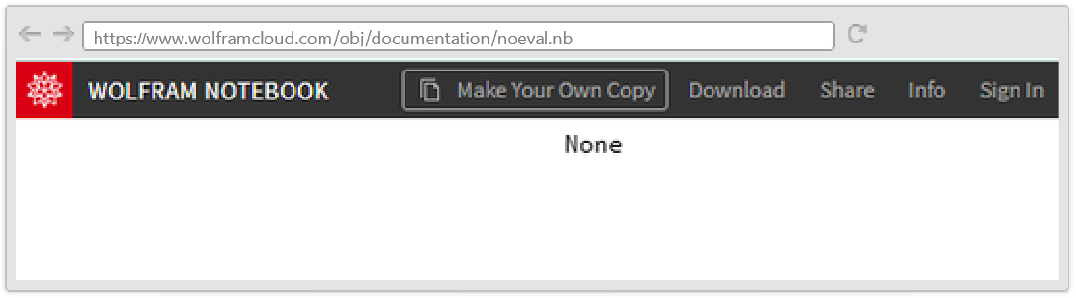
Publish a notebook that attempts to show the root directory cloud object but with no evaluation privileges:
CloudPublish[Dynamic[$CloudRootDirectory], "noeval.nb", EvaluationPrivileges -> None]The root directory is None because the evaluation privileges setting has disabled access to the account's cloud objects:
IconRules (1)
IncludeDefinitions (1)
Exclude definitions associated with the published expression from the current kernel session; instead, load the definitions from a file during evaluation:
geoGraphFunc[x_] := GeoGraphics[x];
CloudSave[geoGraphFunc, "GeoGraphImage.m"];api = CloudPublish[APIFunction[{"loc" -> "City"}, (CloudGet["GeoGraphImage.m"];geoGraphFunc[#loc])&], IncludeDefinitions -> False]URLExecute[api, {"loc" -> "Scranton"}]Magnification (1)
Preserve the magnification of the source document during CloudPublish:
obj = CloudPublish[Notebook[{Cell["head", "Section"], Cell["text", "Text"]}, Magnification -> 2], Magnification -> Inherited]Options[CloudGet[obj], Magnification]MetaInformation (1)
Permissions (1)
Permissions provides a way to restrict access to a specific user or group of users.
Create a new PermissionsGroup. Add more users by adding their $CloudUserID to the list:
CreatePermissionsGroup["mygroup", {$CloudUserID}]Use CloudPublish to publish any object with the specified access permissions:
obj = CloudPublish[20!, Permissions -> PermissionsGroup["mygroup"] -> {"Read", "Write"}]Options[obj, Permissions]SourceLink (1)
Do not set a source link during CloudPublish:
obj = CloudPublish[12!, SourceLink -> None]Check the SourceLink setting:
Options[obj, SourceLink]Properties & Relations (1)
CloudPublish is equivalent to CloudDeploy with automatic Permissions for all users and AutoCopy enabled:
obj = CloudDeploy[Manipulate[Plot[Sin[x(1 + a x)], {x, 0, 6}], {a, 0, 2}]]SetOptions[obj, Permissions -> All -> Automatic, AutoCopy -> True]Related Links

 Wolfram Notebook Embedder
Text
Wolfram Research (2015), CloudPublish, Wolfram Language function, https://reference.wolfram.com/language/ref/CloudPublish.html (updated 2020).
CMS
Wolfram Language. 2015. "CloudPublish." Wolfram Language & System Documentation Center. Wolfram Research. Last Modified 2020. https://reference.wolfram.com/language/ref/CloudPublish.html.
APA
Wolfram Language. (2015). CloudPublish. Wolfram Language & System Documentation Center. Retrieved from https://reference.wolfram.com/language/ref/CloudPublish.html