

DatasetTheme
is an option for Dataset that specifies an overall theme for a dataset and its elements.
Details
- DatasetThemetheme effectively sets the default values for multiple dataset options.
- Explicit Dataset options will override any settings set by theme.
- DatasetTheme{theme1,theme2,…} will automatically combine theme1, theme2, etc.
- Possible settings for DatasetTheme include:
-
Automatic automatically adapt to background and stylesheet "name" explicit dataset theme - Base themes affect the whole dataset and are typically used as a single setting. For special effects or situations, they can be combined with feature themes.
- Common base themes include:
-
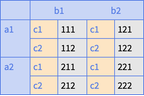
"Business" a bright, modern look appropriate for business presentations or infographics 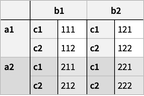
"Detailed" emphasize the structure of data using backgrounds and dividers 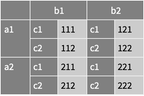
"Marketing" elegant, eye-catching design suitable for marketing needs 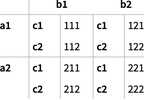
"Minimal" bare-bones design with minimal structural elements 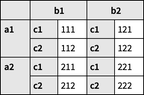
"Monochrome" single-color design for printing and accessibility 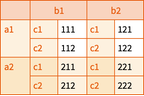
"Scientific" candid design useful for analyzing detailed data without overbearing colors 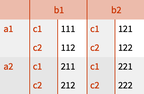
"Web" clean, bold design suitable for a consumer website or blog 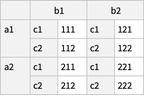
"Classic" historical design of datasets to remain compatible with existing uses - Feature themes affect specific aspects of a dataset and are typically used in combination with a base theme or together with other feature themes.
- Font feature themes affect dataset headers and content. Themes include:
-
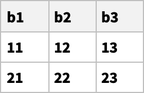
"Bold" bold font 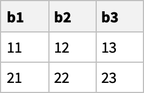
"BoldHeaders" bold font headers 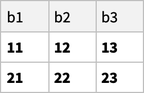
"BoldItems" bold font content 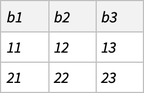
"Italic" italic font 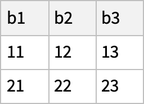
"Large" large font 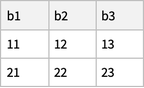
"Small" small font 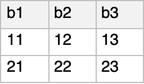
"Sans" sans font 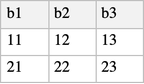
"Serif" serif font 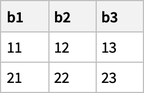
"StrongHeaders" emphasised headers 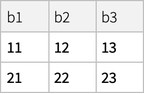
"WeakHeaders" de-emphasised headers - Divider feature themes affect dataset dividers. Themes include:
-
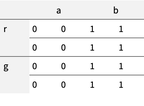
"RowDividers" row dividers only 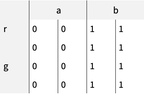
"ColumnDividers" column dividers only 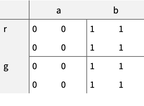
"GroupDividers" dividers that group low-level blocks 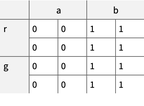
"FullDividers" row and column dividers - Background feature themes affect dataset backgrounds. Themes include:
-
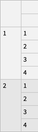
"AlternatingRowBackgrounds" top-level row backgrounds striped 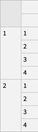
"AlternatingColumnBackgrounds" top-level column backgrounds striped 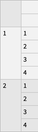
"AlternatingRowColumnBackgrounds" top-level row and column backgrounds striped 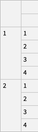
"AlternatingLeafRowItemBackgrounds" lowest-level row backgrounds striped 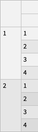
"AlternatingAllRowBackgrounds" row backgrounds striped at all levels - Layout feature themes affect how datasets elements are arranged. Themes include:
-
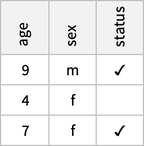
"VerticalColumnHeaders" orient column header text vertically - Background and divider feature themes can be parameterized with style information.
Examples
open all close allBasic Examples (3)
Take[ExampleData[{"Dataset", "Planets"}], 5, -2]Use a detailed theme with striped row backgrounds:
Dataset[Take[ExampleData[{"Dataset", "Planets"}], 5, -2], DatasetTheme -> "Detailed"]Use a small minimal theme with de-emphasized headers:
Dataset[Take[ExampleData[{"Dataset", "Planets"}], 5, -2], DatasetTheme -> {"Minimal", "Small", "WeakHeaders"}]Scope (10)
Base Themes (5)
Dataset[WikipediaData["Eiffel Tower", "GeoNearbyDataset", MaxItems -> 10], DatasetTheme -> "Business"]Use a base theme with striped row backgrounds:
Dataset[AxiomaticTheory["GroupAxioms", "Dataset"], DatasetTheme -> "Detailed"]Use a base theme with a clean, minimalist appearance:
Dataset[ExampleData[{"Dataset", "Planets"}], DatasetTheme -> "Minimal"]Use a base theme with dark backgrounds:
Dataset[CalendarData["MayanLongCount", "Dataset"], DatasetTheme -> "Marketing"]Combine a base theme with a feature theme for a customized presentation:
Dataset[EntityValue[Entity["Element", "Hydrogen"], "PropertyAssociation"], DatasetTheme -> {"Scientific", "Serif"}]
| |

| |
Parameterized Themes (5)
Specify the color to be used for row striping:
Dataset[IdentityMatrix[6], DatasetTheme -> {"AlternatingRowBackgrounds", LightBlue}]Specify colors for both rows and columns:
Dataset[IdentityMatrix[6], DatasetTheme -> {"AlternatingRowColumnBackgrounds", LightBlue, LightGreen}]Use cyclic colors for row striping:
Dataset[IdentityMatrix[6], DatasetTheme -> {"AlternatingRowBackgrounds", {LightBlue, LightGreen, LightGray}}]Specify the styles of dividers:
Dataset[Nest[<|"a" -> #, "b" -> #|>&, 0, 3], DatasetTheme -> {"RowDividers", {Orange, AbsoluteThickness[2]}}]Combine a base theme with a parametrized theme:
Dataset[Nest[<|"a" -> #, "b" -> #|>&, 0, 3], DatasetTheme -> {"Marketing", {"RowDividers", Red}}]Text
Wolfram Research (2021), DatasetTheme, Wolfram Language function, https://reference.wolfram.com/language/ref/DatasetTheme.html.
CMS
Wolfram Language. 2021. "DatasetTheme." Wolfram Language & System Documentation Center. Wolfram Research. https://reference.wolfram.com/language/ref/DatasetTheme.html.
APA
Wolfram Language. (2021). DatasetTheme. Wolfram Language & System Documentation Center. Retrieved from https://reference.wolfram.com/language/ref/DatasetTheme.html