

DefineOutputStreamMethod
DefineOutputStreamMethod["name",{"fname1"function1,"fname2"function2,… }]
defines a custom output stream method with the specified name, allowing the Wolfram Language to call the stream functions for opening and writing to an output stream.
Details
- Output stream methods are different ways to create OutputStream objects. DefineOutputStreamMethod allows new output stream methods to be added to the predefined list.
- An output stream method can provide a way to write a stream to a new output destination, filter an output stream (such as encryption or compression), perform side effects while writing, or do a combination.
- Possible output stream method functions include:
-
"NameTestFunction" whether this method can open a stream of the given name "ConstructorFunction" open a new output stream using this method (required) "CloseFunction" close the stream and release its resources "WriteFunction" write bytes to the stream "FlushFunction" ensure that bytes buffered in memory are written to the stream "StreamPositionFunction" the number of bytes written "OptionChangesFunction" modify the options returned by Options[stream] - The "ConstructorFunction" is required to be included in the function list. Other functions have a default behavior if a function is not provided. Although not required, if no "WriteFunction" is included, the stream will effectively ignore all output written to it, so typically it should be included.
- Each OutputStream has a current state expression associated with it. The initial state expression is returned by "ConstructorFunction". Other functions take the current state as a parameter and return a new state value. This state expression is where a stream method can store information such as a network connection, the number of bytes written and other information needed by the stream method functions.
- If a function returning a new state value is not provided, the default definition returns the given state unmodified.
- An output stream method is used by OpenWrite or OpenAppend if the Method option uses the registered output stream method name or MethodAutomatic and the output stream's "NameTestFunction" return True for an output stream name.
- With MethodAutomatic, OpenWrite["name"] and OpenAppend["name"] call "NameTestFunction"f as f["name"] and the output stream method to construct the stream if f returns True.
- If no "NameTestFunction" is supplied, the default implementation always returns False.
- When OpenWrite or OpenAppend opens an output stream, they call "ConstructorFunction"f as f[name,isAppend,caller,opts], where name is the stream name (a file path, URL or other stream identifier) and isAppend is True for OpenAppend and False for OpenWrite. The caller is either OpenWrite or OpenAppend and can be used for issuing messages. The opts arguments are option rules. The function f is expected to return a list {success,state} where success is True if the constructor was successful in opening the stream, and state is the initial value of the stream state.
- When Method{"method","name"value,...}, the rules after "method" are included in the opts rules passed to the "ConstructorFunction". This allows callers to pass settings to the output stream method.
- Close[stream] calls "CloseFunction"f as f[state]. This is the last function that will be called on an output stream, so it should perform any necessary resource cleanup.
- If no "CloseFunction" is supplied, the default implementation does nothing.
- Stream-writing functions such as Write and WriteString call "WriteFunction"f as f[state,{byte1,...}]. The function f is expected to return a list {byteCount,state}. The byteCount should indicate the number of bytes actually written. The returned state will be passed to other functions as the stream's new current state expression.
- If no "WriteFunction" is provided, the default implementation returns a byte count of 0 and passes the given state unchanged.
- Stream-writing functions such as Write and WriteString may call the "FlushFunction"f as f[state] to ensure that output bytes are transferred from memory buffers to their destination. The function f is expected to return a list {Null,state}, where state is the new stream state expression.
- If the "WriteFunction" always flushes its buffer before returning, or does not use a buffer, then the "FlushFunction" does not need to be provided.
- StreamPosition will call "StreamPositionFunction"f as f[state]. The function f should return a list {nbytes,state}, where nbytes is the number of bytes written to the stream, and state is the new stream state expression (it can be unchanged).
- The "OptionChangesFunction" is used to give the stream method a way to alter the value returned by Options[stream,Method] for cases where the options contain a secret, such as a password.
- Options[stream] will call "OptionChangesFunction"f as f[state,opts]. The function f should return a list {newopts,state}, where newopts will be used as the Method option setting returned by Options.
- If an output stream method with the same name exists, DefineOutputStreamMethod will fail.
- An output stream method can be removed with RemoveOutputStreamMethod.
Examples
open all close allBasic Examples (1)
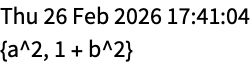
Define an output stream method that prints output cells with a timestamp:
DefineOutputStreamMethod["DatedPrint", {
	"ConstructorFunction" -> ({True, Null}&),
	"WriteFunction" -> ({Length[#2],
	If[#2 =!= ToCharacterCode["
"], Print[DateString[], "
", FromCharacterCode[#2]]
	]}&)
	}]
Open a stream using that output stream method:
str = OpenWrite["dateprinter", Method -> "DatedPrint"]Write[str, "hello, world"]
Write[str, {a ^ 2, 1 + b ^ 2}]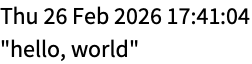
Close[str]Scope (6)
Define an output stream method that uses "NameTestFunction" to open a stream with a name beginning with the prefix "dateprinter:":
DefineOutputStreamMethod["DatePrinter", {
	"NameTestFunction" -> StringStartsQ["dateprinter:"],
	"ConstructorFunction" -> ({True, Null}&),
	"WriteFunction" -> ({Length[#2],
	If[#2 =!= ToCharacterCode["
"], Print[DateString[], "
", FromCharacterCode[#2]]
	]}&)
	}]
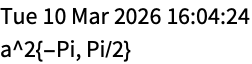
Open a stream with this method based only on the name (without needing a Method option):
strm = OpenWrite["dateprinter:"]Write[strm, "hello, world"]
Write[strm, a ^ 2, {-π, π / 2}]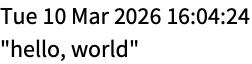
Close[strm]Define an output stream method that writes to a file, while keeping a checksum that it prints when the stream is closed:
DefineOutputStreamMethod[
	"FileChecksum",
	{
	"ConstructorFunction" ->
	Function[{name, append, caller, opts},
	{True, <|"Stream" -> OpenWrite[name, BinaryFormat -> True], "FileName" -> name, "ByteCount" -> 0, "Checksum" -> 0|>}
	],
	"CloseFunction" -> Function[state, Print[KeyDrop[state, "Stream"]];Close[state["Stream"]]],
	"WriteFunction" ->
	Function[{state, bytes},
	Module[{newstate = state, count = Length[bytes]},
	BinaryWrite[state["Stream"], bytes];
	newstate["ByteCount"] += count;
	newstate["Checksum"] += Total[bytes];
	{count, newstate}
	]
	],
	"StreamPositionFunction" -> Function[state, {state["ByteCount"], state}]
	}
	]
Open a stream with the registered method:
str = OpenWrite["file.log", FormatType -> OutputForm, Method -> "FileChecksum"]Write[str, DateString[], " ", MemoryInUse[]]
Write[str, DateString[], " ", MemoryInUse[]]Check the number of bytes written so far:
StreamPosition[str]Close the stream, which will let the stream method show its collected statistics:
Close[str]
Confirm the contents of the written file:
FilePrint["file.log"]
Define an output stream method that obscures its file by "rotating" each byte by a number passed to the constructor in the Method option:
DefineOutputStreamMethod[
	"RotateObscuredFile",
	{
	"ConstructorFunction" ->
	Function[{name, append, caller, opts},
	{True, <|"Stream" -> OpenWrite[name, BinaryFormat -> True], "ByteCount" -> 0, "Rotate" -> With[{n = Lookup[opts, "Rotate", 0]}, Mod[# + n, 256]&]|>}
	],
	"CloseFunction" -> Function[state, Close[state["Stream"]]],
	"WriteFunction" ->
	Function[{state, bytes},
	Module[{newstate = state, count = Length[bytes]},
	BinaryWrite[state["Stream"], Map[state["Rotate"], bytes]];
	newstate["ByteCount"] += count;
	{count, newstate}
	]
	]
	}
	]
Open a stream using this method, which will use the default rotation of zero, which gives no obscuring:
strm = OpenWrite["file.txt", Method -> "RotateObscuredFile"]Examine the Method option of the open stream:
Options[strm, Method]Write[strm, "The quick brown fox jumped."]Close[strm]FilePrint["file.txt"]
Now open the stream and pass an argument to the method constructor:
strm = OpenWrite["file.txt", Method -> {"RotateObscuredFile", "Rotate" -> 2}]Examine the Method option of the open stream:
Options[strm, Method]Write[strm, "The quick brown fox jumped."]Close[strm]Examine the file contents, revealing it has been obscured by performing a rotation:
FilePrint["file.txt"]
Define an output stream method that obscures its file by "rotating" each byte by a number passed to the constructor in the Method option but that hides the parameter in the stream options by using the "OptionChangesFunction":
DefineOutputStreamMethod[
	"ObscureFile",
	{
	"ConstructorFunction" ->
	Function[{name, append, caller, opts},
	{True, <|"Stream" -> OpenWrite[name, BinaryFormat -> True], "ByteCount" -> 0, "Rotate" -> With[{n = Lookup[opts, "Rotate", 0]}, Mod[# + n, 256]&]|>}
	],
	"OptionChangesFunction" -> Function[{state, options}, {FilterRules[options, Except["Rotate"]], state}],
	"CloseFunction" -> Function[state, Close[state["Stream"]]],
	"WriteFunction" ->
	Function[{state, bytes},
	Module[{newstate = state, count = Length[bytes]},
	BinaryWrite[state["Stream"], Map[state["Rotate"], bytes]];
	newstate["ByteCount"] += count;
	{count, newstate}
	]
	]
	}
	]
Open a stream with a method argument:
strm = OpenWrite["file.txt", Method -> {"ObscureFile", "Rotate" -> 2}]Examine the Method option of the open stream to show the sensitive "Rotate" value is not shown:
Options[strm, Method]Write[strm, "The quick brown fox jumped."]Close[strm]Examine the file contents, revealing it has been obscured by performing a rotation:
FilePrint["file.txt"]
Define a minimal output stream method that silently consumes bytes but does nothing with them:
DefineOutputStreamMethod["NullStream", {"ConstructorFunction" -> ({True, Null}&)}]Open a stream with this method:
strm = OpenWrite["test", Method -> "NullStream"]Write an expression to the stream:
Write[strm, RandomInteger[{0, 255}, 10 ^ 7]]With no internal state, the default stream position always gives -1:
StreamPosition[strm]Close[strm]Define an output stream method where the constructor indicates failure:
DefineOutputStreamMethod["FailingStream", {"ConstructorFunction" -> ({False, Null}&)}]Attempt to open a stream with this method:
strm = OpenWrite["test", Method -> "FailingStream"]
Neat Examples (1)
Define an output stream method that will create an Image from the stream data and pass it to a function when the stream is closed:
DefineOutputStreamMethod[
	"ImageWriter",
	{
	"ConstructorFunction" ->
	Function[{n, a, hd, opts},
	With[{rcvr = Lookup[opts, "Receiver"]},
	{!MissingQ[rcvr], <|"Bytes" -> <||>, "Count" -> 0, "Receiver" -> rcvr|>}
	]
	],
	"WriteFunction" ->
	Function[{state0, bytes},
	Module[{state = state0},
	state["Bytes"][Length[state["Bytes"]] + 1] = bytes;
	{Length[bytes], state}
	]
	],
	"CloseFunction" ->
	Function[state,
	Module[{bytes, side},
	bytes = Flatten[Values[state["Bytes"]]];
	side = Ceiling[Sqrt[Length[bytes]]];
	(* call the receiver hook and pass it the Image *)
	state["Receiver"][Image[ArrayReshape[bytes, {side, side}, 0], "Byte"]]
	]
	]
	}
	]
Open a stream, passing a function that will assign the final image to a variable:
strm = OpenWrite["test", Method -> {"ImageWriter", "Receiver" -> Function[img, testimg = img]}]Write some things to the stream:
Write[strm, "The quick brown fox jumped over the lazy dogs."]
Write[strm, m x + b, Range[10]]Close[strm]Evaluate the variable that was assigned by the function passed in the Method option:
testimgRecover the characters written to the stream from the image:
FromCharacterCode[Map[Round[256 * #]&, Flatten[ImageData[testimg]]]]Text
Wolfram Research (2012), DefineOutputStreamMethod, Wolfram Language function, https://reference.wolfram.com/language/ref/DefineOutputStreamMethod.html.
CMS
Wolfram Language. 2012. "DefineOutputStreamMethod." Wolfram Language & System Documentation Center. Wolfram Research. https://reference.wolfram.com/language/ref/DefineOutputStreamMethod.html.
APA
Wolfram Language. (2012). DefineOutputStreamMethod. Wolfram Language & System Documentation Center. Retrieved from https://reference.wolfram.com/language/ref/DefineOutputStreamMethod.html