

GraphCenter
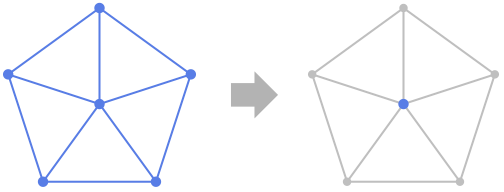
GraphCenter[g]
gives the set of vertices with minimum eccentricity in the graph g.
GraphCenter[{vw,…}]
uses rules vw to specify the graph g.
Details and Options
- GraphCenter is also known as the Jordan center.
- The following options can be given:
-
EdgeWeight Automatic weight for each edge Method Automatic method to use - Possible Method settings include "Dijkstra", "FloydWarshall", and "Johnson".
Examples
open all close allBasic Examples (1)
Scope (7)
GraphCenter works with undirected graphs:
GraphCenter[[image]]GraphCenter[[image]]GraphCenter[[image]]GraphCenter[[image]]GraphCenter[[image]]Use rules to specify the graph:
GraphCenter[{1 -> 2, 2 -> 3, 3 -> 1, 3 -> 4, 4 -> 5, 5 -> 3}]g = GridGraph[{10, 10, 10, 10}];Timing[GraphCenter[g]//Length]VertexCount[g]Applications (1)
people = {"Elisabeth", "James", "Anna", "John", "Dorothy", "Linda", "Michael", "Larry", "Carol", "Nancy", "David", "Nora", "Julia", "Ben", "Oscar", "Felicia", "Arlene", "Rudy"};Use Subsets to create edges between all members of the family:
UndirectedEdge@@@Subsets[{"John", "Dorothy", "David"}, {2}]relations = Join@@Table[UndirectedEdge@@@Subsets[family, {2}], {family, {{"Elisabeth", "Anna"}, {"James", "Anna", "Linda", "Larry", "Nancy"}, {"John", "Dorothy", "David"}, {"Linda", "Michael", "Nora", "Julia"}, {"Larry", "Carol", "Ben", "Oscar"}, {"Nancy", "David", "Arlene"}, {"Oscar", "Felicia"}, {"Arlene", "Rudy"}}}];g = Graph[people, relations, VertexShapeFunction -> "Name"]Find the people who are most closely related to everybody at the gathering:
GraphCenter[g]Properties & Relations (7)
In a connected graph, the center can be found using VertexEccentricity:
g = GridGraph[{3, 4}]VertexEccentricity[g, #]& /@ VertexList[g]Flatten[Position[%, Min[%]]]GraphCenter[g]For a CompleteGraph, every vertex is at the center:
HighlightGraph[#, GraphCenter[#]]& /@ Table[CompleteGraph[n, VertexSize -> Small], {n, 3, 6}]For a PathGraph with positive weights, there is either one center vertex or two center vertices:
HighlightGraph[#, GraphCenter[#]]& /@ Table[PathGraph[Range[n], VertexSize -> Large], {n, 5, 8}]For a CycleGraph, all vertices are in the center:
HighlightGraph[#, GraphCenter[#]]& /@ Table[CycleGraph[n, VertexSize -> Small], {n, 3, 6}]For a WheelGraph of size 5 or more, the hub is the graph center:
HighlightGraph[#, GraphCenter[#]]& /@ Table[WheelGraph[n, VertexSize -> Small], {n, 5, 8}]For a GridGraph, the center forms a grid with all dimensions being one or two:
HighlightGraph[#, GraphCenter[#]]& /@ Table[GridGraph[dim, VertexSize -> Medium, ImageSize -> {Tiny, Tiny}], {dim, {{3, 3}, {3, 4}, {4, 3}, {4, 4}}}]For a CompleteKaryTree, the root vertex is the center:
HighlightGraph[#, GraphCenter[#]]& /@ Table[CompleteKaryTree[n, VertexSize -> Large], {n, 3, 5}]Text
Wolfram Research (2010), GraphCenter, Wolfram Language function, https://reference.wolfram.com/language/ref/GraphCenter.html (updated 2015).
CMS
Wolfram Language. 2010. "GraphCenter." Wolfram Language & System Documentation Center. Wolfram Research. Last Modified 2015. https://reference.wolfram.com/language/ref/GraphCenter.html.
APA
Wolfram Language. (2010). GraphCenter. Wolfram Language & System Documentation Center. Retrieved from https://reference.wolfram.com/language/ref/GraphCenter.html