

ImageAssemble
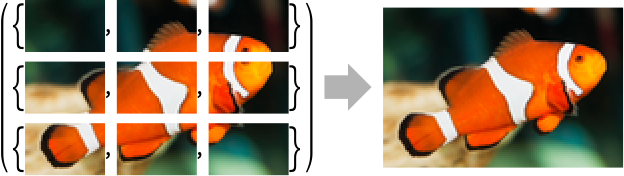
ImageAssemble[{{im11,…,im1n},…,{imm1,…,immn}}]
assembles a single image from an array of images.
ImageAssemble[{{im11,…,im1n},…,{imm1,…,immn}},fitting]
assembles images using the fitting method.
Details and Options
- ImageAssemble creates a collage from an array images, which can be used to compare the effects of one or two parameters on an image, or to visualize different steps of a procedure.
- ImageAssemble assembles an array of 2D or 3D images into a single image.
- ImageAssemble[{image1,image2,…}] assembles the imagei as a row.
- By default, using no fitting specification, the imageij should have commensurate sizes.
- Possible settings for fitting include:
-
None do not attempt to match the dimensions "Fill" fit the smaller dimension; crop the other if necessary "Fit" fit the whole image; keep the aspect ratio; pad if necessary "Stretch" stretch the image to fit by resampling - If any imageij is Missing[], corresponding pixels are replaced with the background color.
- The following options can be specified:
-
Background Automatic background color to use PaddingSize 0 padding size around the whole image Resampling Automatic resampling method to use Spacings 0 spacing between images - Settings for Spacings can have the following forms:
-
spec apply spec to all gaps between images {specx,specy,…} applies specific spacing for each dimension
Examples
open all close allBasic Examples (2)
Assemble a 2D array of images:
ImageAssemble[{
	{[image], [image], [image], [image], [image], [image], [image]}, {[image], [image], [image], [image], [image], [image], [image]}, {[image], [image], [image], [image], [image], [image], [image]}, {[image], [image], [image], [image], [image], [image], [image]}, {[image], [image], [image], [image], [image], [image], [image]}}]
Show the result of edge detection using varying radius and threshold values:
ImageAssemble[Table[EdgeDetect[[image], r, t], {r, {2, 4, 6}}, {t, {.01, .05, .1}}], Background -> 1, Spacings -> 5]Scope (11)
Data (7)
ImageAssemble[{[image], [image]}]ImageAssemble[(| |
| ---------------------------------------------------------------- |
| [image] |
| [image] |)]ImageAssemble[(| | |
| ---------------------------------------------------------------- | ---------------------------------------------------------------- |
| [image] | [image] |
| [image] | [image] |)]Assemble images of different types and color spaces:
ImageAssemble[(| | |
| ---------------------------------------------------------------- | ---------------------------------------------------------------- |
| [image] | [image] |
| [image] | [image] |)]The data may contain missing elements:
ImageAssemble[(| | |
| ---------------------------------------------------------------- | ---------------------------------------------------------------- |
| [image] | [image] |
| [image] | Missing[] |)]The rows and columns with only Missing elements are skipped:
ImageAssemble[(| | | |
| ---------------------------------------------------------------- | ---------------------------------------------------------------- | --------- |
| [image] | [image] | Missing[] |
| Missing[] | Missing[] | Missing[] |
| [image] | [image] | Missing[] |)]ImageAssemble[{[image], [image], [image]}]Fitting (4)
Assemble images of commensurate sizes:
ImageAssemble[(| | |
| ---------------------------------------------------------------- | ---------------------------------------------------------------- |
| [image] | [image] |
| [image] | [image] |)]Assemble images of different sizes fitting the larger dimension:
ImageAssemble[(| | |
| ---------------------------------------------------------------- | ---------------------------------------------------------------- |
| [image] | [image] |
| [image] | [image] |), "Fill"]Assemble images of different sizes fitting the smaller dimension:
ImageAssemble[(| | |
| ---------------------------------------------------------------- | ---------------------------------------------------------------- |
| [image] | [image] |
| [image] | [image] |), "Fit"]Assemble images of different sizes by resizing them:
ImageAssemble[(| | |
| ---------------------------------------------------------------- | ---------------------------------------------------------------- |
| [image] | [image] |
| [image] | [image] |), "Stretch"]Options (9)
Background (2)
The value of Background is used for whole-image padding as well as spacing. By default, 0 is used:
ImageAssemble[(| | |
| ---------------------------------------------------------------- | ---------------------------------------------------------------- |
| [image] | [image] |
| [image] | [image] |), PaddingSize -> 5, Spacings -> 5]ImageAssemble[(| | |
| ---------------------------------------------------------------- | ---------------------------------------------------------------- |
| [image] | [image] |
| [image] | [image] |), PaddingSize -> 5, Spacings -> 5, Background -> Red]Setting Background to Transparent will result in an image with an alpha channel:
ImageAssemble[(| | |
| ---------------------------------------------------------------- | ---------------------------------------------------------------- |
| [image] | [image] |
| [image] | [image] |), PaddingSize -> 5, Spacings -> 5, Background -> Transparent]Information[%, "Transparency"]PaddingSize (2)
By default, the whole image is not padded:
ImageAssemble[(| | |
| ---------------------------------------------------------------- | ---------------------------------------------------------------- |
| [image] | [image] |
| [image] | [image] |)]Use PaddingSize to pad the whole image:
ImageAssemble[(| | |
| ---------------------------------------------------------------- | ---------------------------------------------------------------- |
| [image] | [image] |
| [image] | [image] |), PaddingSize -> 5]Use Background to specify the padding scheme:
ImageAssemble[(| | |
| ---------------------------------------------------------------- | ---------------------------------------------------------------- |
| [image] | [image] |
| [image] | [image] |), PaddingSize -> 5, Background -> Red]Specify a different padding size for each side in the form {{left,right},{bottom,top}}:
ImageAssemble[(| | |
| ---------------------------------------------------------------- | ---------------------------------------------------------------- |
| [image] | [image] |
| [image] | [image] |), PaddingSize -> {{2, 4}, {6, 8}}]Spacings (5)
By default, no spacing is added between images:
ImageAssemble[(| | |
| ---------------------------------------------------------------- | ---------------------------------------------------------------- |
| [image] | [image] |
| [image] | [image] |)]Specify the amount of spacings:
ImageAssemble[(| | |
| ---------------------------------------------------------------- | ---------------------------------------------------------------- |
| [image] | [image] |
| [image] | [image] |), Spacings -> 5]Specify different spacings in  and
and  directions:
ImageAssemble[(| | |
| ---------------------------------------------------------------- | ---------------------------------------------------------------- |
| [image] | [image] |
| [image] | [image] |), Spacings -> {10, 5}]The value of Background specifies the color of spacings between images:
ImageAssemble[(| | |
| ---------------------------------------------------------------- | ---------------------------------------------------------------- |
| [image] | [image] |
| [image] | [image] |), Spacings -> 5, Background -> Red]Specify spacings in three dimensions for arrays of rank 3:
ImageAssemble[{(| | |
| ---------------------------------------------------------------- | ---------------------------------------------------------------- |
| [image] | [image] |
| [image] | [image] |), (| | |
| ---------------------------------------------------------------- | ---------------------------------------------------------------- |
| [image] | [image] |
| [image] | [image] |)}, Spacings -> 3]Applications (7)
Search the web for some images:
list = WebImageSearch["fish", "Thumbnails", MaxItems -> 4]Assemble images by cropping them to commensurate sizes:
ImageAssemble[Partition[list, 2], "Fill", Spacings -> 5, Background -> White]Assemble different steps of fractal sets:
ImageAssemble[
	Table[Rasterize[mesh[i], RasterSize -> 100], {mesh, {SierpinskiMesh, MengerMesh}}, {i, 4}],
	Spacings -> 3, PaddingSize -> 3, Background -> Gray]
Assemble a collection of Delacroix's artworks:
paintings = EntityValue[Entity["Person", "EugeneDelacroix::77vj8"], EntityProperty["Person", "NotableArtworks"]];
data = DeleteMissing[EntityValue[paintings, "Image"]];
ImageAssemble[Partition[data, 5], "Fill", Spacings -> 3, PaddingSize -> 3, Background -> White]
Assemble images smoothly by assembling at different scales using image pyramids:
{apple, orange} = {[image], [image]};splitMerge[i1_Image, i2_Image] :=
With[{c = Floor[1 / 2 First@ImageDimensions[i1]]},
ImageAssemble[{{ImageTake[i1, All, {1, c}], ImageTake[i2, All, {c + 1, -1}]}}]]pyramids = Map[ImagePyramid[#, "Laplacian", {2, 2}]&, {apple, orange}];pFruit = ImagePyramidApply[splitMerge, pyramids]InverseImagePyramid[pFruit]Compare with the single scale assembly:
splitMerge[apple, orange]Assemble together different effects applied to an image:
effects = {"Decolorization", "Comics", "Sepia", "Embossing", "ColorBoosting", "EdgeStylization", "Jitter", "OilPainting"};i = [image];ImageAssemble[ArrayReshape[ImageEffect[i, #]& /@ effects, {2, 4}], Spacings -> 2]Explore the effect of an increasing filter radius on successive slices of an image:
i = [image];
ImageAssemble[MapIndexed[Blur[#1, 2Last[#2]]&, ImagePartition[i, Scaled[{1 / 6, 1}]], {2}], Spacings -> 1]
Detect and highlight object in frames from a video:
v = Video[CloudObject["https://www.wolframcloud.com/obj/documentation/dog"]]list = VideoFrameList[v, 100];RandomSample[list, 3]Check which frame contains a dog:
check = ImageContainsQ[#, Entity["Concept", "CanisFamiliaris::597qc"]]& /@ list;Create a visualization of which frames contain a dog:
ImageAssemble[Partition[MapThread[ImageAdd[ImageResize[#, 50], #2 {0, .4, 0}]&, {list, Boole[check]}], 10], Spacings -> 1]Properties & Relations (2)
ImageAssemble and ImagePartition are reverse operations:
i = RandomImage[1, {10, 10}];
i == ImageAssemble[ImagePartition[i, 5]]
By default, ImageAssemble requires images to have commensurate sizes:
list = {[image], [image], [image]};ImageAssemble[list]
Use the fitting argument to preprocess the set:
ImageAssemble[list, "Fit"]Use ConformImages to perform custom fitting:
ImageAssemble[ConformImages[list, 100, "Pad"]]Text
Wolfram Research (2008), ImageAssemble, Wolfram Language function, https://reference.wolfram.com/language/ref/ImageAssemble.html (updated 2020).
CMS
Wolfram Language. 2008. "ImageAssemble." Wolfram Language & System Documentation Center. Wolfram Research. Last Modified 2020. https://reference.wolfram.com/language/ref/ImageAssemble.html.
APA
Wolfram Language. (2008). ImageAssemble. Wolfram Language & System Documentation Center. Retrieved from https://reference.wolfram.com/language/ref/ImageAssemble.html