

ImageTake
ImageTake[image,n]
gives an image consisting of the first n rows of image.
ImageTake[image,-n]
gives an image consisting of the last n rows of image.
ImageTake[image,{row1,row2}]
gives rows row1 through row2.
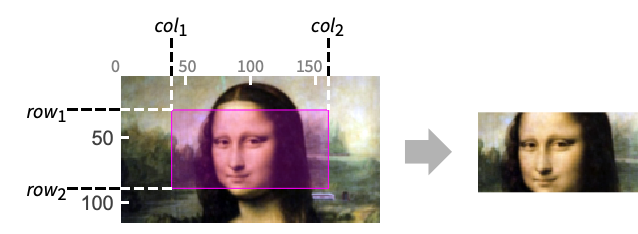
ImageTake[image,{row1,row2},{col1,col2}]
gives the image that spans row1 to row2 and col1 to col2.
ImageTake[video,…]
returns a video in which every frame consists of the specified region of interest.
ImageTake[image3d,{slice1,slice2},{row1,row2},{col1,col2}]
gives the 3D image consisting of the specified slices, rows, and columns.
Details
- ImageTake is typically used for extracting regions of interest by cropping or trimming an image.
- ImageTake uses the standard sequence specification:
-
All all elements n elements 1 up to n UpTo[n] elements 1 up to n -n last n elements {n} element n only {m,n} elements m through n inclusive {m,n,s} elements m through n in steps of s - If fewer elements exist than are requested, ImageTake will just return the elements that are present.
- For video inputs, the region of interest can be a fixed specification for all frames or a function of time (in seconds from the start).
Examples
open all close allBasic Examples (2)
Scope (5)
Data (3)
Take rows 80 to 200 from a grayscale image:
ImageTake[[image], {80, 200}]Take the top 100 rows of every video frame:
ImageTake[\!\(\*VideoBox[""]\), 100]
| |
Take the top 23 slices of a 3D image:
ImageTake[[image], 23]Parameters (2)
Take the last 100 rows from an image:
i = [image];ImageTake[i, -100]ImageTake[i, {30, 100}]ImageTake[i, {100}]Take every other row of the image:
ImageTake[i, {1, -1, 2}]ImageTake[i, All, 100]Take a range of rows and columns:
ImageTake[i, {30, 130}, {100, 200}]Take the bottom 23 slices of a 3D image:
i = \!\(\*Graphics3DBox[«10»]\);
ImageTake[i, -23]
Take a selected horizontal slice of a 3D image:
ImageTake[i, {15}]Take all slices in a selected region of the 3D image:
ImageTake[i, All, -23, -23]Take selected part of a 3D volume:
ImageTake[i, {1, 20}, {26, 46}, {26, 46}]Take selected part of a 3D volume, selecting slices with a step of 5:
ImageTake[i, {1, 20}, {26, 46}, {26, 46, 5}]Applications (2)
Trim an image by removing a 30-pixel-wide border:
ImageTake[[image], {30, -30}, {30, -30}]Use ImageKeypoints to determine a region of interest:
i = [image];
{x, y} = Round[MinMax /@ Transpose[ImageKeypoints[i, KeypointStrength -> 0.0001]]]
Highlight the region of interest:
HighlightImage[i, Rectangle@@Transpose[{x, y}]]Convert from image coordinates to matrix coordinates and extract the region of interest:
ImageTake[i, Sort[250 - y], Sort[x]]Properties & Relations (2)
Use ImageTake to obtain the same top-bottom reflection as with ImageReflect:
ImageTake[\!\(\*GraphicsBox[«3»]\), {-1, 1}]Use Downsample or ImageTake to downsample an image by extracting every other pixel:
i = [image];ImageTake[i, {1, -1, 2}, {1, -1, 2}] == Downsample[i, 2]Interactive Examples (2)
image = ExampleData[{"TestImage", "Volubilis"}];
Manipulate[ImageTake[image, {pt[[1]], pt[[1]] + 200}, {pt[[2]], pt[[2]] + 200}], {pt, {1, 1}, Reverse@ImageDimensions[image] - 200}]
Interactively take specified parts on a volume:
Manipulate[ImageTake[ExampleData[{"TestImage3D", "CThead"}], {s1, s2}, {r1, r2}, {c1, c2}], {r1, 1, 256}, {r2, 1, 256}, {c1, 1, 256}, {c2, 1, 256}, {s1, 1, 99}, {s2, 1, 99}]Text
Wolfram Research (2008), ImageTake, Wolfram Language function, https://reference.wolfram.com/language/ref/ImageTake.html (updated 2021).
CMS
Wolfram Language. 2008. "ImageTake." Wolfram Language & System Documentation Center. Wolfram Research. Last Modified 2021. https://reference.wolfram.com/language/ref/ImageTake.html.
APA
Wolfram Language. (2008). ImageTake. Wolfram Language & System Documentation Center. Retrieved from https://reference.wolfram.com/language/ref/ImageTake.html