JuliaSetIterationCount[f,z,p]
returns the number of iterations, beginning with the complex number  , of the function
  needed to determine whether p is in the Julia set of f.
returns the number of iterations, beginning with the complex number  , of the function
 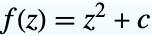 needed to determine whether p is in the Julia set of
 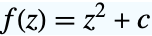 .
.
JuliaSetIterationCount[c,{p1,p2,…}]
returns a list of the number of iterations required to determine whether each member of {p1,p2,…} is in the Julia set of 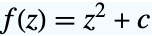 .
.


JuliaSetIterationCount
JuliaSetIterationCount[f,z,p]
returns the number of iterations, beginning with the complex number  , of the function
  needed to determine whether p is in the Julia set of f.
returns the number of iterations, beginning with the complex number  , of the function
 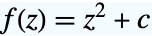 needed to determine whether p is in the Julia set of
 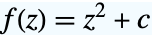 .
.
JuliaSetIterationCount[f,z,{p1,p2,…}]
returns a list of the number of iterations required to determine whether each member of {p1,p2,…} is in the Julia set of f.
JuliaSetIterationCount[c,{p1,p2,…}]
returns a list of the number of iterations required to determine whether each member of {p1,p2,…} is in the Julia set of 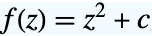 .
.
Details and Options
- The Julia set of a function f is the closure of the set of all repelling fixed points of f.
- JuliaSetIterationCount uses the same "OrbitDetection" algorithm as JuliaSetPlot.
- JuliaSetIterationCount takes the following options:
-
MaxIterations 1000 maximum number of iterations to use WorkingPrecision Automatic the precision used in internal computations - With MaxIterations->n, where n is a positive integer, the function
 will be iterated at most n times to determine if z lies outside of the Julia set. If z is not found to lie outside the Julia set, JuliaSetIterationCount returns n+1. The default setting is MaxIterations->1000.
 - With WorkingPrecision->n, each iteration is internally calculated to n digits of precision. Without this option, the amount of precision used is determined based on the precision of p and the value of MaxIterations.
Examples
open all close allBasic Examples (2)


Scope (6)
Find the iteration count of  for the Julia set of
  where
where  :
:
JuliaSetIterationCount[-1, .1 - .2 * I]JuliaSetIterationCount[z ^ 2 - 1, z, .1 - .2 * I]Find the iteration count of 0 for the Julia set of a polynomial:
JuliaSetIterationCount[z ^ 3 - z - 1, z, 0]Find the iteration count of 0 for the Julia set of a rational function:
JuliaSetIterationCount[z ^ 2 / (z ^ 2 - 1), z, 0]Find the iteration counts for a list of numbers:
JuliaSetIterationCount[z ^ 2 / (z ^ 2 - 1), z, {0, 1, 2, 3, 4, 5, 6, 7}]Find the iteration counts for an array of numbers:
Shallow[JuliaSetIterationCount[-1, Table[x + I * y, {y, -.01, .01, .0001}, {x, .61, .63, .0001}]]]MatrixPlot[%]JuliaSetIterationCount works on all kinds of numbers:
JuliaSetIterationCount[z ^ 3 - z + 1, z, {-2, -1.979, 1 / 4, 0.26, I, 1 + I, 1 / Pi}]Options (2)
MaxIterations (1)
MaxIterations must be increased if the number of iterations needed exceeds 1000:
{JuliaSetIterationCount[0, I + 10 ^ -309], JuliaSetIterationCount[0, I + 10 ^ -309, MaxIterations -> 2000]}WorkingPrecision (1)
Increasing WorkingPrecision can increase accuracy, at the cost of more time:
{JuliaSetIterationCount[0, I + 10 ^ -309, MaxIterations -> 2000], JuliaSetIterationCount[0, I + 10 ^ -309, MaxIterations -> 2000, WorkingPrecision -> 1000]}Setting WorkingPrecision too low can result in the iteration entering a false loop:
z0 = .618147895647545764;
{JuliaSetIterationCount[z ^ 2 - 1, z, z0, WorkingPrecision -> 3], JuliaSetIterationCount[z ^ 2 - 1, z, z0]}
Properties & Relations (3)
ArrayPlot applied to JuliaSetIterationCount[c] is essentially JuliaSetPlot[c]:
JuliaSetPlot[z ^ 2 - 1, z, Method -> "OrbitDetection"]The red dot in the middle comes from taking the Log after JuliaSetIterationCount returns 0:
ArrayPlot[Log@Transpose@JuliaSetIterationCount[z ^ 2 - 1, z, Table[Complex[x, y], {x, -2, 2, .01}, {y, -1, 1, .01}]], PlotRange -> All]JuliaSetIterationCount can accept lists, which is faster than applying it to each member of a list:
First@AbsoluteTiming@
JuliaSetIterationCount[z ^ 2 - 1, z, Table[Complex[x, y], {x, -2, 2, .05}, {y, -2, 2, .05}]]First@AbsoluteTiming@
Table[JuliaSetIterationCount[z ^ 2 - 1, z, Complex[x, y]], {x, -2, 2, .05}, {y, -2, 2, .05}]Possible Issues (1)
Neat Examples (2)
Display the iteration count as height:
ListPlot3D[Log[1 + JuliaSetIterationCount[z ^ 2 - 1 - I / 3, z, Table[Complex[x, y], {x, -2, 2, .01}, {y, -1, 1, .01}]]]]Create a three-dimensional image by varying a parameter:
data = Table[JuliaSetIterationCount[(z ^ 2 + c), z, Table[Complex[x, y], {y, -1, 1, .03}, {x, -2, 2, .03}]], {c, -1, 1, 1 / 19}];Image3D[Rescale[Log[Clip[data, {1, Infinity}]]]]Text
Wolfram Research (2014), JuliaSetIterationCount, Wolfram Language function, https://reference.wolfram.com/language/ref/JuliaSetIterationCount.html.
CMS
Wolfram Language. 2014. "JuliaSetIterationCount." Wolfram Language & System Documentation Center. Wolfram Research. https://reference.wolfram.com/language/ref/JuliaSetIterationCount.html.
APA
Wolfram Language. (2014). JuliaSetIterationCount. Wolfram Language & System Documentation Center. Retrieved from https://reference.wolfram.com/language/ref/JuliaSetIterationCount.html