



Parallelize
Parallelize[expr]
evaluates expr using automatic parallelization.
Details and Options
- Parallelize[expr] automatically distributes different parts of the evaluation of expr among different available kernels and processors.
- Parallelize[expr] normally gives the same result as evaluating expr, except for side effects during the computation.
- Parallelize has attribute HoldFirst, so that expressions are not evaluated before parallelization.
- The following options can be given:
-
Method Automatic granularity of parallelization DistributedContexts $DistributedContexts contexts used to distribute symbols to parallel computations ProgressReporting $ProgressReporting whether to report the progress of the computation - The Method option specifies the parallelization method to use. Possible settings include:
-
"CoarsestGrained" break the computation into as many pieces as there are available kernels "FinestGrained" break the computation into the smallest possible subunits "EvaluationsPerKernel"->e break the computation into at most e pieces per kernel "ItemsPerEvaluation"->m break the computation into evaluations of at most m subunits each Automatic compromise between overhead and load balancing - Method->"CoarsestGrained" is suitable for computations involving many subunits, all of which take the same amount of time. It minimizes overhead but does not provide any load balancing.
- Method->"FinestGrained" is suitable for computations involving few subunits whose evaluations take different amounts of time. It leads to higher overhead but maximizes load balancing.
- The DistributedContexts option specifies which symbols appearing in expr have their definitions automatically distributed to all available kernels before the computation.
- The default value is DistributedContexts:>$DistributedContexts with $DistributedContexts:=$Context, which distributes definitions of all symbols in the current context, but does not distribute definitions of symbols from packages.
- The ProgressReporting option specifies whether to report the progress of the parallel computation.
- The default value is ProgressReporting:>$ProgressReporting.
- Parallelize[f[…]] parallelizes these functions that operate on a list element by element: Apply, AssociationMap, Cases, Count, FreeQ, KeyMap, KeySelect, KeyValueMap, Map, MapApply, MapIndexed, MapThread, Comap, AssociationComap, ComapApply, MemberQ, Pick, Scan, Select and Through.
- Parallelize[iter] parallelizes the iterators Array, Do, Product, Sum, Table.
- Parallelize[list] evaluates the elements of list in parallel.
- Parallelize[f[…]] can parallelize listable and associative functions and inner and outer products. »
- Parallelize[cmd1;cmd2;…] wraps Parallelize around each cmdi and evaluates these in sequence. »
- Parallelize[s=expr] is converted to s=Parallelize[expr].
- Parallelize[expr] evaluates expr sequentially if expr is not one of the cases recognized by Parallelize.
Parallelize Options
Parallelize Scope
Examples
open all close allBasic Examples (4)
Parallelize[Map[Composition[Framed, FactorInteger], {1, 11, 111, 1111, 11111, 111111}]]Parallelize[Table[Length[FactorInteger[10 ^ 50 + n]], {n, 20}]]Functions defined interactively can immediately be used in parallel:
f1[n_] := Length[FactorInteger[(10 ^ n - 1) / 9]]Parallelize[Map[f1, Range[50, 60]]]Longer computations display information about their progress and estimated time to completion:
res = Parallelize[Map[PrimeQ[2 ^ # - 1]&, Range[9601, 12000]]];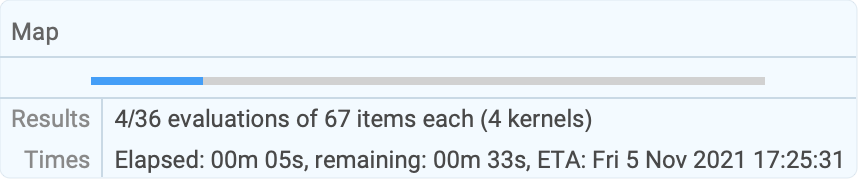
| |
Scope (23)
Listable Functions (1)
Structure-Preserving Functions (8)
Many functional programming constructs that preserve list structure parallelize:
Parallelize[Map[f, {a, b, c, d}]]Parallelize[Scan[Print, Range[5]]]


Parallelize[MapIndexed[List, {a, b, c, d}]]Parallelize@MapIndexed[f, <|"a" -> 1, "b" -> 2|>]Parallelize[MapThread[f, {{a, b, c}, {u, v, w}}]]Parallelize[Apply[f, {{a, b, c}, {u, v, w}, {x, y}}, 1]]Parallelize[MapApply[f, {{a, b, c}, {u, v, w}, {x, y}}]]f@@@list is equivalent to MapApply[f,list]:
Parallelize[f@@@{{a, b, c}, {u, v, w}, {x, y}}]Parallelize[Comap[{f, g, h}, x]]Parallelize[ComapApply[{f, g, h}, {1, 2}]]Parallelize[Through[{f, g, h}[a, b]]]The result need not have the same length as the input:
Parallelize[Cases[Range[100], _ ? PrimeQ]]Parallelize[Select[Range[200!, 200! + 2000], PrimeQ]] - 200!Parallelize[Pick[{a, b, c, d}, {1, 0, 1, 1}, 1]]Without a function, Parallelize simply evaluates the elements in parallel:
Parallelize[{1 + 2, Sin[1.0], Print[3], $KernelID}]
Reductions (4)
Count the number of primes up to one million:
Parallelize[Count[Range[10 ^ 6], _ ? PrimeQ]]Check whether 93 occurs in a list of the first 100 primes:
Parallelize[MemberQ[Array[Prime, 100], 93]]Check whether a list is free of 5:
Parallelize[FreeQ[Range[10 ^ 6], 5]]The argument does not have to be an explicit List:
Parallelize[FreeQ[foo[1, 2, 3, 4, 5], 5]]Inner and Outer Products (2)
Inner products automatically parallelize:
Parallelize[Inner[f, {{a1, a2}, {b1, b2}, {c1, c2}, {d1, d2}}, {x1, x2}]]Parallelize[Dot[{a, b, c}, {x, y, z}]]Outer products automatically parallelize:
Parallelize[Outer[StringJoin, {"", "re", "un"}, {"cover", "draw", "wind"}, {"", "ing", "s"}]]Iterators (3)
Evaluate a table in parallel, with or without an iterator variable:
Parallelize[Table[i, {i, 2, 21, 2}]]Parallelize[Table[RandomReal[], {10}, {2}]]Generate an array in parallel:
Parallelize[Array[Prime, 20]]Evaluate sums and products in parallel:
Parallelize[Product[i, {i, 100}]]Parallelize[Sum[N[Pi ^ (1 / i), 100], {i, 100}]]The evaluation of the function happens in parallel:
Sum[Pause[1]; i, {i, 4}]//AbsoluteTimingParallelize[Sum[Pause[1]; i, {i, 4}]]//AbsoluteTimingThe list of file names is expanded locally on the subkernels:
Parallelize[Count[FileNames["*.m", $InstallationDirectory, Infinity], f_ /; FileByteCount[f] > 500000]]Associative Functions (1)
Functions with the attribute Flat automatically parallelize:
Parallelize[a + b + c + d + e + f]Parallelize[a * b * c * d]Parallelize[LCM[1, 2, 3, 4, 5, 6]]Functions for Associations (4)
Parallelize AssociationMap:
Parallelize[AssociationMap[Prime, Range[10]]]Parallelize KeyMap:
Parallelize[KeyMap[Prime, AssociationMap[Identity, Range[10]]]]Parallelize KeySelect:
Parallelize[KeySelect[AssociationMap[Identity, Range[100]], PrimeQ]]Parallelize KeyValueMap:
Parallelize[KeyValueMap[List, AssociationMap[Prime, Range[20]]]]Generalizations & Extensions (4)
Listable functions of several arguments:
Parallelize[MapThread[Labeled[Framed[f[##]], $KernelID]&, {{a, b, c}, {x, y, z}}]]Only the right side of an assignment is parallelized:
Parallelize[primes = Select[Range[10 ^ 10, 10 ^ 10 + 100], PrimeQ]]Elements of a compound expression are parallelized one after the other:
Parallelize[
	primes = Table[Prime[10 ^ i], {i, 11}];IntegerLength /@ primes]
Parallelize the generation of video frames:
Parallelize[VideoGenerator[Plot[Sin[# x], {x, 0, 10}, PlotLabel -> ("Plot[Sin[a x]]
a = " <> ToString[N@#]), ImageSize -> {320, 240}]&, 5]]
Options (13)
DistributedContexts (5)
By default, definitions in the current context are distributed automatically:
remote[x_] := {$KernelID, x ^ 3}Parallelize[Table[remote[i], {i, 4}]]Do not distribute any definitions of functions:
local[x_] := {$KernelID, x ^ 2}Parallelize[Table[local[i], {i, 4}], DistributedContexts -> None]Distribute definitions for all symbols in all contexts appearing in a parallel computation:
a`f[x_] := {$KernelID, x}
b`f[x_] := {$KernelID, -x}Parallelize[{a`f[1], b`f[1]}, DistributedContexts -> Automatic]Distribute only definitions in the given contexts:
a`g[x_] := {$KernelID, x}
b`g[x_] := {$KernelID, -x}Parallelize[{a`g[1], b`g[1]}, DistributedContexts -> {"a`"}]Restore the value of the DistributedContexts option to its default:
SetOptions[Parallelize, DistributedContexts :> $Context]Method (6)
Break the computation into the smallest possible subunits:
Parallelize[Map[Labeled[Framed[#], $KernelID]&, Range[10]], Method -> "FinestGrained"]Break the computation into as many pieces as there are available kernels:
Parallelize[Map[Labeled[Framed[#], $KernelID]&, Range[10]], Method -> "CoarsestGrained"]Break the computation into at most 2 evaluations per kernel for the entire job:
Parallelize[Table[Labeled[Framed[i], $KernelID], {i, 12}], Method -> "EvaluationsPerKernel" -> 2]Break the computation into evaluations of at most 5 elements each:
Parallelize[Table[Labeled[Framed[i], $KernelID], {i, 18}], Method -> "ItemsPerEvaluation" -> 5]The default option setting balances evaluation size and number of evaluations:
Parallelize[Table[Labeled[Framed[i], $KernelID], {i, 20}], Method -> Automatic]Calculations with vastly differing runtimes should be parallelized as finely as possible:
Parallelize[Select[Range[4000, 5000], PrimeQ[2 ^ # - 1]&], Method -> "FinestGrained"]A large number of simple calculations should be distributed into as few batches as possible:
BinCounts[Parallelize[Map[Mod[Floor[# * Pi], 10]&, Range[10000]], Method -> "CoarsestGrained"], {0, 10}]ProgressReporting (2)
Do not show a temporary progress report:
res = Parallelize[Map[PrimeQ[2 ^ # - 1]&, Range[9601, 12000]], ProgressReporting -> False];Use Method"FinestGrained" for the most accurate progress report:
res = Parallelize[Select[Range[9000, 10000], PrimeQ[2 ^ # - 1]&], Method -> "FinestGrained", ProgressReporting -> True];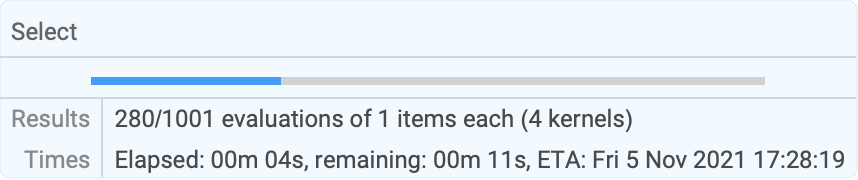
| |
Applications (4)
Parallelize[Select[Range[9000, 10000], PrimeQ[2 ^ # - 1]&], Method -> "FinestGrained"]Watch the results appear as they are found:
SetSharedVariable[primes]primes = {};
Monitor[Parallelize[Scan[If[PrimeQ[2 ^ # - 1], AppendTo[primes, #]]&, Range[1000, 5000]], Method -> "FinestGrained"], primes];
primesCompute a whole table of visualizations:
Parallelize[Table[StreamPlot[ {x^i y^j, x^jy^i}, {x, -3, 3}, {y, -3, 3}, ImageSize -> 100], {i, 2}, {j, 2}]]$TrigFunctions = {Sin, Cos, Sec, Csc, Tan, Cot, ArcSin, ArcCos, ArcSec, ArcCsc, ArcTan, ArcCot};Parallelize@Table[Plot3D[Abs[f[x + I y]], {x, -2, 2}, {y, -2, 2}, MeshFunctions -> Function@@@{{{x, y, z}, Re[f[x + I y]]}, {{x, y, z}, Im[f[x + I y]]}}, MeshShading -> {{Orange, None}, {None, Green}}, PlotLabel -> f, Ticks -> None, ImageSize -> 100], {f, $TrigFunctions}]Search a range in parallel for local minima:
res = Parallelize[Apply[Function[{x0, x1}, FindMinimum[Cos[x]Sin[Sqrt[10]x]Exp[-0.01x], {x, x0, x1}]], Partition[Range[0, 30, 3], 2, 1], {1}]]res[[Ordering[res, 1]]][[1]]Use a shared function to record timing results as they are generated:
record[k_, t_] := AppendTo[counts[[k]], t];
SetSharedFunction[record]
Set up a dynamic bar chart with the timing results:
ids = ParallelEvaluate[$KernelID];mi = Max[ids];
counts = Table[{0}, {mi}];
Dynamic[BarChart[counts[[ids]], PerformanceGoal -> "Speed", ChartLayout -> "Stacked", ChartLabels -> {ids, None}]]
Run a series of calculations with vastly varying runtimes:
Parallelize[Table[Module[{t}, t = Timing[Plus@@FactorInteger[2 ^ i - 1][[All, 2]]];
	record[$KernelID, t[[1]]];t[[2]]],
	{i, 192, 160, -1}], Method -> "FinestGrained"]
Properties & Relations (7)
For data parallel functions, Parallelize is implemented in terms of ParallelCombine:
Parallelize[Select[Range[100], PrimeQ]]ParallelCombine[Select[#, PrimeQ]&, Range[100]]Parallelize[Count[Range[100], _ ? PrimeQ]]ParallelCombine[Count[#, _ ? PrimeQ]&, Range[100], Plus]Parallel speedup can be measured with a calculation that takes a known amount of time:
AbsoluteTiming[Parallelize[Table[Pause[1];$KernelID, {8}]]]Define a number of tasks with known runtimes:
tasks = Range[0.1, 1, 0.05]The time for a sequential execution is the sum of the individual times:
sequentialTime = Total[tasks]speedup[parallelTime_] := sequentialTime / parallelTimeMeasure the speedup for parallel execution:
speedup @ First[AbsoluteTiming[Parallelize[Map[Pause, tasks]]]]Finest-grained scheduling gives better load balancing and higher speedup:
speedup@First[AbsoluteTiming[Parallelize[Map[Pause, tasks], Method -> "FinestGrained"]]]Scheduling large tasks first gives even better results:
speedup @ First[AbsoluteTiming[Parallelize[Map[Pause, Reverse[tasks]], Method -> "FinestGrained"]]]Form the arithmetic expression 1⊗2⊗3⊗4⊗5⊗6⊗7⊗8⊗9 for ⊗ chosen from +, –, *, /:
form[ops_List] := StringJoin[Riffle[Range[Length[ops] + 1], ops] /. {Plus -> "+", Times -> "*", Subtract -> "-", Divide -> "/", i_Integer :> ToString[i]}]Each list of arithmetic operations gives a simple calculation:
form[{Plus, Times, Plus}]ToExpression[%]Find all sequences of arithmetic operations that give 0:
zero = Parallelize[Select[Tuples[{Plus, Times, Subtract, Divide}, 8], ToExpression[form[#]] == 0&]];
Length[zero]
Display the corresponding expressions:
Style[form /@ zero, 10]Functions defined interactively are automatically distributed to all kernels when needed:
ftest[n_] := Labeled[Framed[PrimeQ[2 ^ n - 1]], $KernelID]Parallelize[Map[ftest, Range[1275, 1285]]]Distribute definitions manually and disable automatic distribution:
gtest[n_] := Labeled[Framed[PrimeQ[2 ^ n - 1]], $KernelID]DistributeDefinitions[gtest];Parallelize[Map[ftest, Range[1275, 1285]], DistributedContexts -> None]For functions from a package, use ParallelNeeds rather than DistributeDefinitions:
Needs["FiniteFields`"]Table[GF[7][{3}] ^ i, {i, 7}]ParallelNeeds["FiniteFields`"]Parallelize[Table[GF[7][{3}] ^ i, {i, 7}]]Set up a random number generator that is suitable for parallel use and initialize each kernel:
ParallelEvaluate[SeedRandom[1, Method -> {"ParallelMersenneTwister", "Index" -> $KernelID}]];Join@@ParallelEvaluate[RandomReal[1, 10]]Possible Issues (8)
Expressions that cannot be parallelized are evaluated normally:
Parallelize[Integrate[1 / (x - 1), x]]
Parallelize[Map[f, {a, b, c}, 0]]
Side effects cannot be used in the function mapped in parallel:
primes = {};
Parallelize[Scan[If[PrimeQ[2 ^ # - 1], AppendTo[primes, #]]&, Range[1000, 4000]]];
primes
Use a shared variable to support side effects:
SetSharedVariable[primes]primes = {};
Parallelize[Scan[If[PrimeQ[2 ^ # - 1], AppendTo[primes, #]]&, Range[1000, 4000]]];
primesIf no subkernels are available, the result is computed on the master kernel:
CloseKernels[];Parallelize[Map[f, {a, b, c}]]
If a function used is not distributed first, the result may still appear to be correct:
ftest[n_] := Labeled[Framed[PrimeQ[2 ^ n - 1]], $KernelID]Parallelize[Map[ftest, Range[1275, 1285]], DistributedContexts -> None]Only if the function is distributed is the result actually calculated on the available kernels:
DistributeDefinitions[ftest]Parallelize[Map[ftest, Range[1275, 1285]], DistributedContexts -> None]Definitions of functions in the current context are distributed automatically:
gtest[n_] := Labeled[Framed[PrimeQ[2 ^ n - 1]], $KernelID]Parallelize[Map[gtest, Range[1275, 1285]]]Definitions from contexts other than the default context are not distributed automatically:
ctx`gtest[n_] := Labeled[Framed[PrimeQ[2 ^ n - 1]], $KernelID]Parallelize[Map[ctx`gtest, Range[1275, 1285]]]Use DistributeDefinitions to distribute such definitions:
DistributeDefinitions[ctx`gtest];Parallelize[Map[ctx`gtest, Range[1275, 1285]]]Alternatively, set the DistributedContexts option to include all contexts:
cty`gtest[n_] := Labeled[Framed[PrimeQ[2 ^ n - 1]], $KernelID]Parallelize[Map[cty`gtest, Range[1275, 1285]], DistributedContexts -> Automatic]Explicitly distribute the definition of a function:
f[i_] := {i, $KernelID}
DistributeDefinitions[f];Clear[f]The modified definition is automatically distributed:
Parallelize[Map[f, Range[8]]]Suppress the automatic distribution of definitions:
g[i_] := {i, $KernelID}
DistributeDefinitions[g];Clear[g]Parallelize[Map[g, Range[8]], DistributedContexts -> None]Symbols defined only on the subkernels are not distributed automatically:
ParallelEvaluate[h[i_] := {i, $KernelID}];Parallelize[Map[h, Range[8]]]The value of $DistributedContexts is not used in Parallelize:
$DistributedContexts = None;local1[x_] := {$KernelID, x ^ 2}Parallelize[Table[local1[i], {i, 4}]]Set the value of the DistributedContexts option of Parallelize:
SetOptions[Parallelize, DistributedContexts -> None]local2[x_] := {$KernelID, x ^ 3}Parallelize[Table[local2[i], {i, 4}]]Restore all settings to their default values:
$DistributedContexts := $ContextSetOptions[Parallelize, DistributedContexts :> $Context]Trivial operations may take longer when parallelized:
AbsoluteTiming[Parallelize[Table[N[Sin[x]], {x, 0, 1000}]];]AbsoluteTiming[Table[N[Sin[x]], {x, 0, 1000}];]Neat Examples (1)
Display nontrivial automata as they are found:
Module[{auto = {}}, SetSharedVariable[auto];
	(* Progress *)
	PrintTemporary@Dynamic[GraphicsGrid[Partition[auto, 3, 3, 1, {}], Frame -> All, ImageSize -> 500]];
	(* Compute *)
	Parallelize[Scan[(out = Position[CellularAutomaton[{#, {2, 1}, {1, 1, 1}}, {{{{1}}}, 0}, {{{8}}}], 1];If[Length[out] > 50, AppendTo[auto, Graphics3D[{Cuboid /@ out}, Boxed -> False]]];)&, Range[2, 50, 2]]];
	(* Output *)
GraphicsGrid[Partition[auto, 3, 3, 1, {}], Frame -> All, ImageSize -> 500]]Text
Wolfram Research (2008), Parallelize, Wolfram Language function, https://reference.wolfram.com/language/ref/Parallelize.html (updated 2021).
CMS
Wolfram Language. 2008. "Parallelize." Wolfram Language & System Documentation Center. Wolfram Research. Last Modified 2021. https://reference.wolfram.com/language/ref/Parallelize.html.
APA
Wolfram Language. (2008). Parallelize. Wolfram Language & System Documentation Center. Retrieved from https://reference.wolfram.com/language/ref/Parallelize.html