

PixelValuePositions
PixelValuePositions[image,val]
returns a list of pixel positions in image that exactly match the value val.
PixelValuePositions[image,val,d]
returns all pixel positions that have values within a distance d from val.
Details
- PixelValuePositions finds and returns pixels of specific values in 2D and 3D images and is typically used for locating features or removing artifacts.
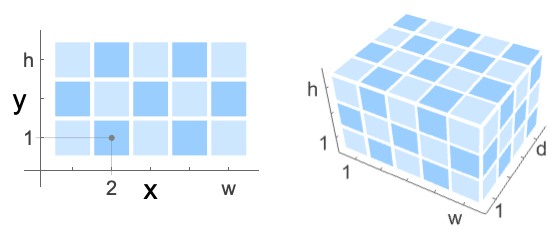
- PixelValuePositions assumes a pixel-aligned coordinate system that is shifted by 0.5 to the left and down with respect to the standard image coordinate system.
- Use ImageValuePositions to get positions in the standard image coordinate system.
- The pixel value val can be in one of the following forms:
-
s a scalar color a color {s1,s2,…} a list of channel values "Max" pixels with maximum intensity "Min" pixels with minimum intensity - In 3D, PixelValuePositions[image,val] returns the positions {xp,yp,zp}, such that pixel position
 corresponds to the center of the bottom-left front pixel.
Examples
open all close allBasic Examples (3)
Extract positions of the white pixels:
PixelValuePositions[[image], 1]Positions of the pixels with values within the specified distance from white:
PixelValuePositions[[image], White, .05]Positions of white pixels in a 3D image:
PixelValuePositions[[image], White]Scope (4)
Positions of the pixels with maximum intensity:
PixelValuePositions[[image], "Max"]Positions of the pixels with minimum intensity:
PixelValuePositions[[image], "Min"]PixelValuePositions[[image], Red]Positions of the pixels with values within the specified distance from red:
PixelValuePositions[[image], Red, .1]Applications (2)
Extract data coordinates in an image:
img = [image];
pos = PixelValuePositions[img, Green, .1]
Find a best-fit sine function:
FindFit[pos, a Sin[b x] + c, {a, b, c}, x]Extract coordinates of annotations in a document:
img = [image];
pos = PixelValuePositions[img, Red, 0.35];
Make the handwritten annotations disappear:
HighlightImage[img, {White, pos}]Properties & Relations (2)
PixelValuePositions[image,val] is equivalent to PixelValuePositions[image,val,0]:
PixelValuePositions[[image], Gray] == ImageValuePositions[[image], Gray, 0]PixelValuePositions[image,val] is equivalent to ImageValuePositions[image,val] plus  :
:
PixelValuePositions[[image], Gray, 0.05] == ImageValuePositions[[image], Gray, 0.05] + 0.5Text
Wolfram Research (2012), PixelValuePositions, Wolfram Language function, https://reference.wolfram.com/language/ref/PixelValuePositions.html.
CMS
Wolfram Language. 2012. "PixelValuePositions." Wolfram Language & System Documentation Center. Wolfram Research. https://reference.wolfram.com/language/ref/PixelValuePositions.html.
APA
Wolfram Language. (2012). PixelValuePositions. Wolfram Language & System Documentation Center. Retrieved from https://reference.wolfram.com/language/ref/PixelValuePositions.html