

RemoveAlphaChannel
RemoveAlphaChannel[color]
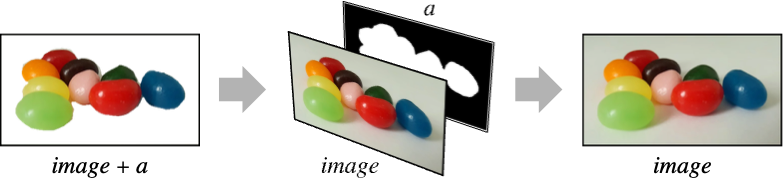
removes opacity from color.
RemoveAlphaChannel[color,bg]
removes opacity by blending color with the background color bg.
RemoveAlphaChannel[image,…]
removes opacity from all pixels in image.
RemoveAlphaChannel[video,…]
removes opacity from frames of video.
Details
- RemoveAlphaChannel returns an image or a color without an opacity value or alpha channel, either dropping or blending the colors with a specified background color.
- RemoveAlphaChannel returns the original color or image if it does not contain an alpha channel.
- When blending with a background color, an RGB or grayscale color or image is always returned.
- RemoveAlphaChannel works with any valid color directive as well as 2D and 3D images.
Examples
open all close allBasic Examples (3)
Remove opacity from a color directive:
RemoveAlphaChannel[RGBColor[1, 0, 0, 0.5]]Drop the alpha channel from an image:
RemoveAlphaChannel[[image]]Remove opacity by blending with a white background:
RemoveAlphaChannel[[image], White]ImageChannels[%]Scope (6)
Remove opacity from a color directive:
RemoveAlphaChannel[RGBColor[1, 0, 0, 0.5]]Remove an opaque mask from a grayscale image:
RemoveAlphaChannel[[image]]Remove opacity by blending with a pink background:
RemoveAlphaChannel[[image], Pink]Remove the alpha channel from a 3D image:
RemoveAlphaChannel[[image]]Blend with a black background:
RemoveAlphaChannel[[image], Black]Remove the alpha channel from a video:
SlideShowVideo[[image], VideoTransparency -> True]
ImageChannels[%]RemoveAlphaChannel[%%, Pink]
ImageChannels[%]Applications (2)
Replace all transparent colors with fully opaque colors in graphics:
g = Graphics[Table[{RandomColor[RGBColor[_, _, _, _]], Disk[RandomReal[1, 2], RandomReal[.2]]}, {i, 20}], PlotRange -> All]ReplaceAll[g, c_ ? ColorQ :> RemoveAlphaChannel[c]]Create artistic effects using alpha blending:
RemoveAlphaChannel[[image], LightGreen]Properties & Relations (2)
On an image with no alpha channel, the input image is returned:
RemoveAlphaChannel[[image]]Remove the alpha channel using ColorSeparate followed by ColorCombine:
channels = ColorSeparate[[image]]ColorCombine[Most[channels]]Text
Wolfram Research (2010), RemoveAlphaChannel, Wolfram Language function, https://reference.wolfram.com/language/ref/RemoveAlphaChannel.html (updated 2022).
CMS
Wolfram Language. 2010. "RemoveAlphaChannel." Wolfram Language & System Documentation Center. Wolfram Research. Last Modified 2022. https://reference.wolfram.com/language/ref/RemoveAlphaChannel.html.
APA
Wolfram Language. (2010). RemoveAlphaChannel. Wolfram Language & System Documentation Center. Retrieved from https://reference.wolfram.com/language/ref/RemoveAlphaChannel.html