

ReplaceImageValue
ReplaceImageValue[image,posval]
changes the pixel values at position pos in image to val.
ReplaceImageValue[image,posval,"type"]
assumes val to be of the specified type.
Details and Options
- ReplaceImageValue is typically used for image correction or annotation of 2D and 3D images by replacing image values at selected positions.
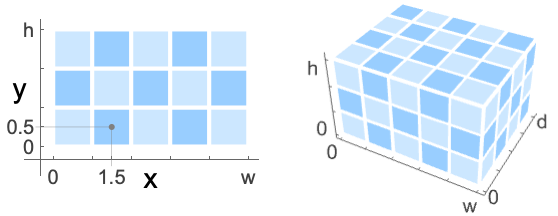
- ReplaceImageValue by default assumes position pos to be in the standard image coordinate system.
- Positions pos can be in one of the following forms:
-
{x,y} or {x,y,z} single position in 2D or 3D {xmin;;xmax,…} span of positions {xmin;;xmax;;xstep,…} span of positions with steps {pos1,pos2,…} a list of position specifications markerimage a marker image - ReplaceImageValue[image,{pos1->val1,…}] can be used to set pixel values for multiple positions.
- When a position pos lies on a boundary between pixels, all adjacent pixels are modified.
- Use ReplacePixelValue to specify exact pixel positions with integer indices.
- Image value val can be in one of the following forms:
-
s a scalar color a color {s1,s2,…} a list of channel values - Possible settings for "type" include:
-
"Bit" integer 0 or 1 "Byte" integer 0 through 255 "Bit16" integer 0 through 65535 "Real32" single-precision real (32 bit) "Real64" double-precision real (64 bit) - Other coordinate systems can be specified by setting the DataRange option. Typical settings include:
-
Automatic {{0,1},{0,h/w}} in 2D, {{0,1},{0,d/w},{0,h/w}} in 3D Full {{0,w},{0,h}} in 2D, {{0,w},{0,d},{0,h}} in 3D (default) {{left,right},{bottom,top}} explicit coordinate ranges in 2D {{left,right},{front,back},{bottom,top}} explicit coordinate ranges in 3D - ReplaceImageValue typically gives an image that has the same type as image.
Examples
open all close allBasic Examples (3)
ReplaceImageValue[[image], {2.5, 2.5} -> White]Replace a list of pixels in an image:
ReplaceImageValue[[image], Table[{i - 0.5, i - 0.5} -> Hue[(i - 1) / 5] , {i, 6}]]Specify the data type of the replacement value:
ReplaceImageValue[[image], {2.5, 2.5} -> 255, "Byte"]Scope (15)
Data (4)
Replace a value in a grayscale image:
ReplaceImageValue[[image], {1.5, 0.5} -> 1]Replace a value in a color image:
ReplaceImageValue[[image], {0.5, 0.5} -> Yellow]Replace a value in a grayscale 3D image:
ReplaceImageValue[[image], {2.5, 0.5, 2.5} -> 0]Set a pixel in the top-left front corner of a 3D color image to gray:
ReplaceImageValue[[image], {0.5, 0.5, 2.5} -> Gray]Position (6)
ReplaceImageValue[[image], {0.5, 0.5} -> Yellow]Replace image values at multiple positions:
ReplaceImageValue[[image], {{0.5, 0.5} -> Yellow, {1.5, 0.5} -> Brown}]Replace multiple image values:
ReplaceImageValue[[image], {{0.5, 0.5}, {1.5, 0.5}} -> Cyan]Use Span to replace multiple image values:
ReplaceImageValue[[image], {0.5 ;; 1.5, 0.5} -> Cyan]ReplaceImageValue[[image], {All, 1.5} -> Red]Use a marker image to replace image values:
ReplaceImageValue[[image], [image] -> Red]Value (3)
ReplaceImageValue[[image], {0.5, 0.5} -> 0.75]Replace a single image value with a given color:
ReplaceImageValue[[image], {0.5, 0.5} -> Yellow]Specify the value as a color triplet:
ReplaceImageValue[[image], {0.5, 0.5} -> {0, 0, 0}]ReplaceImageValue[[image], {0.5, 0.5} -> {0, 0, 0, 0.5}]Replace a monochrome pixel with a color value:
ReplaceImageValue[[image], {0.5, 0.5} -> Red]Options (5)
DataRange (5)
Replace image values sampled on a circle using a normalized data range:
ReplaceImageValue[[image], Table[{Cos[α], Sin[α]}, {α, 0, 2π, π / 50}] -> Red, DataRange -> {{-1, 1}, {-1, 1}}]ReplaceImageValue[[image], Table[{Cos[α], Sin[α]}, {α, 0, 2π, π / 50}] -> Red, DataRange -> Automatic]Replace values sampled on a circle in an image with a non-unity aspect ratio using the default data range:
ReplaceImageValue[[image], Table[{Cos[α], Sin[α]}, {α, 0, 2π, π / 50}] -> Red, DataRange -> Automatic]ReplaceImageValue[[image], Table[{Cos[α], Sin[α]}, {α, 0, 2π, π / 50}] -> Red, DataRange -> {{-1, 1}, {-1, 1}}]Use the Full data range:
ReplaceImageValue[[image], 100Table[{Cos[α], Sin[α]}, {α, 0, 2π, π / 50}] -> Red, DataRange -> Full]Applications (1)
Properties & Relations (5)
ReplaceImageValue only affects pixels inside the image:
ReplaceImageValue[[image], {10, 10} -> Red]Any position within the bounds of a pixel may be used:
ReplaceImageValue[[image], {0.1, 0.66} -> Red]Image values are set in the given order:
ReplaceImageValue[[image], {{0.5, 0.5} -> Red, {2.5, 2.5} -> Blue, {2.5, 2.5} -> Green}]When coordinates correspond to a boundary between pixels, all surrounding pixels are replaced:
ReplaceImageValue[[image], {{1.2, 1.7} -> Red, {0, 5} -> Green, {3, 4} -> Blue, {7, 0} -> Orange, {8, 7.8} -> Pink , {3, 6.5} -> Purple, {6.5, 4} -> Cyan}]Read set pixels using ImageValue with "Nearest" resampling and "Fixed" padding:
img = RandomImage[1, {100, 200}];
pos = {{0, 0}, {100, 0}, {100, 200}, {0, 200}, {50, 100}, {12.5, 12.5}};
val = RandomReal[1, Length[pos]];
ImageValue[ReplaceImageValue[img, Thread[pos -> val]], pos, Resampling -> "Nearest", Padding -> "Fixed"] === valText
Wolfram Research (2012), ReplaceImageValue, Wolfram Language function, https://reference.wolfram.com/language/ref/ReplaceImageValue.html (updated 2014).
CMS
Wolfram Language. 2012. "ReplaceImageValue." Wolfram Language & System Documentation Center. Wolfram Research. Last Modified 2014. https://reference.wolfram.com/language/ref/ReplaceImageValue.html.
APA
Wolfram Language. (2012). ReplaceImageValue. Wolfram Language & System Documentation Center. Retrieved from https://reference.wolfram.com/language/ref/ReplaceImageValue.html