



VideoJoin
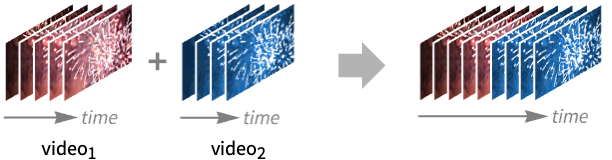
VideoJoin[video1,video2,…]
concatenates all videoi and returns a video object.
Details and Options
- VideoJoin is typically used to combine multiple video files in a sequence.
- Video objects videoi may have different properties, including frame size and frame rate. The properties are conformed before joining.
- Video objects may have different numbers of tracks. Corresponding tracks are joined together.
- By default, VideoJoin places the new video under the "Video" directory in $WolframDocumentsDirectory.
- The following options can be specified:
-
AudioEncoding Automatic audio encoding to use CompressionLevel Automatic compression level to use ConformationMethod Automatic how to conform frames of different sizes FrameRate Automatic frame rate to use GeneratedAssetFormat Automatic the file format of the result GeneratedAssetLocation $GeneratedAssetLocation location of the generated asset OverwriteTarget Automatic whether to overwrite an existing file RasterSize Automatic raster size of video frames SampleRate Automatic sample rate to use SubtitleEncoding Automatic subtitle encoding to use TransitionDirection Automatic direction of the transition TransitionDuration Automatic duration of the transition TransitionEffect Automatic transition effect to use VideoEncoding Automatic video encoding to use VideoTransparency False whether the output video should have a transparency channel - By default, videos are joined without any transition effect.
- Using TransitionDurationdur, videos are overlapped by the specified duration dur during which the transition happens.
- Supported settings for TransitionEffect are:
-
None update instantly without a visual effect "Fade" fade from old content to new "Push" have new content push old content away "Wipe" fade from old content to new using a wiping effect
Examples
open all close allBasic Examples (1)
Scope (2)
Join videos with similar properties:
v = Video["ExampleData/Caminandes.mp4"];
segments = VideoTrim[v, {{10, 20}, {30, 35}}]Duration /@ segmentsVideoJoin[segments]Join videos with different properties:
v1 = Video["ExampleData/fish.mp4"];
v2 = Video["ExampleData/bullfinch.mkv"];Information[#, {"Duration", "OriginalRasterSize"}]& /@ {v1, v2}Properties of the resulting video are chosen such that most input data can be stored in the output:
VideoJoin[v1, v2];
Information[%]Options (17)
AudioEncoding (1)
CompressionLevel (1)
Join videos using default compression:
v1 = Video["ExampleData/Caminandes.mp4"];v2 = Video["ExampleData/bullfinch.mkv"];FileSize[Information[VideoJoin[v1, v2], "ResourcePath"]]FileSize[Information[VideoJoin[v1, v2, CompressionLevel -> 1], "ResourcePath"]]The choice of encoders affects the amount by which a file can be compressed:
FileSize[Information[VideoJoin[v1, v2, VideoEncoding -> "LIBVPX-VP9"], "ResourcePath"]]FileSize[Information[VideoJoin[v1, v2, VideoEncoding -> "LIBVPX-VP9", CompressionLevel -> 1], "ResourcePath"]]ConformationMethod (2)
By default, black padding is used when images are not stretched to fit the common image size:
{v1, v2} = SlideShowVideo[#, IconizedObject[«dur»]]& /@ {[image], [image]};By default, a common frame size is used and videos are made to fit in the frame:
VideoJoin[v1, v2]//VideoFrameList[#, 2]&Use "Fill" fitting to fill the whole canvas for all frames:
VideoJoin[v1, v2, ConformationMethod -> "Fill"]//VideoFrameList[#, 2]&Use "Stretch" fitting to resize the frames:
VideoJoin[v1, v2, ConformationMethod -> "Stretch"]//VideoFrameList[#, 2]&Perform windowboxing when fitting frames:
VideoJoin[v1, v2, ConformationMethod -> "Windowbox"]//VideoFrameList[#, 2]&VideoJoin[v1, v2, ConformationMethod -> {"Windowbox", Padding -> Green}]//VideoFrameList[#, 2]&Use the RasterSize option to specify the desired frame dimensions:
{v1, v2} = SlideShowVideo[#, IconizedObject[«dur»]]& /@ {[image], [image]};By default, a common frame size is used and videos are made to fit in the frame:
VideoJoin[v1, v2, RasterSize -> {200, 100}]//VideoFrameList[#, 2]&VideoJoin[v1, v2, RasterSize -> {200, 100}, ConformationMethod -> Padding -> Green]//VideoFrameList[#, 2]&Specify a different fitting scheme:
VideoJoin[v1, v2, RasterSize -> {200, 100}, ConformationMethod -> "Stretch"]//VideoFrameList[#, 2]&FrameRate (1)
By default, the largest frame rate (rounded to the nearest integer value) is used:
v1 = Video["ExampleData/Caminandes.mp4"];v2 = Video["ExampleData/bullfinch.mkv"];Information[#, "VideoTracks"]& /@ {v1, v2}Information[VideoJoin[v1, v2], "VideoTracks"]Specify the frame rate to use:
Information[VideoJoin[v1, v2, FrameRate -> 15], "VideoTracks"]GeneratedAssetLocation (1)
By default, generated video files are stored in $WolframDocumentsDirectory:
v1 = Video["ExampleData/Caminandes.mp4"];v2 = Video["ExampleData/bullfinch.mkv"];Information[VideoJoin[v1, v2], "ResourcePath"]Specify the output file directory:
Information[VideoJoin[v1, v2, GeneratedAssetLocation -> $TemporaryDirectory], "ResourcePath"]Information[VideoJoin[v1, v2, GeneratedAssetLocation -> FileNameJoin[{$TemporaryDirectory, "out.mkv"}]], "ResourcePath"]OverwriteTarget (1)
By default, existing files are not overwritten:
v1 = Video["ExampleData/Caminandes.mp4"];v2 = Video["ExampleData/bullfinch.mkv"];Information[VideoJoin[v1, v2, GeneratedAssetLocation -> FileNameJoin[{$TemporaryDirectory, "out.mkv"}]], "ResourcePath"]VideoJoin[v1, v2, GeneratedAssetLocation -> FileNameJoin[{$TemporaryDirectory, "out.mkv"}]]//Head
Information[VideoJoin[v1, v2, GeneratedAssetLocation -> FileNameJoin[{$TemporaryDirectory, "out.mkv"}], OverwriteTarget -> True], "ResourcePath"]RasterSize (1)
By default, the largest raster size is used:
v1 = Video["ExampleData/Caminandes.mp4"];v2 = Video["ExampleData/bullfinch.mkv"];Information[#, "VideoTracks"]& /@ {v1, v2}Information[VideoJoin[v1, v2], "VideoTracks"]Specify the raster width to use, while preserving the aspect ratio:
Information[VideoJoin[v1, v2, RasterSize -> 100], "VideoTracks"]Specify the raster width and height:
Information[VideoJoin[v1, v2, RasterSize -> {200, 100}], "VideoTracks"]SampleRate (1)
By default, the largest sample rate is used:
v1 = Video["ExampleData/Caminandes.mp4"];v2 = Video["ExampleData/bullfinch.mkv"];Information[#, "AudioTracks"]& /@ {v1, v2}Information[VideoJoin[v1, v2], "AudioTracks"]Specify the sample rate to use:
Information[VideoJoin[v1, v2, SampleRate -> 22050], "AudioTracks"]SubtitleEncoding (1)
Specify the subtitle encoding to use:
v1 = Video["ExampleData/Caminandes.mp4"];v2 = Video["ExampleData/bullfinch.mkv"];Information[VideoJoin[v1, v2, GeneratedAssetLocation -> FileNameJoin[{$TemporaryDirectory, "out.mkv"}], OverwriteTarget -> True, SubtitleEncoding -> "WEBVTT"], "SubtitleTracks"]TransitionDirection (2)
v1 = Video["ExampleData/fish.mp4"];
v2 = Video["ExampleData/rule30.mp4"];VideoJoin[v1, v2, TransitionEffect -> "Push", TransitionDirection -> Left, RasterSize -> 300]v1 = Video["ExampleData/fish.mp4"];
v2 = Video["ExampleData/rule30.mp4"];VideoJoin[v1, v2, TransitionEffect -> "Push", TransitionDirection -> Top, RasterSize -> 300]TransitionDuration (1)
TransitionEffect (3)
By default, no transition effect is happening:
v1 = Video["ExampleData/fish.mp4"];
v2 = Video["ExampleData/rule30.mp4"];VideoJoin[v1, v2, RasterSize -> 300]VideoExtractFrames[%4, Interval[{Duration[v1] - Quantity[0.1, "Seconds"], Duration[v1] + Quantity[0.1, "Seconds"]}]]Specify a transition duration for a smooth transition:
v1 = Video["ExampleData/fish.mp4"];
v2 = Video["ExampleData/rule30.mp4"];VideoJoin[v1, v2, TransitionEffect -> "Fade", TransitionDuration -> .8, RasterSize -> 300]Specify a transition duration for a smooth transition:
v1 = Video["ExampleData/fish.mp4"];
v2 = Video["ExampleData/rule30.mp4"];VideoJoin[v1, v2, TransitionEffect -> "Push", TransitionDuration -> .8, RasterSize -> 300]Text
Wolfram Research (2020), VideoJoin, Wolfram Language function, https://reference.wolfram.com/language/ref/VideoJoin.html (updated 2024).
CMS
Wolfram Language. 2020. "VideoJoin." Wolfram Language & System Documentation Center. Wolfram Research. Last Modified 2024. https://reference.wolfram.com/language/ref/VideoJoin.html.
APA
Wolfram Language. (2020). VideoJoin. Wolfram Language & System Documentation Center. Retrieved from https://reference.wolfram.com/language/ref/VideoJoin.html