Creating Palettes
| Generating a Palette Programmatically | Installing the Palette into the Wolfram System |
| Finalizing and Saving the Palette | Extended Examples |
| CreatePalette[expr] | create and open a palette notebook containing expr in the front end |
| PaletteNotebook[{cell1,cell2,…}] | an in-cell representation of a palette notebook that can be manipulated by the front end |
CreatePalette[Grid[Partition[PasteButton[Style[#, 12], RawBoxes[#], ImageSize -> 24]& /@ {"π", "E", "I", "∞", "°", "×", "÷", "->", ":>", "==", "≠", "≤", "≥", "∈", "∍", "¬", "∧", "∨", "⋃", "⋂"}, 5], Spacings -> {0, 0}]];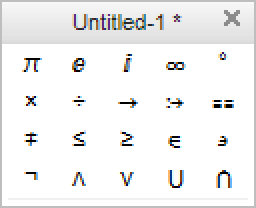
 button or wrapping CreatePalette around the PaletteNotebook expression.
PaletteNotebook[Grid[Partition[PasteButton[Style[#, 12], RawBoxes[#], ImageSize -> 24]& /@ {"π", "E", "I", "∞", "°", "×", "÷", "->", ":>", "==", "≠", "≤", "≥", "∈", "∍", "¬", "∧", "∨", "⋃", "⋂"}, 5], Spacings -> {0, 0}]]| Cell[BoxData["\<\"π\"\>"],"cellstyle"] | interpreted box structure |
| Cell[BoxData["π"],"cellstyle"] | uninterpreted box structure |
πEI∞°×÷ -> :> == ≠ ≤ ≥ ∈∍¬∧∨⋃⋂π ∞ ° × ÷ ≠ ≤ ≥ ∈ ∍ ¬ ∧ ∨ ⋃ ⋂
"π"CreatePalette[Column[Button[Style[#, 12, FontFamily -> "Times"], FrontEndTokenExecute[InputNotebook[], "Style", #], Appearance -> "Palette", ImageSize -> 120]& /@ {"Title", "Subtitle", "Subsubtitle", "Section", "Subsection", "Subsubsection", "Text", "Code", "Input"}, Spacings -> 0]];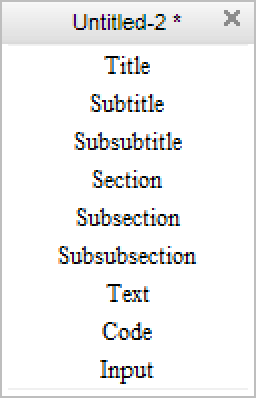
f[a_, b_] := Button[Style[a, 12, FontFamily -> "Times"], FrontEndTokenExecute[b], Appearance -> "Palette", ImageSize -> 156]g[a_, b_] := Hyperlink[Style[a, 12, FontFamily -> "Times"], b, Appearance -> "Palette", BaseStyle -> {FontColor -> StandardBlue}, ImageSize -> 156]PaletteNotebook@Column[{f["Documentation Center", "OpenHelpLink"], g["Alphabetical Function Listing", "paclet:guide/AlphabeticalListing"], f["Delete Output", "DeleteGeneratedCells"], f["Quit Kernel", "EvaluatorQuit"]}, Spacings -> 0]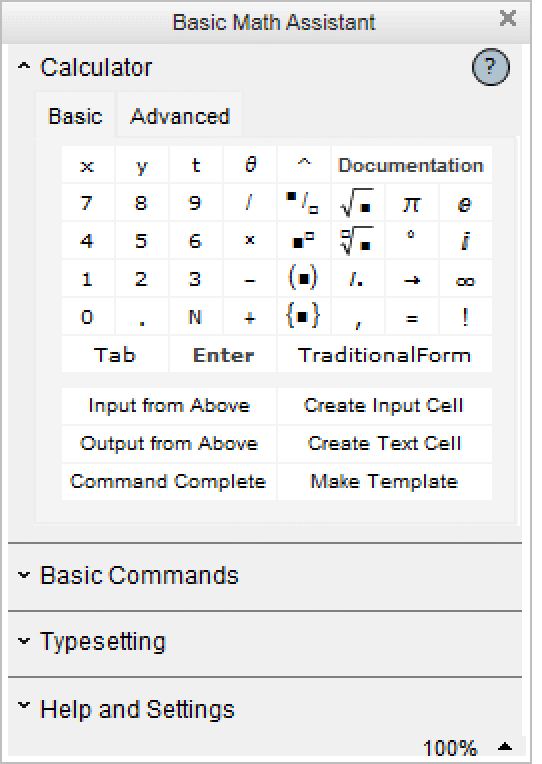
1. To set these options programmatically, specify each of the options above in a CreatePalette statement. For example:
CreatePalette[expr,Magnification->1.0,DynamicUpdating->True]
Note: Setting DynamicUpdating->True should only be done when the palette functionality has been completely debugged and is in a ready-to-use state, as this prevents the front end from aborting a dynamic evaluation that may or may not contain bugs.
2. To set these options using the Option Inspector, select the palette and open the Option Inspector:
In Notebook Options ▶ Display Options, explicitly set Magnification to avoid inheriting the global setting.
In Cell Options ▶ Evaluation Options, explicitly set DynamicUpdating->True to enable Dynamic even if dynamic updating is disabled in the user's front end.
Dynamic[ExpandFileName /@ AbsoluteCurrentValue[$FrontEnd, PalettePath]]
Dependent Opener Views
CreatePalette[DynamicModule[{opener1 = True, opener2 = False},
	Column[{OpenerView[{"First Opener", "text"}, Dynamic[opener1, (opener1 = #;opener2 = !opener2)&]], OpenerView[{"Second Opener", "text"}, Dynamic[opener2, (opener2 = #;opener1 = !opener1)&]]}]], WindowTitle -> "Palette"];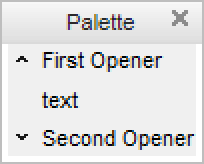
Applying and Evaluating Functions
PaletteNotebook@Column[Button[Defer[#[]], Inherited, BaseStyle -> "Evaluate", Evaluator -> None, Appearance -> "Palette"]& /@ {Expand, Factor, Apart}, Spacings -> 0.1](4 x^4 + 8 x^2)^44096 x^8 + 8192 x^10 + 6144 x^12 + 2048 x^14 + 256 x^16