WSTP Development with CMake

| Supported Development Platforms | Building WSTP Programs |
| Installing the WSTP Components | Running WSTP Programs |
This document describes how to compile and run Wolfram Symbolic Transfer Protocol (WSTP) programs written in C or C++ using command-line CMake. "WSTP and External Program Communication" describes how to write WSTP programs in both the Wolfram Language and the C language.
CMake is a cross-platform build system generator. You use it to configure a project once and then build it with the native toolchain on each platform. You can download CMake from cmake.org or install it with your operating system package manager. WSTP requires CMake 3.20 or later.
This document does not teach CMake, C or C++. It focuses on the WSTP files that are shipped with the SDK and the command-line build flow used by the examples.
Supported Development Platforms
WSTP can be used with any development environment that supports the platform toolchain and binary interface. Typical development platforms include recent versions of Xcode for macOS, Visual C++ for Windows and gcc for Linux. This document only describes the command-line CMake workflow.
Installing the WSTP Components
The WSTP Developer Kit is located in the installation layout under  .
.
Recommended Installation
CompilerAdditions Installation
The WSTP components that you need to build WSTP programs are already installed in the SDK. One way to use these components is to leave them in place and refer to them by full path in your CMake files. Another is to copy them to any other convenient location and then point the cmake variable WSTP_ROOT_DIR to that directory.
The  directory contains the WSTP files used by the CMake workflow.
| wstp.h | C/C++ header file |
| WSTP.cmake | CMake configuration file |
| wsprep | program to preprocess .tm files into C code |
| <static library> | platform-dependent static library |
| <dynamic library> | platform-dependent dynamic library |
Files in the CompilerAdditions directory.
Platform | Static library | Dynamic library |
| macOS | libWSTPi4.a | wstp.framework |
| Linux | libWSTP64i4.a | 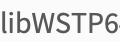 |
| Windows | wstp64i4s.lib | wstp64i4.lib (import library for wstpi64.dll) |
Names of library files for each platform.
WSTPExamples Installation
This directory contains the source code for some very simple WSTP programs. By using this source code, you can learn how to build and run WSTP programs without having to write any code yourself.
The top-level  file builds all bundled examples. The
  file in each example subdirectory builds only that example.
PrebuiltExamples Installation
This directory contains prebuilt versions of the example programs. "Running WSTP Programs" describes how to run two of these programs. "Building WSTP Programs" describes how to build them yourself using the source code in the WSTPExamples directory.
Building WSTP Programs
The general procedure for building WSTP programs is to include  in any C or C++ source files that make WSTP function calls, to compile your source files and then to link the resulting object code with the appropriate WSTP library and any other standard libraries required by your application. If your application uses the WSTP template mechanism, then your template files must first be processed into a C or C++ source file using
  .
.
The SDK ships with CMake support for this workflow, so the template-processing step and the library selection are handled automatically by the example CMake files.
Using WSTP Template Files
If your program uses the WSTP template mechanism as described in "WSTP and External Program Communication", you must preprocess source files containing template entries using the  application. A template entry is a sequence of lines that contain template keywords. Each entry defines a Wolfram Language function that, when evaluated, calls an associated C function.
When  processes such source files, it converts template entries into C functions, without changing other text, and writes out additional C functions that implement a remote procedure call mechanism using WSTP. The result is a C source file that is ready for compilation.
wsprep addtwo.tm -o addtwotm.c
will produce a C++ source file  from the template entries and the other text remaining in
  . You would then compile the output file using the C++ compiler. If you use the CMake build system, you can express this step as a build rule in the same way the bundled examples do.
In the example projects, this is automated by the  function from
  , which creates a CMake custom command that runs
  on the
  file and places the generated source file in the build tree. To use this function for your own .tm file, you can add a statement like the following to your CMake file.
# Generate tm.cxx file using wsprep
prep_sourcefile(${CMAKE_CURRENT_SOURCE_DIR}/addtwo.tm addtwo.tm.cxx)
Building WSTP Programs from the Command Line
The bundled CMake project in  builds all of the sample programs. To build the sample programs, in this case
  , create a build directory in a convenient location and evaluate the cmake commands to build the
  directory.
mkdir build.wstp-examples
cmake -S "<full path>/WSTP/DeveloperKit/<platform>/WSTPExamples" -B "build.wstp-examples"
cmake --build "build.wstp-examples"
Note cmake prefers you to use forward slash, /, to delimit pathnames, even on Windows where the typical pathname delimiter is a backslash.
If you are using a multi-config generator such as Visual Studio or Xcode, add  to the build command.
As a convenience, WSTPExamples/CMakeLists.txt sets the WSTP_ROOT_DIR variable to automatically find WSTP. When building individual sample programs or building your own WSTP programs, you will have to define this yourself. It can be defined from the command-line using -DWSTP_ROOT_DIR=value.
To build a single sample program, configure that example's subdirectory and include the WSTP_ROOT_DIR setting.
mkdir build.addtwo
cmake -S "<full path>/WSTP/DeveloperKit/<platform>/WSTPExamples/addtwo" -DWSTP_ROOT_DIR="<full path>/WSTP/DeveloperKit/<platform>/CompilerAdditions" -B "build.addtwo"
cmake --build "build.addtwo"
Replace  with
with  ,
,  ,
,  ,
,  ,
,  ,
,  ,
,  or
or  as needed.
The top-level  builds all examples, while the
  files in each example subdirectory build only that specific example.
Example CMake Pattern
The example projects show the intended build pattern for your own WSTP code.
cmake_minimum_required(VERSION 3.20)
project(mywstpapp CXX)

if(NOT WSTP_ROOT_DIR)
    message(FATAL_ERROR "WSTP_ROOT_DIR is not set")
endif()
include(${WSTP_ROOT_DIR}/WSTP.make)

# Call prep_sourcefile() for any .tm file
# If your WSTP project has no .tm files, this will be omitted
prep_sourcefile(${CMAKE_CURRENT_SOURCE_DIR}/myfunc.tm myfunc.tm.cxx)

add_executable(mywstpapp ${CMAKE_CURRENT_SOURCE_DIR}/myfunc.cxx \
                         ${CMAKE_CURRENT_BINARY_DIR}/myfunc.tm.cxx)
target_link_libraries(mywstpapp WSTP::STATIC_LIBRARY)
This presumes that you will be setting the WSTP_ROOT_DIR variable when invoking CMake, typically by passing the command-line flag -DWSTP_ROOT_DIR=value.
If you prefer dynamic linking, link against  instead of
  .
.
The  example is a template program that uses the same pattern, only with
  and
and  .
.
Running WSTP Programs
The instructions in "Building WSTP Programs" describe how to build two WSTP programs using source code in the WSTPExamples directory. These two programs, addtwo and factor, are already built for you in the PrebuiltExamples folder. Before building them on your own, you should try to run the prebuilt examples to verify that the WSTP system additions are installed and working and to learn what to expect from these examples when they are properly built. The rest of the comments assume that you are using the programs found in the Developer Kit.
Running a Prebuilt Example from the Wolfram Language Kernel
The first example program, addtwo, is a WSTP template program that is installed into the Wolfram Language. That is, this program runs in the background, providing, as a service to the Wolfram Language, one or more externally compiled functions. To the Wolfram Language user, these functions appear to be built in. In order to get this new functionality, the user of the Wolfram Language must run the Install[] function. The addtwo program uses a template file that defines the Wolfram Language function AddTwo[] as a call to the C function addtwo(). (The template mechanism is described in "WSTP and External Program Communication".) The source code for this program looks likes this.
:Begin:
:Function:       addtwo
:Pattern:        AddTwo[i_Integer, j_Integer]
:Arguments:      { i, j }
:ArgumentTypes:  { Integer, Integer }
:ReturnType:     Integer
:End:

:Evaluate: AddTwo::usage = "AddTwo[x, y] gives the sum of two machine integers x and y."

int addtwo( int i, int j)
{
    return i+j;
}

int main(int argc, char* argv[])
{
    return WSMain(argc, argv);
}
FileNameJoin[{$InstallationDirectory, "SystemFiles", "Links", "WSTP", "DeveloperKit", $SystemID, "PrebuiltExamples"}]link = Install["./addtwo"]LinkPatterns[link]? AddTwoAddTwo[2, 3]AddTwo[2 ^ 31 - 1, 1]AddTwo[2 ^ 31, 1]AddTwo[x, 1]??AddTwoUninstall[link]
ResetDirectory[]Invoking the Wolfram Language Kernel from within a Prebuilt Example
The second example program, factor, is a Wolfram System front end in the sense that the Wolfram Language kernel runs in the background providing, as a service to factor, the computational services of the kernel—in this case, the ability to factor an integer typed by the user. These examples assume that the Wolfram System is installed in the Applications directory.
Launch the "factor" application by starting a command prompt, changing to the PrebuiltExamples directory, and executing the following command.
factor -linklaunch -linkname "/Applications/Wolfram.app/Contents/MacOS/WolframKernel"
factor -linklaunch -linkname 'wolfram'
factor -linklaunch -linkname "C:\Program Files\Wolfram Research\Wolfram\15.0\WolframKernel.exe"
After a moment, a prompt will appear requesting that you type an integer. Type an integer with fewer than 10 digits and press the Return key.
Integer to factor:
The prime factors returned by the Wolfram Language are printed, and factor closes its link with the Wolfram Language.
Integer to factor: 123456789
3 ^ 2
3607 ^ 1
3803 ^ 1
Supported Link Protocols
The C function WSOpenArgcArgv() and the Wolfram Language function LinkOpen[] are documented in "WSTP and External Program Communication". The legal values for the LinkProtocol option are "SharedMemory", "TCPIP" and "IntraProcess". A LinkProtocol is the mechanism used to transport data from one end of a connection to the other. "SharedMemory" is the default protocol.
| "SharedMemory" | the default protocol; implemented using a shared memory mechanism that requires both sides of the link to run on the same machine |
| "TCPIP" | implemented using TCP/IP and can connect different systems |
| "IntraProcess" | an efficient protocol for communicating within the same process by allocating in-process memory |
| "Pipes" | implemented using the Unix pipes functionality; only available on Linux and macOS |
Valid options for the LinkProtocol option.