

InitializePDECoefficients
InitializePDECoefficients[vd,sd,rules]
initializes the coefficients specified by rules in accordance with variable data vd and solution data sd to generate a PDECoefficientData object.
Details and Options
- The coefficients are assumed to come from a second-order system of
 PDEs in
  space dimensions of the form:
 - In InitializePDECoefficients[vd,sd,rules], the rules should be of the form name->coefficient. The possible coefficient names are:
-
"LoadCoefficients" {{f1},{f2},…}  is a scalar
"LoadDerivativeCoefficients" {{γ1},{γ2},…}  is a vector of length
"DiffusionCoefficients" {{-c11,-c12,…},{-c21,-c22,…},…}  may be specified as scalars, diagonal vectors of length
  , or
, or  ×
× matrices
"ConservativeConvectionCoefficients" {{-α11,-α12,…},{-α21,-α22,…},…}  is a vector of length
"ConvectionCoefficients" {{β11,β12,…},{β21,β22,…},…}  is a vector of length
"ReactionCoefficients" {{a11,a12,…},{a21,a22,…},…}  is a scalar
 - If a rule is not specified for any of these coefficient names, the coefficients of that type are all assumed to be 0.
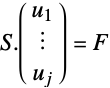
- DiscretizePDE will take the generated PDECoefficientData object and provide system matrices such that
- where
 is the stiffness matrix and
  a load vector.
 - Transient systems of PDEs may be specified up through second, with
 the first-order temporal derivative and
  the second-order temporal derivative.
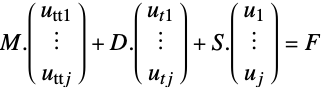
 - The transient coefficient form is:
- DiscretizePDE will take the generated PDECoefficientData object and provide system matrices such that
- where
 is the mass matrix,
  the damping matrix,
  the stiffness matrix and
  a load vector.
 - The possible damping coefficient names are:
-
"DampingDiffusionCoefficients" {{-dc11,-dc12,…},{-dc21,-dc22,…},…}  may be specified as scalars, diagonal vectors of length
  or
or  ×
× matrices
"DampingConservativeConvectionCoefficients" {{-dα11,-dα12,…},{-dα21,-dα22,…},…}  is a vector of length
"DampingConvectionCoefficients" {{dβ11,dβ12,…},{dβ21,dβ22,…},…}  is a vector of length
"DampingReactionCoefficients" {{dα11,dα12,…},{dα21,dα22,…},…}  is a scalar
 - The possible mass coefficient names are:
-
"MassDiffusionCoefficients" {{-mc11,-mc12,…},{-mc21,-mc22,…},…}  may be specified as scalars, diagonal vectors of length
  or
or  ×
× matrices
"MassConservativeConvectionCoefficients" {{-mα11,-mα12,…},{-mα21,-mα22,…},…}  is a vector of length
"MassConvectionCoefficients" {{mβ11,mβ12,…},{mβ21,mβ22,…},…}  is a vector of length
"MassReactionCoefficients" {{mα11,mα12,…},{mα21,mα22,…},…}  is a scalar
 - "Mass" coefficients contribute to the mass matrix
 , "Damping" coefficients contribute to the damping matrix
  , and the remaining coefficients contribute to the stiffness matrix
  and the load vector
  .
. - NDSolve reduces transient systems so that they are first order in time.
- The coefficients can be functions of space, time, parameters, dependent variables and first-order derivatives of dependent variables.
- Variable data vd and solution data sd are corresponding lists of variables and values. Templates for vd and sd may be generated using NDSolve`VariableData and NDSolve`SolutionData, and components may be set using NDSolve`SetSolutionDataComponent.
- InitializePDECoefficients verifies and optimizes the coefficients in accordance with variable data vd and solution data sd.
- The "Space" component of vd and sd should be set to the spatial variables and the spatial mesh represented as a NumericalRegion object, respectively.
- The "DependentVariables" component of vd should be a list of dependent variable name symbols without arguments.
- For time-dependent problems, the "Time" component of vd and sd should be set to the temporal variable and the initial time, respectively.
- For nonlinear problems, the "DependentVariables" component of sd should be set to the initial seedings for the dependent variables.
- For parametric problems, the "Parameters" component of vd and sd should be set to the parametric variables and the initial parametric values, respectively.
- InitializePDECoefficients has the following options:
-
"VerificationData" Automatic specify PDE coefficient verification data - Options given to InitializePDECoefficients can be given to NDSolve by specifying "InitializePDECoefficientsOptions". »
- Setting the option from NDSolve and related functions is explained in NDSolve Finite Element Options.


Examples
open all close allBasic Examples (2)
Load the finite element package:
Needs["NDSolve`FEM`"]Set up a NumericalRegion:
nr = ToNumericalRegion[Disk[]]Set up variable and solution data:
vd = NDSolve`VariableData[{"DependentVariables", "Space"} -> {{u}, {x, y}}];
sd = NDSolve`SolutionData["Space" -> nr];
Convert a Laplace equation  into coefficients:
InitializePDECoefficients[vd, sd, "DiffusionCoefficients" -> {{-IdentityMatrix[2]}}]Convert a Poisson equation  into coefficients:
InitializePDECoefficients[vd, sd, "DiffusionCoefficients" -> {{-IdentityMatrix[2]}}, "LoadCoefficients" -> {{1}}]Scope (6)
Coefficients can be functions:
f[x_, y_] := {{x ^ 2, 0}, {x + y, y ^ 2}}InitializePDECoefficients[vd, sd, "DiffusionCoefficients" -> {{-f[x, y]}}]Coefficients can be interpolation functions:
ifun = Interpolation[Flatten[Table[Evaluate[{{x, y}, Sin[x y]}], {x, 0, 1, 0.2}, {y, 0, 1 / 2, 0.1}], 1]]InitializePDECoefficients[vd, sd, "LoadCoefficients" -> {{-ifun[x, y]}}]Coefficients can be nonlinear:
sdnonlinear = sd;
NDSolve`SetSolutionDataComponent[sdnonlinear, "DependentVariables", {0.}];
InitializePDECoefficients[vd, sdnonlinear, "DiffusionCoefficients" -> {{{{-u[x, y], 0}, {0, -Derivative[1, 0][u][x, y]}}}}]
If the input for "DiffusionCoefficient" is a vector, it is interpreted as the diagonal of the requested input matrix:
InitializePDECoefficients[vd, sd, "DiffusionCoefficients" -> {{-{1, 1}}}] === InitializePDECoefficients[vd, sd, "DiffusionCoefficients" -> {{-IdentityMatrix[2]}}]If the input for "DiffusionCoefficient" is a scalar, the scalar is put in all places of the diagonal of the requested matrix:
InitializePDECoefficients[vd, sd, "DiffusionCoefficients" -> {{-1}}] === InitializePDECoefficients[vd, sd, "DiffusionCoefficients" -> {{-IdentityMatrix[2]}}]vd2 = vd;
NDSolve`SetSolutionDataComponent[vd2, "DependentVariables", {u, v}];
InitializePDECoefficients[vd2, sd, "DiffusionCoefficients" -> -{{{{(100000/91), 0}, {0, (5000/13)}}, {{0, (30000/91)}, {(5000/13), 0}}}, {{{0, (5000/13)}, {(30000/91), 0}}, {{(5000/13), 0}, {0, (100000/91)}}}}]Options (1)
"VerificationData" (1)
The PDE coefficients that are given to InitializePDECoefficients are verified so that they evaluate to numeric input:
rc[x_ ? NumericQ, y_ ? NumericQ] := (Print["Test Coordinate: ", {x, y}];1)InitializePDECoefficients[vd, sd, "ReactionCoefficients" -> {{-rc[x, y]}}]
The verification is done by finding a test coordinate that lies within the NumericalRegion. It may, however, happen that the automatically chosen test coordinate or test ElementMarker are at a singularity:
rc[x_ ? NumericQ, y_ ? NumericQ] := (Print["Test Coordinate: ", {x, y}];1 / (x + 0.5 + y + 0.5))InitializePDECoefficients[vd, sd, "ReactionCoefficients" -> {{-rc[x, y]}}]


Overwriting the automatic finding of the verification data can be done with the "VerificationData" option:
InitializePDECoefficients[vd, sd, "ReactionCoefficients" -> {{-rc[x, y]}}, "VerificationData" -> {"Coordinate" -> {0, 0}}]
Additionally, the automatic ElementMarker can be changed:
InitializePDECoefficients[vd, sd, "ReactionCoefficients" -> {{-rc[x, y]}}, "VerificationData" -> {"Coordinate" -> {0, 0}, "ElementMarker" -> 1}]
For nonlinear problems, the verification data for the dependents and the derivative of the dependents can be modified with "DependentVariables" and "DependentVariablesDerivative", respectively:
sdnonlinear = sd;
NDSolve`SetSolutionDataComponent[sdnonlinear, "DependentVariables", {0.}];
InitializePDECoefficients[vd, sdnonlinear, "ReactionCoefficients" -> {{-1 / u[x, y]}}]
Change the test value for the dependent variable to be 1 and not 0 from the initial condition:
InitializePDECoefficients[vd, sdnonlinear, "ReactionCoefficients" -> {{-1 / u[x, y]}}, "VerificationData" -> {"DependentVariables" -> {1}}]Change the test value of the derivative of the dependent variable to the vector {1,1}. The components of the vector are the values of the derivative in each space direction. Currently, a default 0.1 is used:
InitializePDECoefficients[vd, sdnonlinear, "ReactionCoefficients" -> {{-1 / (0.1 - Derivative[1, 0][u][x, y])}}, "VerificationData" -> {"DependentVariablesDerivatives" -> {{1, 1}}}]Applications (6)
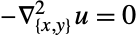
Specify a Laplace equation 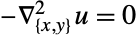 over a disk with Dirichlet and Neumann conditions
  for
for 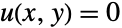 and
and  for
for 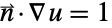 :
:
pded = InitializePDECoefficients[vd, sd, "DiffusionCoefficients" -> {{-IdentityMatrix[2]}}];
bcd = InitializeBoundaryConditions[vd, sd, {{DirichletCondition[u[x, y] == 0, x ≤ -0.3], NeumannValue[1., x ≥ 0.35]}}];
md = InitializePDEMethodData[vd, sd];
Inspect the diffusion coefficients:
pded["DiffusionCoefficients"]Discretize, solve, interpolate and visualize the solution:
dpde = DiscretizePDE[pded, md, sd];
dbc = DiscretizeBoundaryConditions[bcd, md, sd];
{l, s, d, m} = dpde["SystemMatrices"];
DeployBoundaryConditions[{l, s, d, m}, dbc];
res = LinearSolve[s, l];
efun = ElementMeshInterpolation[{nr["ElementMesh"]}, res];
Plot3D[efun[x, y], {x, y}∈nr["ElementMesh"]]
The "LoadCoefficients" coefficient is used by NIntegrate to integrate over a region:
ipde = InitializePDECoefficients[vd, sd, "LoadCoefficients" -> {{1}}];
md = InitializePDEMethodData[vd, sd];
dpde = DiscretizePDE[ipde, md, sd];
Total[dpde["LoadVector"], 2]
Use NIntegrate to verify the result:
NIntegrate[1, {x, y}∈Disk[]]A "ReactionCoefficients" of  can be used to evaluate a function, for example,
  over a region:
ipde = InitializePDECoefficients[vd, sd, "ReactionCoefficients" -> {{1}}, "LoadCoefficients" -> {{x ^ 2 + y ^ 2}}];
md = InitializePDEMethodData[vd, sd];
dpde = DiscretizePDE[ipde, md, sd];
sol = LinearSolve[dpde["StiffnessMatrix"], dpde["LoadVector"]];
if = ElementMeshInterpolation[{md["ElementMesh"]}, sol]
Visualize the evaluated function:
Plot3D[if[x, y], {x, y}∈Disk[]]A "ReactionCoefficients" of  in combination with a "LoadCoefficients" can be used to scale a function, for example,
  over a region by a factor of
  :
:
ipde = InitializePDECoefficients[vd, sd, "ReactionCoefficients" -> {{10}}, "LoadCoefficients" -> {{x ^ 2 + y ^ 2}}];
md = InitializePDEMethodData[vd, sd];
dpde = DiscretizePDE[ipde, md, sd];
sol = LinearSolve[dpde["StiffnessMatrix"], dpde["LoadVector"]];
if = ElementMeshInterpolation[{md["ElementMesh"]}, sol]
Visualize the scaled evaluated function:
Plot3D[if[x, y], {x, y}∈Disk[], PlotRange -> All]A "ReactionCoefficients" in combination with a "LoadDerivativeCoefficients" can be used to interpolate the derivative of a function over a region:
uExact[x_] := Cos[x] + 1
vd1D = NDSolve`VariableData[{"DependentVariables", "Space"} -> {{u}, {x}}];
sd1D = NDSolve`SolutionData["Space" -> ToNumericalRegion[Line[{{0}, {π}}]]];
ipde = InitializePDECoefficients[vd1D, sd1D, "ReactionCoefficients" -> {{-1}},
	"LoadDerivativeCoefficients" -> {{{uExact[x]}}}];
ibcd = InitializeBoundaryConditions[vd1D, sd1D, {{DirichletCondition[u[x] == (D[uExact[x], x] /. x -> 0), x == 0], DirichletCondition[u[x] == (D[uExact[x], x] /. x -> π), x == π]}}];
md = InitializePDEMethodData[vd1D, sd1D];
dpde = DiscretizePDE[ipde, md, sd1D];
dbcd = DiscretizeBoundaryConditions[ibcd, md, sd1D, "Stationary"];
{s, l} = {dpde["StiffnessMatrix"], dpde["LoadVector"]};
DeployBoundaryConditions[{l, s}, dbcd];
sol = LinearSolve[s, l];
if = ElementMeshInterpolation[{md["ElementMesh"]}, sol]
Visualize the difference between the numerical approximation and the exact derivative:
Plot[Evaluate[{if[x] - Div[{uExact[x]}, {x}]}], {x, 0, π}, PlotRange -> All]Specify an equation with mixed spatial and temporal derivatives  in the domain
  :
:
aeqn = -Derivative[0, 2][V][t, x] - Derivative[1, 2][V][t, x]Specify Dirichlet conditions  ,
,  and initial conditions
 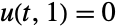 :
:
ic = V[0, x] == 0;
bcRight = V[t, 1] == 0;
bcLeftValue = Sin[2 * π * t];
bcLeft = V[t, 0] == bcLeftValue;
tEnd = 3;
Set up the variable and solution data:
vd1D = NDSolve`VariableData[{"DependentVariables" -> {u}, "Space" -> {x}, "Time" -> t}];
nr1D = ToNumericalRegion[FullRegion[1], {{0, 1}}];
sd1D = NDSolve`SolutionData[{"Space" -> nr1D, "Time" -> 0.}];initCoeffs = InitializePDECoefficients[vd1D, sd1D,
"DiffusionCoefficients" -> {{-IdentityMatrix[1]}},
"DampingDiffusionCoefficients" -> {{-IdentityMatrix[1]}}
]Initialize the boundary conditions:
initBCs = InitializeBoundaryConditions[vd1D, sd1D, {{DirichletCondition[u[t, x] == bcLeftValue, x == 0], DirichletCondition[u[t, x] == 0, x == 1]}}]md = InitializePDEMethodData[vd1D, sd1D]Discretize the PDE coefficients. In this case, all PDE coefficients are time independent:
sdpde = DiscretizePDE[initCoeffs, md, sd1D, "Stationary"];sdpde["StiffnessMatrix"]sdpde["DampingMatrix"]Discretize the boundary conditions:
sbcs = DiscretizeBoundaryConditions[initBCs, md, sd1D]Write a function to compute the residual of the PDE:
discretizePDEResidual[t_ ? NumericQ, u_ ? VectorQ, dudt_ ? VectorQ] :=
	Module[{l, s, d, tdpde, tbcs, nldpde, nlbcs},
	NDSolve`SetSolutionDataComponent[sd1D, "Time", t];
	NDSolve`SetSolutionDataComponent[sd1D, "DependentVariables", u];
	l = sdpde["LoadVector"];
	s = sdpde["StiffnessMatrix"];
	d = sdpde["DampingMatrix"];
	tbcs = DiscretizeBoundaryConditions[initBCs, md, sd1D, "Transient"];
	DeployBoundaryConditions[{l, s, d}, tbcs];
	DeployBoundaryConditions[{l, s, d}, sbcs];
	d.dudt + s.u - l
	]
Evaluate the initial conditions:
init = EvaluateOnElementMesh[{x}, 0, md["ElementMesh"]]["ValuesOnGrid"];Set up a function for the sparsity patterns of the system matrices:
sparsityPatterns[t_, u_ ? VectorQ] := Module[
	{s, d, tdpde, nldpde},
	NDSolve`SetSolutionDataComponent[sd1D, "Time", t];
	NDSolve`SetSolutionDataComponent[sd1D, "DependentVariables", u];
	s = sdpde["StiffnessMatrix"];
	d = sdpde["DampingMatrix"];
	{s["PatternArray"], d["PatternArray"]}
	]
Compute the sparsity patterns:
{stiffnessSparsity, dampingSparsity} = sparsityPatterns[10 ^ -6, init]ufun = NDSolveValue[{discretizePDEResidual[t, U[t], U'[t]] == 0, U[0] == init}, U, {t, 0, tEnd}, Method -> {"EquationSimplification" -> "Residual"}, Jacobian -> {"X" -> {Automatic, Sparse -> stiffnessSparsity}, "XP" -> {Automatic, Sparse -> dampingSparsity}}]Create a unified interpolating function:
femSolution = ElementMeshInterpolation[{ufun["Coordinates"][[1]], md["ElementMesh"]}, Partition[ufun["ValuesOnGrid"], 1]]For comparison, compute a solution with the tensor product grid method:
tpgSolution = NDSolveValue[{aeqn == 0, bcLeft, bcRight, ic}, V, {x, 0, 1}, {t, 0, tEnd}]Plot the difference between the TPG and FEM methods:
Plot3D[tpgSolution[t, x] - femSolution[t, x], {t, 0, tEnd}, {x, 0., 1.}]Properties & Relations (2)
Options given to InitializePDECoefficients can be given to NDSolve by specifying "InitializePDECoefficientOptions":
NDSolve[{Laplacian[u[x, y], {x, y}] == 1 / (x + 1 / 2 + y + 1 / 2), DirichletCondition[u[x, y] == 0, True]}, u, {x, y}∈Disk[]]
Specify "VerificationData" to pass a coordinate that is not at a singularity:
NDSolve[{Laplacian[u[x, y], {x, y}] == 1 / (x + 1 / 2 + y + 1 / 2), DirichletCondition[u[x, y] == 0, True]}, u, {x, y}∈Disk[], Method -> {"FiniteElement", "InitializePDECoefficientsOptions" -> {"VerificationData" -> {"Coordinate" -> {0, 0}}}}]Convert a Poisson equation  into coefficients:
pdec = InitializePDECoefficients[vd, sd, "DiffusionCoefficients" -> {{-IdentityMatrix[2]}}, "LoadCoefficients" -> {{1}}]Use GetInactivePDE to create an inactive version of the input:
GetInactivePDE[pdec, vd]Possible Issues (1)
Typically, NDSolve will detect if coefficients do not evaluate to numeric quantities with the correct dimensions and warn about that:
NDSolveValue[{D[u[t, x], {t, 1}] - D[u[t, x], {x, 2}] == k Sin[x], u[0, x] == 0, DirichletCondition[u[t, x] == 0, True]}, u, {t, 0, π}, {x, -π, π}, Method -> {"PDEDiscretization" -> {"MethodOfLines"}}]
To verify that the coefficients given are adequate for each operator, the coefficients undergo a test evaluation using the initial point in time and a coordinate from the region. If the combination of the coefficient and the used values cancel out, NDSolve cannot detect if a coefficient has not been specified. NDSolve will then give a message that it was not able to compute the elements contributed by a specific operator:
NDSolveValue[{D[u[t, x], {t, 1}] - D[u[t, x], {x, 2}] == Cos[t] Sin[x] + k Sin[t] Sin[x], u[0, x] == 0, DirichletCondition[u[t, x] == 0, True]}, u, {t, 0, π}, {x, -π, π}, Method -> {"PDEDiscretization" -> {"MethodOfLines"}}]



In the preceding case, evaluating the load operator at t=0 and x=-π will let the load operator vanish, and NDSolve cannot detect that k has not been specified:
(Cos[t] * Sin[x] + k * Sin[t] * Sin[x]) /. {t -> 0., x -> -π}Text
Wolfram Research (2014), InitializePDECoefficients, Wolfram Language function, https://reference.wolfram.com/language/FEMDocumentation/ref/InitializePDECoefficients.html (updated 2024).
CMS
Wolfram Language. 2014. "InitializePDECoefficients." Wolfram Language & System Documentation Center. Wolfram Research. Last Modified 2024. https://reference.wolfram.com/language/FEMDocumentation/ref/InitializePDECoefficients.html.
APA
Wolfram Language. (2014). InitializePDECoefficients. Wolfram Language & System Documentation Center. Retrieved from https://reference.wolfram.com/language/FEMDocumentation/ref/InitializePDECoefficients.html