

AASTriangle
AASTriangle[α,β,a]
returns a filled triangle with angles α and β and side length a, where a is adjacent to one angle only.
Details and Options
- AASTriangle is also known as angle-angle-side triangle.
- AASTriangle can be used as a primitive in 2D graphics and as a geometric region in 2D.
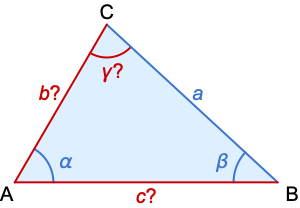
- The given (blue) and computed (red) parameters for an AASTriangle:
- AASTriangle returns a Triangle with
 at the origin,
  on the positive
  axis, and
  in the half-plane
  .
. - AASTriangle allows the length a to be any positive number and the angles α and β to be positive such that α+β<π.
Background & Context
- AASTriangle constructs an angle-angle-side triangle. In particular, AASTriangle[α,β,a] returns the Triangle in
![TemplateBox[{}, Reals]^2](Files/AASTriangle.en/7.png "TemplateBox[{}, Reals]^2") with vertices
with vertices  ,
,  and
and  located at the origin, on the positive
  axis and in the upper half-plane, respectively, with α∠BAC, β∠ABC and a the length of the side opposite
  . By the AAS theorem, the triangle so specified is unique (up to geometric congruence). AASTriangle allows the length a to be any positive number and the angles α and β to be positive numbers satisfying α+β<π. The arguments of AASTriangle may be exact or approximate numeric expressions.
 - The Triangle objects returned by AASTriangle can be used as 2D graphics primitives or geometric regions.
- AASTriangle is related to a number of other symbols. ASATriangle, SASTriangle and SSSTriangle return two-dimensional triangles constructed using different angle and/or side specifications. Finally, AASTriangle is a special case of Triangle, in the sense that AASTriangle[α,β,a] is equivalent to Triangle[{{0,0},{a Csc[α] Sin[α+β],0},{a Cot[α] Sin[β],a Sin[β]}}].
Examples
open all close allBasic Examples (4)


AASTriangle[Pi / 6, Pi / 3, 1]An AASTriangle:
Graphics[AASTriangle[Pi / 6, Pi / 3, 1]]Different styles applied to AASTriangle:
ℛ = AASTriangle[Pi / 6, Pi / 3, 1];
{Graphics[{Pink, ℛ}], Graphics[{EdgeForm[Thick], Pink, ℛ}], Graphics[{EdgeForm[Dashed], Pink, ℛ}], Graphics[{EdgeForm[Directive[Thick, Dashed, Blue]], Pink, ℛ}]}ℛ = AASTriangle[Pi / 6, Pi / 3, 1];Area[ℛ]RegionCentroid[ℛ]Scope (14)
Graphics (4)
Specification (2)
AASTriangle evaluates to Triangle with one point at the origin and one edge on the  axis:
axis:
t = AASTriangle[Pi / 4, Pi / 3, 1]Graphics[{Pink, t}, Frame -> True]A triangle with a symbolic angle:
t = AASTriangle[Pi / 4, β, 1]Table[Graphics[t, ImageSize -> Tiny, PlotLabel -> β], {β, 2π / 8, 5π / 8, π / 8}]Styling (2)
Color directives specify the face color:
Table[Graphics[{c, AASTriangle[Pi / 6, Pi / 3, 1]}], {c, {Red, Green, Blue, Yellow}}]FaceForm and EdgeForm can be used to specify the styles of the interior and boundary:
Graphics[{FaceForm[Pink], EdgeForm[Directive[Thick, Dashed, Blue]], AASTriangle[Pi / 6, Pi / 3, 1]}]Regions (10)
Embedding dimension is the dimension of the space in which the triangle lives:
ℛ = AASTriangle[Pi / 6, Pi / 3, 1];RegionEmbeddingDimension[ℛ]Geometric dimension is the dimension of the triangle itself:
RegionDimension[ℛ]ℛ = AASTriangle[Pi / 6, Pi / 3, 1];{RegionMember[ℛ, {1, 1 / 2}], RegionMember[ℛ, {1, 1}]}RegionMember[ℛ, {x, y}]ℛ = AASTriangle[Pi / 6, Pi / 3, 1];{Area[ℛ], RegionMeasure[ℛ]}c = RegionCentroid[ℛ]Graphics[{{Pink, ℛ}, {Black, Point[c]}}]Distance from a point to an AASTriangle:
ℛ = AASTriangle[Pi / 6, Pi / 3, 1];RegionDistance[ℛ, {1, 1}]{Plot3D[Evaluate@RegionDistance[ℛ, {x, y}], {x, -1, 3}, {y, -1, 2}, MeshFunctions -> {#3&}, Mesh -> 5], ContourPlot[Evaluate@RegionDistance[ℛ, {x, y}], {x, -2, 4}, {y, -2, 3}, Contours -> {{0.5, Red}, {1, Green}, {1.5, Blue}}]}ℛ = AASTriangle[Pi / 6, Pi / 3, 1];SignedRegionDistance[ℛ, {1, 1 / 2}]Plot3D[SignedRegionDistance[ℛ, {x, y}], {x, -1, 3}, {y, -1, 2}, MeshFunctions -> {#3&}, Mesh -> {{0}}, MeshShading -> {Red, Green}]ℛ = AASTriangle[Pi / 6, Pi / 3, 1];RegionNearest[ℛ, {1, 1}]pts = Table[RegionCentroid[ℛ] + 2{Cos[k 2 π / 16], Sin[k 2 π / 16]}, {k, 0., 15}];
nst = RegionNearest[ℛ, #]& /@ pts;Legended[Graphics[{{Thick, Gray, ℛ}, {Thin, Gray, Line[Transpose[{pts, nst}]]}, {Red, Point[pts]}, {Blue, Point[nst]}}], PointLegend[{Red, Blue}, {"start", "nearest"}]]ℛ = AASTriangle[Pi / 6, Pi / 3, 1];BoundedRegionQ[ℛ]rr = RegionBounds[ℛ]Graphics[{ℛ, {EdgeForm[{Dashed, Red}], Opacity[0.2, Yellow], Cuboid@@Transpose[rr]}}]Integrate over an AASTriangle:
ℛ = AASTriangle[Pi / 6, Pi / 3, 1];Integrate[1, {x, y}∈ℛ]Integrate[x y, {x, y}∈ℛ]ℛ = AASTriangle[Pi / 6, Pi / 3, 1];Minimize[{(x - 1)^2(3y - 1)^2 + 1, {x, y}∈ℛ}, {x, y}]Solve equations over an AASTriangle:
ℛ = AASTriangle[Pi / 6, Pi / 3, 1];Reduce[x^2 + y^2 == 1 && {x, y}∈ℛ, {x, y}]Applications (2)
A triangle with two equal angles is an isosceles triangle:
IsoscelesTriangle[α_, s_] := AASTriangle[α, α, s]t = IsoscelesTriangle[3π / 8, 1]Region[t]Area@IsoscelesTriangle[α, s]The circumcircle of an AASTriangle can be found using Circumsphere:
tri = AASTriangle[Pi / 4, Pi / 3, 1.]The circumcircle passes through the three corner points:
circ = Circumsphere[First@tri];Graphics[{{LightGray, circ}, {LightBlue, tri}, {Black, Point[First@tri]}}]Find the midpoints for each edge of the triangle:
midpts = RegionCentroid[Line[#]]& /@ Subsets[First@tri, {2}]Graphics[{{LightBlue, tri}, Point[midpts]}]The perpendicular bisectors are lines from the circumcenter to the midpoints:
center = First[circ];
bisectors = Line[{center, #}]& /@ midpts;Graphics[{{LightBlue, tri}, {Point[center], Point[midpts]}, {Red, Dashed, bisectors}}]Properties & Relations (2)
AASTriangle is a specialized case of Triangle:
AASTriangle[α, β, a]Any AASTriangle can be represented by a Polygon:
Subscript[ℛ, 1] = AASTriangle[Pi / 6, Pi / 3, 1];
Subscript[ℛ, 2] = Polygon[{{0, 0}, {2, 0}, {3 / 2, Sqrt[3] / 2}}];RegionEqual[Subscript[ℛ, 1], Subscript[ℛ, 2]]Text
Wolfram Research (2014), AASTriangle, Wolfram Language function, https://reference.wolfram.com/language/ref/AASTriangle.html.
CMS
Wolfram Language. 2014. "AASTriangle." Wolfram Language & System Documentation Center. Wolfram Research. https://reference.wolfram.com/language/ref/AASTriangle.html.
APA
Wolfram Language. (2014). AASTriangle. Wolfram Language & System Documentation Center. Retrieved from https://reference.wolfram.com/language/ref/AASTriangle.html