


Circumsphere
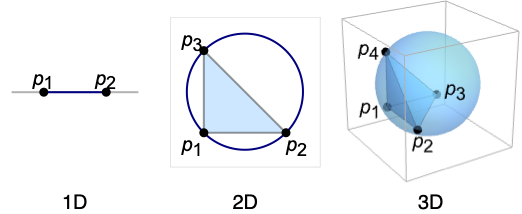
Circumsphere[{p1,…,pn+1}]
gives the sphere that circumscribes the points pi in  .
.
Circumsphere[poly]
gives the circumsphere of a polyhedron or polygon poly.
Details
- Circumsphere is also known as circumcircle, circumscribed circle, or circumscribed disk.
- Circumsphere gives the Sphere of smallest measure (arc length, area, etc.) that circumscribes the points pi.
- Circumsphere evaluates to a Sphere[c,r] where the center c is known as the circumcenter, and radius r is known as the circumradius for the Simplex[{p1,…,pn+1}].
- Circumsphere is defined for
 and is affinely independent.
 - For polyhedra, Circumsphere[poly] is equivalent to Circumsphere[PolyhedronCoordinates[poly]].
- For polygons, Circumsphere[poly] is equivalent to Circumsphere[PolygonCoordinates[poly]].
- Circumsphere can be used with symbolic points in GeometricScene.
Examples
open all close allBasic Examples (2)
Graphics[Circumsphere[{{0, 0}, {1, 0}, {0, 1}}]]Graphics3D[Circumsphere[{{0, 0, 0}, {1, 0, 0}, {0, 1, 0}, {0, 0, 1}}]]The circumsphere of the regular octahedron:
ℛ = Circumsphere[Octahedron[]]Graphics3D[{Opacity[0.6], Octahedron[], ℛ}]Area[ℛ]Scope (17)
Graphics (6)
Specification (2)
Circumspheres in different dimensions:
Graphics[Circumsphere[{{0, 0}, {1, 0}, {0, 1}}]]Graphics3D[Circumsphere[{{0, 0, 0}, {1, 0, 0}, {0, 1, 0}, {0, 0, 1}}]]Circumsphere evaluates to a Sphere:
Circumsphere[{{0, 0, 0}, {1, 0, 0}, {0, 1, 0}, {0, 0, 1}}]{First@%, Last@%}Styling (4)
ℛ = Circumsphere[{{0, 0, 0}, {1, 0, 0}, {0, 1, 0}, {0, 0, 1}}];Table[Graphics3D[{c, ℛ}], {c, {Red, Green, Blue, Yellow}}]Different properties can be specified for the front and back of faces using FaceForm:
ℛ = Circumsphere[{{-1, 0, 0}, {1, 0, 0}, {0, 1, 0}, {0, 0, 1}}];Graphics3D[{FaceForm[Yellow, Blue], ℛ}, PlotRange -> {{-0.8, 0.8}, {-0.8, 0.8}, {-0.8, 0.8}}]Circumspheres with different specular exponents:
ℛ = Circumsphere[{{-1, 0, 0}, {1, 0, 0}, {0, 1, 0}, {0, 0, 1}}];Table[Graphics3D[{Orange, Specularity[White, n], ℛ}], {n, {5, 20, 100}}]Black circumsphere that glows red:
Graphics3D[{Glow[Red], Black, ℛ}]Opacity specifies the face opacity:
ℛ = Circumsphere[{{-1, 0, 0}, {1, 0, 0}, {0, 1, 0}, {0, 0, 1}}];Table[Graphics3D[{Opacity[o], ℛ}], {o, {0.3, 0.5, 0.9}}]Regions (11)
Circumsphere works in any number of dimensions:
Circumsphere[{{0, 0, 0, 0, 0}, {1, 0, 0, 0, 0}, {0, 1, 0, 0, 0}, {0, 0, 1, 0, 0}, {0, 0, 0, 1, 0}, {0, 0, 0, 0, 1}}]Get the circumcenter and circumradius:
{First[%], Last[%]}Embedding dimension is the dimension of the space in which the sphere lives:
ℛ = Circumsphere[{{0, 0}, {1, 0}, {1, 1}}];RegionEmbeddingDimension[ℛ]Geometric dimension is the dimension of the shape itself:
RegionDimension[ℛ]ℛ = Circumsphere[{{1, 0, 0}, {0, 1, 0}, {0, 0, 1}, {-1, 0, 0}}];{RegionMember[ℛ, {1, 0, 0}], RegionMember[ℛ, {1, 2, 3}]}Get conditions for membership:
RegionMember[ℛ, {x, y, z}]ℛ = Circumsphere[{{1, 0, 0}, {0, 1, 0}, {0, 0, 1}, {-1, 0, 0}}];{Area[ℛ], RegionMeasure[ℛ]}c = RegionCentroid[ℛ]Graphics3D[{{Opacity[0.5], LightBlue, ℛ}, {PointSize[Large], Red, Point[c]}}]ℛ = Circumsphere[{{1, 0}, {0, 1}, {-1, 0}}];RegionDistance[ℛ, {1, 2}]{Plot3D[RegionDistance[ℛ, {x, y}], {x, -2, 2}, {y, -2, 2}, MeshFunctions -> {#3&}, Mesh -> 5, Exclusions -> Norm[{x, y}] == 1], ContourPlot[RegionDistance[ℛ, {x, y}], {x, -2, 2}, {y, -2, 2}, Contours -> {{0.5, Red}, {1, Green}, {1.5, Blue}}]}ℛ = Circumsphere[{{1, 0}, {0, 1}, {-1, 0}}];{SignedRegionDistance[ℛ, {2, 0}], SignedRegionDistance[ℛ, {1 / 4, 1 / 3}]}Plot3D[SignedRegionDistance[ℛ, {x, y}], {x, -2, 2}, {y, -2, 2}, MeshFunctions -> {#3&}, Mesh -> 5, Exclusions -> Norm[{x, y}] == 1]ℛ = Circumsphere[{{0, 0, 0}, {1, 0, 0}, {0, 1, 0}, {0, 0, 1}}];{RegionNearest[ℛ, {2, 2, 2}], RegionNearest[ℛ, {(1/2), (1/2), (1/2)}]}Nearest points to an enclosing sphere:
spherePoints[{n_, m_}, c_, r_] :=
Flatten[Table[c + r{Cos[k 2π / n]Sin[l π / m], Sin[k 2π / n]Sin[l π / m], Cos[l π / m]}, {k, 0., n - 1}, {l, 0., m - 1}], 1];pl = spherePoints[{8, 8}, RegionCentroid[ℛ], 3 / 2];
npl = Table[RegionNearest[ℛ, p], {p, pl}];Legended[Graphics3D[{ℛ, {Thin, Gray, Line[Transpose[{pl, npl}]]}, {Red, Point[pl]}, {PointSize[Medium], Blue, Point[npl]}}, Lighting -> "Neutral", Boxed -> False], PointLegend[{Red, Blue}, {"start", "nearest"}]]ℛ = Circumsphere[{{0, 0, 0}, {1, 0, 0}, {0, 1, 0}, {0, 0, 1}}];BoundedRegionQ[ℛ]r = RegionBounds[ℛ]Graphics3D[{{EdgeForm[White], Opacity[0.2, Yellow], Cuboid@@Transpose[r]}, ℛ}, Boxed -> False]Integrate over a Circumsphere:
ℛ = Circumsphere[{{-1, 0, 0}, {1, 0, 0}, {0, 1, 0}, {0, 0, 1}}];Integrate[1, {x, y, z}∈ℛ]Integrate[x^2y^2z^2, {x, y, z}∈ℛ]ℛ = Circumsphere[{{-1, 0, 0}, {1, 0, 0}, {0, 1, 0}, {0, 0, 1}}];Maximize[{x^2 + 2y^2 + 3z^2, {x, y, z}∈ℛ}, {x, y, z}]Solve equations over a Circumsphere:
ℛ = Circumsphere[{{-1, 0, 0}, {1, 0, 0}, {0, 1, 0}, {0, 0, 1}}];Reduce[x^2 == y^2 == z^2 && {x, y, z}∈ℛ, {x, y, z}]//LogicalExpandApplications (7)
Find the intersections of a Line and a Circumsphere:
Subscript[ℛ, 1] = Line[{{-2, -1, 1}, {2, 1, -1}}];
Subscript[ℛ, 2] = Circumsphere[{{-1, 0, 0}, {1, 0, 0}, {0, 1, 0}, {0, 0, 1}}];pts = Solve[{x, y, z}∈Subscript[ℛ, 1] && {x, y, z}∈Subscript[ℛ, 2], {x, y, z}]Graphics3D[{Subscript[ℛ, 1], {Opacity[0.35], Subscript[ℛ, 2]}, {Red, PointSize[Medium], Point[{x, y, z} /. pts]}}, PlotRange -> 1]Find the intersection of two circumspheres:
Subscript[ℛ, 1] = Circumsphere[{{-1, 0}, {1, 0}, {0, 1}}];
Subscript[ℛ, 2] = Circumsphere[{{0, 0}, {2, 0}, {1, 1}}];pts = Solve[{x, y}∈Subscript[ℛ, 1] && {x, y}∈Subscript[ℛ, 2], {x, y}]Graphics[{Subscript[ℛ, 1], Subscript[ℛ, 2], {Red, PointSize[Medium], Point[{x, y} /. pts]}}]Find a perpendicular bisector of a triangle:
pts = {a, b, c} = {{1, 2}, {0, 0}, {3, 0}};circumCenter = RegionCentroid[Circumsphere[pts]];bisector = Line[{circumCenter, RegionCentroid[Line[{a, b}]]}];Visualize circumcenter and bisectors in red:
Graphics[{{LightGray, Circumsphere[pts]}, {LightBlue, Triangle[pts]}, {Dashed, Red, bisector}, {Blue, Point[pts]}, {Red, PointSize[Large], Point[circumCenter]}}]The defining property of a DelaunayMesh is that no input point is contained in the circumcircle of any Triangle in the mesh:
SeedRandom[12345];
pts = RandomReal[{0, 1}, {6, 2}];
ℛ = DelaunayMesh[pts];
tris = First /@ MeshPrimitives[ℛ, 2];
circs = Circumsphere /@ tris;Show[HighlightMesh[ℛ, Style[{0, All}, Directive[Red, PointSize[Medium]]]], Graphics[{Gray, circs}], PlotRange -> {{0, 1}, {0, 1}}]Use Circumsphere to approximate the radius of curvature of a function:
y[x_] := Sin[x ^ 2];
r[x_] := ((1 + y'[x] ^ 2) ^ (3 / 2)) / Abs[y''[x]];
c[x_] := With[{ϵ = 0.0001}, Circumsphere[{{x - ϵ, y[x - ϵ]}, {x, y[x]}, {x + ϵ, y[x + ϵ]}}]];
Compare the exact radius of curvature with the radius from the circumcircle approximation:
{N@r[1], Last[c[1]]}Show[{Plot[y[x], {x, -2, 2}], Graphics[{c[-1.2], c[0], c[1.4], Red, PointSize[Medium], Point[{-1.2, y[-1.2]}], Point[{0, y[0]}], Point[{1.4, y[1.4]}]}]}, AspectRatio -> Automatic]Use a circumsphere with symbolic input to derive a formula for the radius of curvature:
circ = Circumsphere[{{x - ϵ, y[x - ϵ]}, {x, y[x]}, {x + ϵ, y[x + ϵ]}}];Limit[Last@circ, ϵ -> 0, Assumptions -> x∈Reals]The result is identical to the radius formula:
r[x]Use Circumsphere to find a disk covering for any region with a triangulation. First triangulate the region:
ℛ = TriangulateMesh@DiscretizeGraphics[Graphics[CountryData["UnitedStates", {"Shape", "Mercator"}]]]Use Circumsphere to compute a circle for each triangle:
circles = Circumsphere[First[#]]& /@ MeshPrimitives[ℛ, 2];Graphics[{Opacity[0.5], Map[{RandomColor[], #}&, circles]}]coverArea = Total@Map[Area[Disk@@#]&, circles]regionArea = Area[ℛ]regionArea / coverAreaUse Circumsphere to generate a ball covering for a triangulated region. First discretize and triangulate the region:
ℛ = TriangulateMesh[[image], MeshQualityGoal -> "Minimal"]Use Circumsphere to compute spheres for each tetrahedron:
spheres = Circumsphere[First[#]]& /@ MeshPrimitives[ℛ, 3];Graphics3D[{Opacity[0.5], Map[{RandomColor[], #}&, spheres]}]coverVolume = Total@Map[Volume[Ball@@#]&, spheres]regionVolume = Volume[ℛ]regionVolume / coverVolumeProperties & Relations (1)
Circumsphere can represent any Sphere by picking three points on a sphere in 2D:
points = {{x + r, y}, {x - r, y}, {x, y + r}};Simplify[RegionMember[Sphere[{x, y}, r], points], {x, y, r}∈Reals && r > 0]Simplify[Circumsphere[points], r > 0]Picking four points on a sphere in 3D etc.:
points = {{x + r, y, z}, {x - r, y, z}, {x, y + r, z}, {x, y, z + r}};Simplify[RegionMember[Sphere[{x, y, z}, r], points], {x, y, z, r}∈Reals && r > 0]Simplify[Circumsphere[points], r > 0]Text
Wolfram Research (2014), Circumsphere, Wolfram Language function, https://reference.wolfram.com/language/ref/Circumsphere.html (updated 2019).
CMS
Wolfram Language. 2014. "Circumsphere." Wolfram Language & System Documentation Center. Wolfram Research. Last Modified 2019. https://reference.wolfram.com/language/ref/Circumsphere.html.
APA
Wolfram Language. (2014). Circumsphere. Wolfram Language & System Documentation Center. Retrieved from https://reference.wolfram.com/language/ref/Circumsphere.html