

ArrayResample
ArrayResample[array,{n1,n2,…}]
resamples array to have dimensions {n1,n2,…}.
ArrayResample[array,dspec]
resamples array according to the dimension specification dspec.
ArrayResample[array,dspec,scheme]
specifies resampling scheme, either point or bin based.
ArrayResample[array,dspec,scheme,{{xmin,xmax},…}]
resamples only the data in the specified subrange {{xmin,xmax},…}.
Details and Options
- ArrayResample can be used for resampling data arrays based on a large selection of interpolation and approximation models.
- ArrayResample works with data arrays of any depth.
- The dimension specification dspec can be of the form:
-
n n samples Scaled[s] rescale sampling resolution by factor s All preserve dimension Automatic preserve dimension ratios {dspec1,…,dspeck} resample up to the 
 dimension
 - For a multidimensional array, the notation n is taken to be equivalent to {n,Automatic,…} and {n} equivalent to {n,All,…}.
- The dimension ratios for an array of dimensions
 is taken to be
  .
. - The scheme determines the location of sample and resample positions and can be of the form:
-
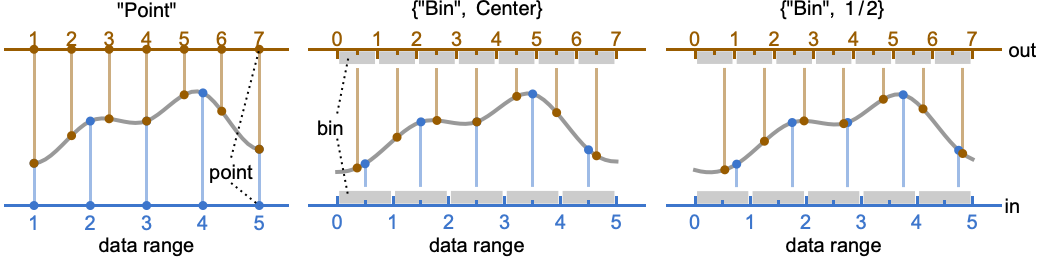
"Point" point sampling (default) "Bin" bin sampling {"Bin",alignment} bin sampling with specified alignment - For input data of length n the "Point" resampling scheme assumes a data range from 1 to n and the "Bin" scheme assumes a data range from 0 to n with the alignment indicating the sample location within each bin.
- Bin alignment alignment can be Left, Center, Right or any number between
 (Left) and 1 (Right).
 - The data range can be modified using the DataRange option.
- By default, the data is resampled on the entire data domain, ranging from 1 to
 for the "Point" scheme and from 0 to
  for the "Bin" scheme. Use the DataRange option to modify the coordinates of the data domain.
 - With a subrange {{xmin,xmax},…} specified with respect to the DataRange, only the data values in the given interval are resampled. »
- The following options can be given:
-
Antialiasing False apply antialiasing when downsampling DataRange Automatic range of the input data Padding "Fixed" padding method Resampling Automatic resampling method - For possible settings for Padding, see the reference page for ArrayPad.
Examples
open all close allBasic Examples (2)
ArrayResample[{1, 2, 3, 4, 5}, 9]ArrayResample[{1, 2, 3, 4, 5}, 3]ArrayResample[(| | | |
| - | - | - |
| 1 | 2 | 3 |
| 2 | 3 | 4 |
| 3 | 4 | 5 |), 6]//MatrixFormScope (8)
Basic Uses (4)
ArrayResample[{1, 2, 3}, 4]Precision of the input is preserved:
ArrayResample[{1.0000000000000000000, 2.0000000000000000000, 3.0000000000000000000, 4.0000000000000000000}, 6]ArrayResample[{a, b, c}, 5]Resample a subdomain of the input signal:
input = Range[100];ArrayResample[input, 20, "Point", {55, 63}]Output Dimensions (1)
Sampling Schemes (3)
By default, the "Point" sampling scheme is used:
ArrayResample[{1, 2, 3}, 7, "Point"]Use the "Bin" scheme, which uses center alignment by default:
ArrayResample[{1, 2, 3}, 6, "Bin"]Specify the alignment of the bins:
ArrayResample[{1, 2, 3}, 6, {"Bin", -1}]Generate a "Point" resampling with three times the input resolution:
input = {2, 1, 3, 4, 2, 5};
m = Length[input];
s = 3;
res1 = ArrayResample[input, Scaled[s]]
Compute the sampling positions:
pos = Range[1, m, (m - 1) / Round[s (m - 1)]]ListPlot[{Thread[{Range[m], input}], Thread[{pos, res1}]}, Joined -> {True, False}, PlotStyle -> {PointSize[.04], Automatic}, Mesh -> All]Options (5)
Antialiasing (1)
When downsampling, by default no antialiasing is happening:
data = {2, 1, 2, 1, 2, 1, 2};ArrayResample[data, Scaled[1 / 2], Padding -> "Reflected"]With antialiasing, all samples that fall in between new samples are averaged:
ArrayResample[data, Scaled[1 / 2], Padding -> "Reflected", Antialiasing -> True]DataRange (1)
DataRange specifies the domain of resampling. Subrange specification is defined with respect to this domain:
data = {0, 2, 0, 1, 4, 1, 9, 4, 4};ArrayResample[data, Scaled[2], "Point"]Resample the first half using default DataRange->{1,n}, where n is the length of data:
ArrayResample[data, Scaled[2], "Point", {1, 5}]Resample the first half of the data using a {0,1} data range:
ArrayResample[data, Scaled[2], "Point", {0, 1 / 2}, DataRange -> {0, 1}]Padding (2)
The default padding value is "Fixed":
ArrayResample[{1, 2, 3}, 9, "Bin"]ArrayResample[{1, 2, 3}, 9, "Bin", Padding -> 0]By default, the same padding is used for all dimensions:
ArrayResample[(| | | |
| - | - | - |
| 1 | 2 | 3 |
| 2 | 1 | 6 |
| 3 | 6 | 2 |), 5, Resampling -> "Cubic", Padding -> 0]//N//MatrixFormUse different paddings for different dimensions:
ArrayResample[(| | | |
| - | - | - |
| 1 | 2 | 3 |
| 2 | 1 | 6 |
| 3 | 6 | 2 |), 5, Resampling -> "Cubic", Padding -> {0, "Fixed"}]//N//MatrixFormResampling (1)
By default, "Linear" resampling is used:
ArrayResample[{1, 2, 3}, 6]Use a different resampling scheme:
ArrayResample[{1, 2, 3}, 6, Resampling -> "Nearest"]"Nearest" resampling averages the samples if the sampling position is halfway between samples:
ArrayResample[{1, 2, 3}, 5, Resampling -> "Nearest"]Use "NearestLeft" or "NearestRight" for a bias to left or right for half-integer sampling positions:
ArrayResample[{1, 2, 3}, 5, Resampling -> "NearestLeft"]Applications (1)
Reduce the size of a dataset for faster visualization:
data = Import["http://exampledata.wolfram.com/hailey.dem.gz", "Data"];(data2 = ArrayResample[N@data, Scaled[1 / 5]])//ReliefPlotAbsoluteTiming[ReliefPlot[#];][[1]]& /@ {data, data2}Properties & Relations (2)
Compare array resampling for a few different kernels:
a = {1, 3, 1, 2};
n = 25;
xpos = Array[#&, n, {1, Length[a]}];
Table[
	result = ArrayResample[a, n, Resampling -> ker];
	ListPlot[Transpose[{xpos, result}], PlotStyle -> PointSize[Medium], Epilog -> {Red, Line[Transpose[{Range[Length[a]], a}]]}, Axes -> {True, False}, PlotLabel -> ker],
	{ker, {"Linear", "Cubic", "German"}}]
Downsample can be used to downsample by an integer factor:
Downsample[Range[9], 2]ArrayResample[Range[9], Scaled[1 / 2]]Possible Issues (1)
Exact computations are performed with integer data:
input = Range[100];AbsoluteTiming[ArrayResample[input, 1000, Resampling -> "Cubic"];]Apply N to integer data for faster computation:
AbsoluteTiming[ArrayResample[N@input, 1000, Resampling -> "Cubic"];]Text
Wolfram Research (2014), ArrayResample, Wolfram Language function, https://reference.wolfram.com/language/ref/ArrayResample.html (updated 2016).
CMS
Wolfram Language. 2014. "ArrayResample." Wolfram Language & System Documentation Center. Wolfram Research. Last Modified 2016. https://reference.wolfram.com/language/ref/ArrayResample.html.
APA
Wolfram Language. (2014). ArrayResample. Wolfram Language & System Documentation Center. Retrieved from https://reference.wolfram.com/language/ref/ArrayResample.html