

CellFrame
Details
- The option is specified as the thickness of the frame in points. A value of 0 indicates no frame.
- Possible settings are:
-
dist the specification of the frame on all sides {{left,right},{bottom,top}} different specifications for the frame on each side - The space left between the frame and the cell contents is determined by CellFrameMargins. The color of the frame is determined by CellFrameColor.
- Dingbats go outside the frame.
- None, False or 0 are equivalent values that prevent the frame from drawing. True is equivalent to a value of 0.5.
- The frame can be modified interactively using the default toolbar available in Window ▶ Toolbar.
Examples
open all close allBasic Examples (2)


Scope (7)
Specification (4)
Use True or False to simply add or remove a default cell frame:
CellPrint[ExpressionCell[{1, 2, 3, 4, 5}, "Print", CellFrame -> True]]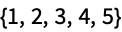
Specify a thickness for a frame in points:
CellPrint[ExpressionCell[{1, 2, 3, 4, 5}, "Print", CellFrame -> 3]]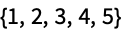
Specify different thicknesses for different edges:
CellPrint[ExpressionCell[{1, 2, 3, 4, 5}, "Print", CellFrame -> {{1, 3}, {5, 7}}]]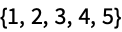
Suppress the frame on one or more sides by using a thickness of 0:
CellPrint[ExpressionCell[{1, 2, 3, 4, 5}, "Print", CellFrame -> {{0, 0}, {3, 3}}]]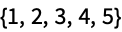
Usage (3)
Cell frames work on top-level cells such as those generated by CellPrint:
CellPrint[ExpressionCell[{a, b, c}, "Print", CellFrame -> True]]
The placement of the vertical portions of the frame are guided by CellMargins in this case:
CellPrint[ExpressionCell[{a, b, c}, "Print", CellFrame -> True, CellMargins -> {{200, 300}, {5, 5}}]]
Cell frames work on inline cells such as those created by evaluating ExpressionCell or TextCell:
ExpressionCell[{a, b, c}, CellFrame -> True]TextCell["1 2 3", CellFrame -> True]The placement of the frame around inline cells is controlled by the content size and CellFrameMargins:
ExpressionCell[1, CellFrame -> True, CellFrameMargins -> 30]Cell frames can be nested by nesting inline cells:
ExpressionCell[{1, ExpressionCell[2, CellFrame -> True], 3}, CellFrame -> True]A cell frame setting on an outer cell will not apply to an inner cell:
ExpressionCell[{1, ExpressionCell[2], 3}, CellFrame -> True]Properties & Relations (4)
Cell frame color is specified with the CellFrameColor option:
ExpressionCell[{1, 2, 3, 4, 5}, "Print", CellFrame -> True, CellFrameColor -> StandardOrange]The margins inside of a cell frame are specified with CellFrameMargins:
ExpressionCell[{1, 2, 3, 4, 5}, "Print", CellFrame -> True, CellFrameMargins -> 20]The cell frame defines the boundary for drawing a cell's background color:
ExpressionCell[{1, 2, 3, 4, 5}, "Print", CellFrame -> 3, CellFrameMargins -> {{20, 20}, {5, 5}}, Background -> StandardGreen]Specify rounded corners with CellFrameRoundingRadius:
ExpressionCell[{1, 2, 3, 4, 5}, "Print", CellFrame -> True, CellFrameRoundingRadius -> 5]Text
Wolfram Research (1996), CellFrame, Wolfram Language function, https://reference.wolfram.com/language/ref/CellFrame.html (updated 2025).
CMS
Wolfram Language. 1996. "CellFrame." Wolfram Language & System Documentation Center. Wolfram Research. Last Modified 2025. https://reference.wolfram.com/language/ref/CellFrame.html.
APA
Wolfram Language. (1996). CellFrame. Wolfram Language & System Documentation Center. Retrieved from https://reference.wolfram.com/language/ref/CellFrame.html