



CloudObject
represents a new anonymous cloud object.
CloudObject["http://…"], CloudObject["https://…"]
represents a cloud object with a given URI.
CloudObject["user:user/path"]
represents a cloud object of a given user with a given path.
CloudObject["uuid:uuid"]
represents a cloud object identified by a given UUID.
CloudObject["/abspath"]
represents a cloud object of the currently authenticated user at an absolute path.
CloudObject["relpath"]
represents a cloud object of the currently authenticated user at a relative path.
CloudObject["relpath",base]
represents a cloud object with a path relative to the base path base.
Details and Options
- CloudObject creates a reference to a cloud object identified by a URL. The cloud object does not need to exist yet.
- Absolute paths are resolved with respect to $CloudRootDirectory. Relative paths are resolved with respect to CloudDirectory.
- Cloud objects are created in the cloud defined by $CloudBase, except when using CloudObject["http://…"] or CloudObject["https://…"].
- CloudObject[CloudObject[...]] is supported and allows options to be added or changed.
- CloudObject[URL["loc"]] is also supported.
- CloudObject allows the following options:
-
AutoCopy False whether to make a copy when opened AutoRemove False whether to schedule the object for deletion CachePersistence Automatic controls the time duration for which the object is cached by a client CloudObjectNameFormat $CloudObjectNameFormat format to use for the name portion of the URL CloudObjectURLType $CloudObjectURLType base type of URL to use (obj, env, ...) EvaluationPrivileges Automatic privileges of evaluations by the object IconRules {} icons for the object in different deployments MetaInformation {} rules giving metainformation Permissions $Permissions permissions for access etc. SourceLink $SourceLink object to be linked as the source - Options[CloudObject[…],…] gives the current options of a previously created CloudObject. SetOptions can be used to reset them.
- DeleteObject[CloudObject[…]] removes a CloudObject.
- If a cloud object directory contains an object named either index.html or index.nb, it will be served when users visit the address of the directory. If both an index.html and index.nb object are present in the directory, the index.html will be used.
- Information of a CloudObject may include the following properties:
-
"UUID" UUID of the cloud object "Path" named object path or None (if anonymous) "DisplayName" display name for cloud object "OwnerCloudUserUUID" cloud user UUID for object owner "OwnerCloudUserID" cloud user ID for object owner "MIMEType" application MIME type "FileType" file type "FileByteCount" file size in bytes "FileHashMD5" MD5 hash "Created" creation date "LastAccessed" access date "LastModified" modification date "Permissions" permission rules "Active" whether the object is active
Examples
open all close allBasic Examples (6)
Create a reference to a new, unnamed cloud object:
CloudObject[]Refer to a cloud object by its full URL:
CloudObject["https://www.wolframcloud.com/obj/documentation/daily-summary.nb"]Refer to a named cloud object with an absolute path:
CloudObject["/daily-summary.nb"]Refer to a named cloud object with a relative path:
CloudObject["daily-summary.nb"]Refer to a named cloud object owned by a specific user:
CloudObject["user:example-user@wolfram.com/file"]Refer to a named object inside a base directory:
CloudObject["daily.nb", "reports/summaries"]Scope (4)
Refer to a named cloud object in a subdirectory of the user's directory in the cloud:
CloudObject["mydir/myfile"]Use a URL to construct a CloudObject:
CloudObject[URL["https://www.wolframcloud.com/obj/documentation/daily-summary.nb"]]Add a persistent option to the CloudObject reference:
CloudObject["myfile", Permissions -> "Public"]Create a public cloud object, specifying the permissions in the CloudObject expression:
obj = CloudPut[42, CloudObject["myfile", Permissions -> "Public"]]The public permissions are in effect:
Options[obj, Permissions]Add a persistent option with one setting to the CloudObject reference:
obj = CloudObject[Permissions -> "Authenticated"]Nest the CloudObject inside another to change the permission setting:
CloudObject[obj, Permissions -> "Public"]Options (13)
AppearanceElements (1)
When connected to a Wolfram Enterprise Private Cloud, deploy a notebook with no appearance elements to show just the notebook content:
CloudDeploy[Notebook[{Cell["My Notebook", "Title"], Cell["Hello, world!", "Text"]}], CloudObject["hello.nb", "https://www.wolfram-epc.example.com", AppearanceElements -> None]]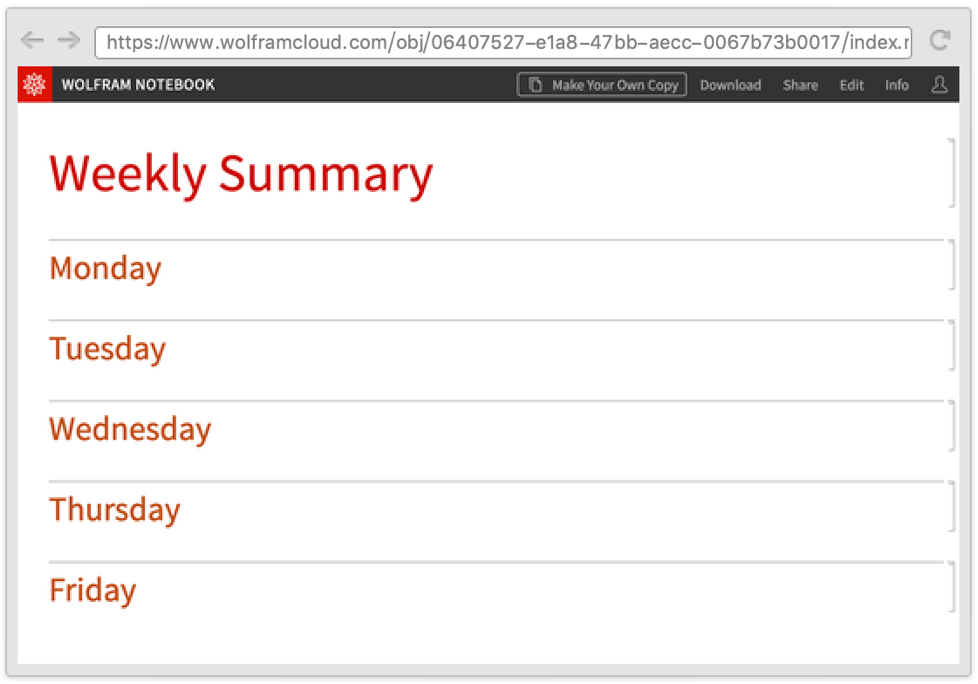
AutoCopy (2)
Deploy a public notebook to a named cloud object with the AutoCopy option set to True:
CloudDeploy[Notebook[{Cell["Hello, world!", "Text"]}], CloudObject["hello.nb", AutoCopy -> True]]Confirm the AutoCopy setting:
Options[CloudObject["hello.nb"], AutoCopy]Use CloudPublish to automatically set the option to True:
exercises = CloudPublish[Style["Today's Exercises", "Title"]]Options[exercises, AutoCopy]AutoRemove (1)
Save a computed value in a temporary object:
co = CloudPut[47!, CloudObject[AutoRemove -> True]]Confirm the AutoRemove setting:
Options[co, AutoRemove]CachePersistence (1)
Export a plot as an image that will be cached in the browser for a day:
img = CloudExport[Plot3D[Sin[x + y ^ 2], {x, -3, 3}, {y, -2, 2}], "PNG", CloudObject[CachePersistence -> Quantity[1, "Days"]]]Confirm the cache setting in the server response headers:
KeyTake[URLRead[img, "Headers"], "cache-control"]CloudObjectNameFormat (1)
Generate a reference to an object using the current $CloudUserUUID:
CloudObject["notebook", CloudObjectNameFormat -> "CloudUserUUID"]Generate a reference to an object using the current $CloudUserID:
CloudObject["notebook", CloudObjectNameFormat -> "CloudUserID"]CloudObjectURLType (1)
EvaluationPrivileges (1)
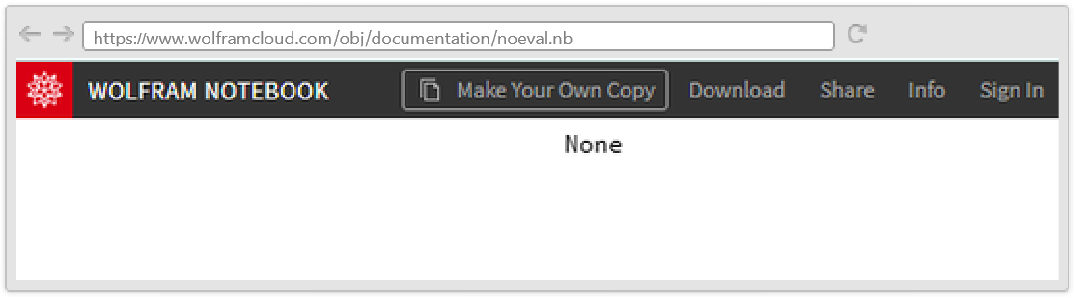
Deploy a notebook that attempts to show the root directory cloud object but with no evaluation privileges:
CloudDeploy[Dynamic[$CloudRootDirectory], CloudObject["noeval.nb", EvaluationPrivileges -> None]]The root directory is None because evaluation privileges setting has disabled access to the account's cloud objects:
IconRules (1)
MetaInformation (1)
Add metadata to an object when exporting it to the cloud:
img = [image];
CloudExport[img, "JPG", CloudObject["images/DragonRoll.jpg", MetaInformation -> {"alt" -> CommonName[ImageIdentify[img]]}]]Options[CloudObject["images/DragonRoll.jpg"], MetaInformation]Permissions (1)
Copy a file to the cloud and make it public:
obj = CopyFile[$InstallationDirectory <> "/Documentation/English/System/ExampleData/glasses.png", CloudObject["images/glasses.png", Permissions -> "Public"]]Confirm that all users can read the object:
Options[obj, Permissions]SharingList (1)
Share an object with another user:
obj = CloudShare[CloudObject["hello.nb"], "cloudtest@wolfram.com"]The user is added to the SharingList option of the CloudObject:
Options[obj, SharingList]SourceLink (1)
Set a reference to the source of an object:
obj = CloudDeploy[Column[{Style["Chernobyl Reactors over Time", "Title"], [image]}], CloudObject["ReactorPlot.nb", SourceLink -> CloudObject["PlotGeneration.nb"]]]Confirm the SourceLink setting:
Options[obj, SourceLink]Applications (2)
Save a computed value in a cloud object:
CloudPut[2 ^ 128, CloudObject["answer"]]Read an expression stored in a cloud object:
CloudGet[CloudObject["answer"]]DeleteObject[CloudObject["answer"]]Create a reference that will be a directory and a reference to an "index.nb" object inside the directory:
directory  = CloudObject["weekend"]
index = CloudObject["index.nb", directory]
Create the directory and deploy a notebook to the index location:
CreateDirectory[directory]
nb = Notebook[{Cell["Weekend Summary", "Title"], Cell["Saturday", "Section"], Cell["Sunday", "Section"]}];
CloudDeploy[nb, index]
When visiting the directory URL, the contents of "index.nb" will be shown.
Properties & Relations (4)
Relative paths are resolved with respect to CloudDirectory:
SetCloudDirectory["mydir"]The cloud object is created under the "mydir" directory:
CloudObject["myfile"]Cloud objects with an absolute path are created under $CloudRootDirectory:
CloudObject["/myfile"]A cloud object with an empty absolute path is the same as $CloudRootDirectory:
CloudObject["/"] === $CloudRootDirectoryA cloud object can be constructed from a simple file name and a directory object with CloudObject or with FileNameJoin:
{CloudObject["report.nb", "project"], FileNameJoin[{CloudObject["project"], "report.nb"}]}LocalObject is used for local persistent storage:
Put[10!, LocalObject[]]Possible Issues (3)
Applying CloudObject itself does not create an actual object in the cloud; it only refers to an object. So accessing the URL immediately will return a Not Found page:
obj = CloudObject[]URLRead[obj, "StatusCode"]Only by writing content to the cloud object is it actually created in the cloud:
CloudPut[10!, obj]Get[obj]Relative paths are related to the current CloudDirectory[], so if SetCloudDirectory is used, care should be taken to restore it after use if relative paths are used everywhere.
Refer to an object in the home directory:
CloudObject["report.nb"]Change to a different working directory:
SetCloudDirectory["project"]Now the same reference from above produces a different URL:
CloudObject["report.nb"]The original object can be referred to with an absolute path instead, which does not depend on CloudDirectory[]:
CloudObject["/report.nb"]The original object can also be constructed with a relative path and a base directory, specified either with a path or a cloud object:
{CloudObject["report.nb", "/"], CloudObject["report.nb", $CloudRootDirectory]}Reset the cloud directory to its default:
SetCloudDirectory[]Now the original relative reference works as it did:
CloudObject["report.nb"]The empty string is treated as an empty relative path and will resolve to the same as CloudDirectory[]. Change the current cloud directory:
SetCloudDirectory["/Base"]Compare a cloud object with an empty relative path to the current cloud directory:
{CloudObject[""], CloudDirectory[]}Change the current cloud directory back to its default:
SetCloudDirectory[]
 Fast Introduction for Programmers: Cloud Deployment
 An Elementary Introduction to the Wolfram Language
Text
Wolfram Research (2014), CloudObject, Wolfram Language function, https://reference.wolfram.com/language/ref/CloudObject.html (updated 2020).
CMS
Wolfram Language. 2014. "CloudObject." Wolfram Language & System Documentation Center. Wolfram Research. Last Modified 2020. https://reference.wolfram.com/language/ref/CloudObject.html.
APA
Wolfram Language. (2014). CloudObject. Wolfram Language & System Documentation Center. Retrieved from https://reference.wolfram.com/language/ref/CloudObject.html