


DataConnectionObject[assoc]
represents data given by the details in assoc.
Details and Options
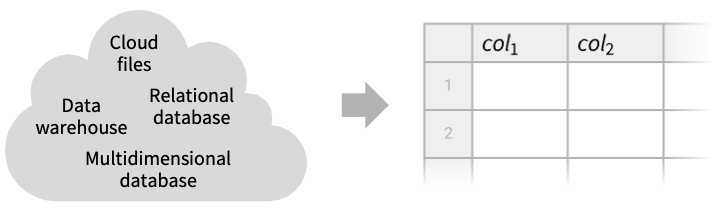
- DataConnectionObject uses a data connector to retrieve data from a remote storage system handling authentication and data retrieval.
- Use Import to retrieve data from the linked resource.
- DataConnectionObject supports filesystem connections, such as "AmazonS3" and "Dropbox", and relational database connections, such as "PostgreSQL" and "SQLite".
- For the complete list of supported connections, see the guide "Listing of Supported Connections".
- DataConnectionObject creates a reference to a data source. The source does not need to exist yet.
- General keys typically found in assoc are:
-
"ConnectionName" name of the connection ("AmazonS3", "Dropbox", …) "Location" connection-specific path or location details "Redownload" whether to redownload cache files - The following option is supported:
-
Authentication Automatic the authentication credentials or method - Possible values for Authentication are:
-
Automatic attempt to use saved credentials or give a dialog "Dialog" give authentication parameters via a dialog SystemCredential["key"] retrieve authentication information from secure storage SystemCredentialData[…] stored authentication data SecuredAuthenticationKey[…] give an OAuth-secured authentication key assoc provide explicit credentials - Use the form Authentication :> SystemCredential["key"] to delay evaluating securely stored credentials.
- DataConnectionObject[…]["Properties"] returns the list of all available properties of the connection.
- DataConnectionObject[…][prop] returns the property prop of the connection.
- Supported properties typically include:
-
"ConnectionName" name of the connection "Location" specified path or query "Redownload" whether the connection always redownloads - When data is retrieved from a connection, it is usually cached in $CacheBaseDirectory.
Examples
open all close allBasic Examples (4)
Create a DataConnectionObject to data located on Azure Blob Storage:
DataConnectionObject[
<|"ConnectionName" -> "AzureBlobStorage", "Account" -> "wolframdataconnection", "Container" -> "samples", "Location" -> "sample.parquet"|>]FileFormat[DataConnectionObject[Association["ConnectionName" -> "AzureBlobStorage",
"Account" -> "wolframdataconnection", "Container" -> "samples", "Location" -> "sample.parquet"],
Association["UUID" -> "0f0b9fca-0ecd-415e-99c1-8853135d3643"]]]Import tabular data from a DataConnectionObject:
Import[DataConnectionObject[Association["ConnectionName" -> "AzureBlobStorage",
  "Account" -> "wolframdataconnection", "Container" -> "samples", "Location" -> "sample.parquet"],
 Association["UUID" -> "0f0b9fca-0ecd-415e-99c1-8853135d3643"]]]
Import an image from a DataConnectionObject:
Import[DataConnectionObject[Association["ConnectionName" -> "AzureBlobStorage",
  "Account" -> "wolframdataconnection", "Container" -> "samples", "Location" -> "coneflower.jpg"],
 Association["UUID" -> "d4fa458d-cfee-4fa7-8b97-2a8f70a7c8dc"]]]
Scope (3)
Basic Operations (3)
Import tabular data from a DataConnectionObject:
Import[DataConnectionObject[Association["ConnectionName" -> "AzureBlobStorage",
  "Account" -> "dataconnection", "Container" -> "samples", "Location" -> "sample.parquet"],
Association["UUID" -> "6a9b8172-5a13-4660-b915-89254a2838fe"]]]FileFormat[DataConnectionObject[Association["ConnectionName" -> "AzureBlobStorage",
"Account" -> "dataconnection", "Container" -> "samples", "Location" -> "sample.parquet"],
Association["UUID" -> "6a9b8172-5a13-4660-b915-89254a2838fe"]]]By default, data is cached in $CacheBaseDirectory the first time it is retrieved:
Import@DataConnectionObject[
	<|"ConnectionName" -> "AmazonS3", "Region" -> "us-east-2", "Bucket" -> "wolframdataconnection", "Location" -> "samples/sample.parquet"|>]
Use "Redownload" True to refresh the cached file:
Import@DataConnectionObject[
	<|"ConnectionName" -> "AmazonS3", "Region" -> "us-east-2", "Bucket" -> "wolframdataconnection", "Location" -> "samples/sample.parquet", "Redownload" -> True|>]
Options (5)
Authentication (5)
By default, give a dialog or login page:
Import@DataConnectionObject[
	<|"ConnectionName" -> "AzureBlobStorage", "Account" -> "wolframdataconnection", "Container" -> "test-private", "Location" -> "50states.txt"|>]//Short
Show a dialog to give credentials or override saved credentials:
Import@DataConnectionObject[
	<|"ConnectionName" -> "AzureBlobStorage", "Account" -> "wolframdataconnection", "Container" -> "test-private", "Location" -> "50states.txt"|>, Authentication -> "Dialog"]//Short
Give explicit credentials as a SystemCredentialData object:
Import@DataConnectionObject[
	<|"ConnectionName" -> "AzureBlobStorage", "Account" -> "wolframdataconnection", "Container" -> "test-private", "Location" -> "50states.txt"|>, Authentication -> SystemCredentialData[<|"SASToken" -> "token"|>, "SASToken"]]//Short
Use credentials stored in SystemCredential:
SystemCredential["MYAZURETOKEN"] = SystemCredentialData[<|"SASToken" -> "token"|>, "SASToken"];Import@DataConnectionObject[<|"ConnectionName" -> "AzureBlobStorage", "Account" -> "wolframdataconnection", "Container" -> "test-private", "Location" -> "50states.txt"|>, Authentication :> SystemCredential["MYAZURETOKEN"]]//ShortGive explicit credentials as an association:
Import@DataConnectionObject[
	<|"ConnectionName" -> "AmazonS3", "Region" -> "us-east-2", "Bucket" -> "wolframdataconnection", "Location" -> "samples/sample.parquet"|>, Authentication -> <|"AccountKeyID" -> "AccountName", "AccountSecret" -> "Password"|>]
Applications (1)
Analyze a Remote Dataset (1)
Retrieve data from Azure Blob Storage:
tab = Import@DataConnectionObject[Association["ConnectionName" -> "AzureBlobStorage",
  "Account" -> "wolframdataconnection", "Container" -> "samples", "Location" -> "sample.parquet"],
 Association["UUID" -> "0f0b9fca-0ecd-415e-99c1-8853135d3643"]]
Calculate the mean of the column "numbers" for each expression type:
means = AggregateRows[tab, "average" -> (Mean[#numbers]&), "expr_types" -> (Head[#expressions]&)]Generate a pie chart with the average values of "numbers" for each expression type:
PieChart[means -> "average", ChartLabels -> Normal[...]]Text
Wolfram Research (2025), DataConnectionObject, Wolfram Language function, https://reference.wolfram.com/language/ref/DataConnectionObject.html (updated 2026).
CMS
Wolfram Language. 2025. "DataConnectionObject." Wolfram Language & System Documentation Center. Wolfram Research. Last Modified 2026. https://reference.wolfram.com/language/ref/DataConnectionObject.html.
APA
Wolfram Language. (2025). DataConnectionObject. Wolfram Language & System Documentation Center. Retrieved from https://reference.wolfram.com/language/ref/DataConnectionObject.html