

SystemCredential
SystemCredential["keyname"]
gives the expression stored under "keyname" in secure storage.
Details
- Expressions can be stored with SystemCredential["keyname"]=expr.
- Expressions that can be stored in SystemCredential include:
-
"string" secret string such as password SystemCredentialData general-purpose key-value pairs SecuredAuthenticationKey credentials for an external service - Expressions stored under "keyname" can be removed with Unset[SystemCredential["keyname"]].
- SystemCredential uses the operating system's keychain, if possible. If no secure storage is available, it stores its secrets in an encrypted local file.
- Under Windows and macOS, the data is by default stored in the default keychain provided.
- Under Linux, one of the supported wallet systems can be used.
Examples
open all close allBasic Examples (3)
Store a secret string under the key name "mykey":
SystemCredential["mykey"] = "123"Read the string from secure storage:
SystemCredential["mykey"]SystemCredential["mykey"]=.Securely store an authentication key:
SystemCredential["MyAuthKey"] = SecuredAuthenticationKey[Association["Name" -> "MyAuthKey", "OAuthType" -> "AuthorizationCode",
  "OAuthVersion" -> "2.0", "ClientID" -> "myID", "ClientSecret" -> "mySecret",
  "AccessTokenURL" -> "https://mytestexampleurl.com/oauth/access_token",
  "UserAuthorizationURL" -> "https://www.mytestexampleurl.com/api/v1/authorize",
  "VerifierInputFunction" -> "WolframConnectorChannel", "TransmissionMethod" -> "Headers",
  "RedirectURI" -> Automatic, "UUID" -> "71fa7a3a-eb96-4881-b230-17f0d24a710c"]]
Securely store a record of key-value pairs, with the "Password" field being encrypted:
SystemCredential["example.com"] = SystemCredentialData[<|
	"Username" -> "myname",
	"Email" -> "user@example.com",
	"Password" -> "secret value"
	|>, "Password"]
Retrieve the stored information:
SystemCredential["example.com"]Applications (1)
Create a SecuredAuthenticationKey with credentials from an external service, the "AuthorizationCode" OAuth 2.0 workflow:
mykey = SecuredAuthenticationKey[<|"Name" -> "MyAuthKey", "OAuthType" -> "AuthorizationCode", "OAuthVersion" -> "2.0", "ClientID" -> "myID", "ClientSecret" -> "mySecret", "AccessTokenURL" -> "https://mytestexampleurl.com/oauth/access_token", "UserAuthorizationURL" -> "https://www.mytestexampleurl.com/api/v1/authorize", "RedirectURI" -> "https://www.mytestexampleurl.com/api/v1/landing", "VerifierInputFunction" -> "WolframConnectorChannel"|>]Store the key in secure storage:
SystemCredential["mytestexampleurl.com"] = mykeyUse the stored key to send signed requests to the service:
URLRead[HTTPRequest["https://mytestexampleurl.com/api"], Authentication -> SystemCredential["mytestexampleurl.com"]]Properties & Relations (3)
List all names of securely stored data:
SystemCredentialKeys[All]Remove stored data for a given key name:
Unset[SystemCredential["abc"]]Unset @* SystemCredential /@ SystemCredentialKeys[All];Use SystemCredentialKey"keyname" to securely store authentication dialog fields between sessions:
AuthenticationDialog[{"Public key", "Private key" -> "12345" -> "Masked"}, SystemCredentialKey -> "Example1"]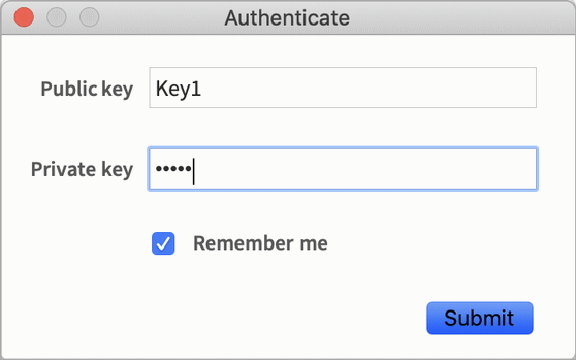
The data is remembered in secure storage under the given name:
SystemCredential["Example1"]Possible Issues (1)
Numbers are not accepted by SystemCredential:
SystemCredential["Example2"] = 123
SystemCredential[a] = "123"
Text
Wolfram Research (2020), SystemCredential, Wolfram Language function, https://reference.wolfram.com/language/ref/SystemCredential.html.
CMS
Wolfram Language. 2020. "SystemCredential." Wolfram Language & System Documentation Center. Wolfram Research. https://reference.wolfram.com/language/ref/SystemCredential.html.
APA
Wolfram Language. (2020). SystemCredential. Wolfram Language & System Documentation Center. Retrieved from https://reference.wolfram.com/language/ref/SystemCredential.html