

DateDifference
DateDifference[date1,date2]
gives the number of days from date1 to date2.
DateDifference[date1,date2,"unit"]
gives the difference between date1 and date2 in the specified unit.
DateDifference[date1,date2,{"unit1","unit2",…}]
gives the difference as a list with elements corresponding to the successive "uniti".
Details and Options
- DateDifference computes the amount of time between two given dates, expressing the result either as a physical duration or as a number of calendar steps.
- DateDifference returns a Quantity object.
- Dates can be specified in the following forms:
-
DateObject[…] date object {y,m,d} year, month, day {y,m} the first day of the specified month {y} January 1 of the year y "string" date as a string ("Jan. 1, 2022") {y,m,d,h,m,s} precise time time absolute time specification - Possible units are "Year", "Quarter", "Month", "Week", "Day", "Hour", "Minute", "Second".
- {y,m,d} is taken to be equivalent to {y,m,d,0,0,0} etc.
- DateDifference takes the following option:
-
DayCountConvention "ActualActual" counting convention by which the difference is computed Method Automatic date arithmetic method to use - For added time steps with variable duration (e.g. "Month"), date arithmetic can either convert the steps into a physical duration (continuous arithmetic) or treat them all as discrete calendar steps (discrete arithmetic).
- The option value Method"Continuous" implements continuous arithmetic. Discrete arithmetic is implemented with Methodrolling, where possible rolling methods are "RollForward", "RollBackward" and "RollOver", with the default being "RollBackward".
- For discrete arithmetic, adding, for example, a month may result in a date that does not exist (e.g. February 30). In such cases, there are three possible options for how that date should be resolved:
-
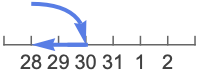
"RollBackward" roll back to the last existing date (Feb 28) 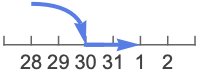
"RollForward" roll forward to the next existing date (Mar 1) 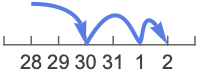
"RollOver" increment from the next existing date (Mar …) - DateDifference enumerated in days follows the day count convention, regardless of the magnitude of the difference.
- DateDifference[date2] gives the fractional number of days from the current time until date2.
Examples
open all close allBasic Examples (4)
Give the number of days between January 1 and July 4:
DateDifference[DateObject[{2022, 1, 1}, "Day"], DateObject[{2022, 7, 4}, "Day"]]Use dates specified in {y,m,d} form:
DateDifference[{2022, 8, 29}, {2023, 1, 1}]Find a date difference in units of weeks:
DateDifference[DateObject[{2022, 1, 1}, "Day"], DateObject[{2022, 7, 4}, "Day"], "Week"]Find a date difference in units of days, hours and minutes:
DateDifference[DateObject[{2022, 1, 1}, "Day"], DateObject[{2022, 7, 4}, "Day"], {"Day", "Hour", "Minute"}]Scope (8)
If the second date is before the first, the date difference is negative:
DateDifference[DateObject[{2022, 7, 4}, "Day"], DateObject[{2022, 1, 1}, "Day"]]If only one date is given, then the difference from the current date will be returned:
DateDifference[Yesterday]Date Formats (3)
Give dates in any format supported by DateString:
DateDifference["May 9, 2021", "Nov 4, 2021"]Different date specifications can be mixed:
DateDifference["May 9, 2021", DateObject[{2021, 11, 4}, "Day"]]DateDifference can use times given in {y,m,d,h,m,s} format:
DateDifference[{2022, 1, 1, 5, 16, 17}, {2022, 1, 5, 7, 8, 11}]Units (3)
Find the number of hours between two dates:
DateDifference[DateObject[{2022, 1, 1}, "Day"], DateObject[{2022, 6, 1}, "Day"], "Hour"]Find the number of years between two dates:
DateDifference[DateObject[{1936, 8, 14}, "Day"], DateObject[{2000, 12, 1}, "Day"], "Year"]Find the difference between two dates in months and days:
DateDifference[DateObject[{2023, 8, 14}, "Day"], DateObject[{2024, 12, 1}, "Day"], {"Month", "Day"}]Options (6)
DayCountConvention (2)
Day count conventions differ with respect to the count applied to the last days of the month:
Table[DateDifference[DateObject[{2022, 1, 31}, "Day"], DateObject[{2023, 1, 31}, "Day"], DayCountConvention -> i] + DateDifference[DateObject[{2023, 1, 31}, "Day"], DateObject[{2023, 2, 28}, "Day"], DayCountConvention -> i], {i, {"ThirtyEPlus360", "Thirty360", "Thirty360US"}}]Compute the difference in years, subject to a day count convention:
DateDifference[DateObject[{2022, 1, 31}, "Day"], DateObject[{2023, 3, 31}, "Day"], "Year", DayCountConvention -> "Thirty360"]CalendarType (2)
Compute a date difference in the Jewish calendar:
DateDifference[{5373, 4, 3}, {5374, 4, 3}, CalendarType -> "Jewish"]Islamic years are shorter than Gregorian years:
With[{islam = First[CalendarConvert[Today, "Islamic"]]}, DateDifference[islam, islam + {4, 0, 0}, CalendarType -> "Islamic"]]Method (2)
By default, March 31 is three months prior to June 30:
DateDifference[DateObject[{2022, 3, 31}, "Day"], DateObject[{2022, 6, 30}, "Day"], {"Month", "Day"}]Using Method"RollForward", there are two months and 30 days separating the dates:
DateDifference[DateObject[{2022, 3, 31}, "Day"], DateObject[{2022, 6, 30}, "Day"], {"Month", "Day"}, Method -> "RollForward"]Compare the results of different arithmetic methods when comparing two dates:
DateDifference[DateObject[{2020, 1, 30}], DateObject[{2023, 3, 1}], {"Month", "Day"}, Method -> #]& /@ {"Continuous", "RollForward", "RollBackward", "RollOver"}Applications (2)
Find the number of years, months, and days since the beginning of the year 2000:
DateDifference[DateObject[{2000}, "Year", "Gregorian", -6.], DateObject[], {"Month", "Day", "Year"}]There are always 184 days between March 21 and September 21:
DateDifference[{2022, 3, 21}, {2022, 9, 21}]There are 181 days between September 21 and March 21 of the following year, if it is not a leap year:
DateDifference[{2022, 9, 21}, {2023, 3, 21}]LeapYearQ[{2022, 3, 21}]There are 182 days if the following year is a leap year:
DateDifference[{2023, 9, 21}, {2024, 3, 21}]LeapYearQ[{2020, 3, 21}]Properties & Relations (1)
DatePlus adds time units to dates, while DateDifference computes units between dates:
DateDifference[DateObject[{2022, 1}, "Month"], DateObject[{2022, 3}, "Month"], "Month"]DatePlus[DateObject[{2022, 1}, "Month"], %]DatePlus[DateObject[{2022, 1}, "Month"], {2, "Month"}]DateDifference[DateObject[{2022, 1}, "Month"], %, "Month"]Possible Issues (2)
Date strings can be ambiguous:
DateDifference["2/4/99", "Feb. 23, 1999"]
Use DateObject to disambiguate between different interpretations:
DateDifference[DateObject[{"2/4/99", {"Day", "Month", "YearShort"}}], "Feb. 23, 1999"]In previous Wolfram Language releases, DateDifference returned purely numerical results. This legacy behavior can be enabled with SetSystemOptions:
DateDifference[Yesterday, Tomorrow]SetSystemOptions["DataOptions" -> "ReturnQuantities" -> False];DateDifference[Yesterday, Tomorrow]Quantity results can be re-enabled by setting the same system option value to True:
SetSystemOptions["DataOptions" -> "ReturnQuantities" -> True];DateDifference[Yesterday, Tomorrow]Text
Wolfram Research (2007), DateDifference, Wolfram Language function, https://reference.wolfram.com/language/ref/DateDifference.html (updated 2022).
CMS
Wolfram Language. 2007. "DateDifference." Wolfram Language & System Documentation Center. Wolfram Research. Last Modified 2022. https://reference.wolfram.com/language/ref/DateDifference.html.
APA
Wolfram Language. (2007). DateDifference. Wolfram Language & System Documentation Center. Retrieved from https://reference.wolfram.com/language/ref/DateDifference.html