

DiscreteVariables
is an option for NDSolve and other functions that specifies variables that only change at discrete times in a temporal integration.
Details
- DiscreteVariables->{v1, v2,…} specifies that v1, v2, … should be treated as variables that only change at discrete times.
- The value of a discrete variable v can be changed through WhenEvent[event,v->val] or WhenEvent[event,v->"DiscontinuitySignature"].
- The discrete variable solution v can be returned by using NDSolve[eqn,{v,…},…].
- DiscreteVariables->{vspec1,vspec2,…} can be used to specify the ranges for discrete variables.
- Possible forms for vspeci are:
-
v v has range Reals or Complexes Element[v,Reals] v has range Reals Element[v,Complexes] v has range Complexes Element[v,Integers] v has range Integers Element[v,{n1,…}] v has discrete range {n1,…} {v,vmin,vmax} v has range 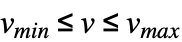
vspeciactioni perform actioni when vspeci is no longer satisfied - Derivatives with respect to time of discrete variables are zero almost everywhere and should not appear in the equations.
- For partial differential equations, discrete variables can depend only on the temporal independent variable in a method of lines semi-discretization.
Examples
open all close allBasic Examples (2)
Solve for  with
with  , a discrete variable that changes at regular intervals in time:
sol = NDSolve[{y'[t] == a[t], WhenEvent[Mod[t, 1], a[t] -> y[t]], y[0] == 1, a[0] == 1}, {y, a}, {t, 0, 4}, DiscreteVariables -> {a}]Plot[Evaluate[{y[t], a[t]} /. sol], {t, 0, 4}]Solve for  with
with  , a discrete variable that changes whenever
  crosses 0:
sol = NDSolve[{y''[t] + a[t]y[t] == 0, WhenEvent[y[t], a[t] -> a[t] + 1], y[0] == 1, y'[0] == 0, a[0] == 1}, {y, a}, {t, 0, 20}, DiscreteVariables -> a]Plot[y[t] /. sol, {t, 0, 20}]Plot[a[t] /. sol, {t, 0, 20}]Scope (7)
Increment a discrete variable at regular time intervals:
sol = NDSolve[{y'[t] == a[t], y[0] == 0, a[0] == 0, WhenEvent[Mod[t, 1], a[t] -> a[t] + 1]}, {y, a}, {t, 0, 4}, DiscreteVariables -> a];Plot[Evaluate[{y[t], a[t]} /. sol], {t, 0, 4}]Increment a discrete variable when the solution crosses 0:
sol = NDSolve[{y''[t] == -y[t], y[0] == y'[0] == 1, a[0] == 0, WhenEvent[y[t] == 0, a[t] -> a[t] + 1]}, {y, a}, {t, 0, 10}, DiscreteVariables -> a];Plot[Evaluate[{y[t], a[t]} /. sol], {t, 0, 10}]Modify multiple discrete variables simultaneously when the solution crosses 0:
eqns = {y''[t] + .5 b[t]y'[t] == -a[t]y[t], a[0] == y[0] == y'[0] == 1, b[0] == 2};sol1 = NDSolve[{eqns, WhenEvent[y[t] == 0, {a[t], b[t]} -> {a[t] + 1, b[t] + a[t]}]}, {y, a, b}, {t, 0, 8}, DiscreteVariables -> {a, b}];Plot[Evaluate[{y[t], a[t], b[t]} /. sol1], {t, 0, 8}]This time, enact the change in  before modifying
  :
:
sol2 = NDSolve[{eqns, WhenEvent[y[t] == 0, {a[t] -> a[t] + 1, b[t] -> b[t] + a[t]}]}, {y, a, b}, {t, 0, 8}, DiscreteVariables -> {a, b}];Plot[Evaluate[{y[t], a[t], b[t]} /. sol2], {t, 0, 10}]Stop the integration when a discrete variable goes out of the discrete range {1,2,3}:
eqns = {x''[t] == -x[t], x[0] == 1, x'[0] == 0, a[0] == 1, WhenEvent[x[t], a[t] -> a[t] + 1]};NDSolve[eqns, x[t], {t, 0, 10}, DiscreteVariables -> {a[t]∈{1, 2, 3}}]
Stop when the discrete variable goes out of the continuous range  :
:
NDSolve[eqns, x[t], {t, 0, 10}, DiscreteVariables -> {{a[t], 0, 3}}]
Print a message when out of range, but continue integrating the equation:
NDSolve[eqns, x, {t, 0, 10}, DiscreteVariables -> {a[t]∈{1, 3, 5, 7} :> Print[{a[t], t}]}]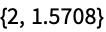
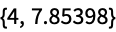
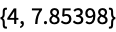
The initial condition is also out of range:
NDSolve[eqns, x, {t, 0, 10}, DiscreteVariables -> {a[t]∈{2, 3} :> Print[{a[t], t}]}]
Discrete variables can take on non-numerical values:
NDSolve[{y'[t] == Switch[a[t], up, 1, down, -1], y[0] == 0, a[0] == up, WhenEvent[y[t] ^ 2 - 1 == 0, a[t] -> Switch[a[t], up, down, down, up]]}, y, {t, 0, 10}, DiscreteVariables -> {a[t]∈{up, down}}];Plot[y[t] /. %, {t, 0, 10}]Allow sliding mode solutions by using the action "DiscontinuitySignature":
sol = NDSolve[{y'[t] == -a[t], y[0] == -1, a[0] == -1, WhenEvent[y[t], a[t] -> "DiscontinuitySignature"]}, {y, a}, {t, 0, 5}, DiscreteVariables -> {a[t]∈{-1, 0, 1}}];Plot the vector field and solution:
vf = VectorPlot[{1, -Sign[y]}, {x, 0, 5}, {y, -1, 1}, VectorColorFunction -> None, VectorStyle -> {Gray, Arrowheads[.04]}, VectorPoints -> 10, FrameLabel -> {t, y}];Show[vf, Plot[y[t] /. sol, {t, 0, 5}, PlotRange -> {-1, 1}, PlotStyle -> {Red}]]The value of the discrete variable  is 0 when the solution is in sliding mode:
Plot[a[t] /. sol, {t, 0, 5}]Set the discontinuity state variable  when
when  reaches a sliding discontinuity curve
  :
:
c[t_] = Sin[t];sol = NDSolve[{Derivative[1][x][t] == 1, Derivative[1][y][t] == -v[t], WhenEvent[y[t] - c[t], v[t] -> "DiscontinuitySignature"], x[0] == 0, y[0] == .5, v[0] == 1}, {x, y, v}, {t, 0, 6}, DiscreteVariables -> {v∈{-1, 0, 1}}];curve = Plot[c[x], {x, 0, 2}, PlotStyle -> Red];Show[curve, ParametricPlot[{{x[t], y[t]}} /. sol, {t, 0, 2}]]Applications (5)
Switch between two right sides of a differential equation using a discrete variable:
rhs[t_, x_, 1] = -x;
rhs[t_, x_, 2] = 1;sol = NDSolve[{x'[t] == rhs[t, x[t], a[t]], x[0] == 1, a[0] == 1, WhenEvent[x[t] - .1, a[t] -> 2], WhenEvent[x[t] - 2, a[t] -> 1]}, {x, a}, {t, 0, 15}, DiscreteVariables -> {a[t]∈{1, 2}}];Plot[x[t] /. sol, {t, 0, 10}]Set up a differential equation that switches between multiple right sides:
Do[rhs[t_, x_, i] = t RandomReal[{-.1, .1}] + x RandomReal[{-1, 1}] + RandomReal[{-.1, .1}], {i, 11}]NDSolve[{x'[t] == rhs[t, x[t], a[t]], x[0] == 0, a[0] == 1, WhenEvent[Mod[t, 1], a[t] -> a[t] + 1]}, x, {t, 0, 10}, DiscreteVariables -> {a[t]∈Range[11]}];Plot[x[t] /. %, {t, 0, 10}]Simulate a ball bouncing down steps:
c = .75;
xsol = NDSolve[{y''[t] == -9.8, y[0] == 13.5, y'[0] == 5, a[0] == 13, WhenEvent[y[t] - a[t] == 0, y'[t] -> -c y'[t]], WhenEvent[Mod[t, 1], a[t] -> a[t] - 1]}, {y, a}, {t, 0, 8}, DiscreteVariables -> {a}] ;Plot[Evaluate[{y[t], a[t]} /. xsol], {t, 0, 8}, Filling -> {2 -> 0}]Plot the ball's kinetic, potential, and total energy:
kin[v_] := .5 v ^ 2;
pot[y_] := 9.8y;
energy[y_, v_] := kin[v] + pot[y];Plot[Evaluate[{kin[y'[t]], pot[y[t]], energy[y[t], y'[t]]} /. xsol], {t, 0, 8}]Simulate the system 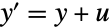 stabilized with a discrete-time controller
  :
:
τ = 1.0;
sol = NDSolve[{y'[t] == y[t] + u[t], y[0] == 1, u[0] == 0, WhenEvent[Mod[t, τ], u[t] -> -2y[t]]}, {y, u}, {t, 0, 20}, DiscreteVariables -> u];Plot[Evaluate[{u[t], y[t]} /. sol], {t, 0, 10}, PlotRange -> {-6, 6}]Change the wave speed  at
at 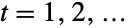 in a wave equation:
sol = NDSolve[{Subscript[∂, t, t]u[t, x] == a[t]Subscript[∂, x, x]u[t, x], u[0, x] == E^-x^2, u^(1, 0)[0, x] == 0, u[t, -10] == u[t, 10], a[0] == 1, WhenEvent[Mod[t, 1], a[t] -> Sqrt[t]]}, u, {t, 0, 40}, {x, -10, 10}, DiscreteVariables -> {a[t]}];DensityPlot[Evaluate[First[u[t, x] /. sol]], {t, 0, 40}, {x, -10, 10}, PlotPoints -> 50]Properties & Relations (1)
NDSolve automatically handles discontinuous functions like Sign using discrete variables:
sol1 = NDSolve[{y'[t] == Sign[1 - y[t]], y[0] == 0}, y, {t, 0, 2}];Plot[y[t] /. sol1, {t, 0, 2}]Use "DiscontinuitySignature" with a discrete variable to emulate the Sign function:
sol2 = NDSolve[{Derivative[1][y][t] == a[t], WhenEvent[1 - y[t], a[t] -> "DiscontinuitySignature"], y[0] == 0, a[0] == 1}, y, {t, 0, 2}, DiscreteVariables -> {a∈{-1, 0, 1}}];Plot[y[t] /. sol2, {t, 0, 2}]Possible Issues (3)
When a discrete variable goes out of range, a message is displayed and the integration halts:
NDSolve[{x''[t] == -x[t], x[0] == 1, x'[0] == 0, y[0] == 0, WhenEvent[x[t], y[t] -> y[t] + 1]}, {x, y}, {t, 0, 8}, DiscreteVariables -> {{y[t], 0, 2}}]
Derivatives of discrete variables cannot appear in the equations passed to NDSolve:
NDSolve[{x''[t] == -a'[t] x[t], x[0] == 1, x'[0] == 0, a[0] == 0, WhenEvent[x[t], a[t] -> a[t] + 1]}, {x, a}, {t, 0, 8}, DiscreteVariables -> {{a[t], 0, 2}}]
Discrete variables with "DiscontinuitySignature" action must have range {-1,0,1}:
sol = NDSolve[{Derivative[1][y][t] == a[t], WhenEvent[1 - y[t], a[t] -> "DiscontinuitySignature"], y[0] == 0, a[0] == 1}, y, {t, 0, 2}, DiscreteVariables -> {a∈{-2, -1, 0, 1}}];
If the range is {-1,1}, the sliding mode solution will not be found:
sol = NDSolve[{Derivative[1][y][t] == a[t], WhenEvent[1 - y[t], a[t] -> "DiscontinuitySignature"], y[0] == 0, a[0] == 1}, y, {t, 0, 2}, DiscreteVariables -> {a∈{-1, 1}}];Plot[{y[t] /. sol}, {t, 0, 2}]Specify the range as Element[a,{-1,0,1}] for sliding mode solutions:
sol = NDSolve[{Derivative[1][y][t] == a[t], WhenEvent[1 - y[t], a[t] -> "DiscontinuitySignature"], y[0] == 0, a[0] == 1}, y, {t, 0, 2}, DiscreteVariables -> {a∈{-1, 0, 1}}];Plot[{y[t] /. sol}, {t, 0, 2}]Text
Wolfram Research (2012), DiscreteVariables, Wolfram Language function, https://reference.wolfram.com/language/ref/DiscreteVariables.html.
CMS
Wolfram Language. 2012. "DiscreteVariables." Wolfram Language & System Documentation Center. Wolfram Research. https://reference.wolfram.com/language/ref/DiscreteVariables.html.
APA
Wolfram Language. (2012). DiscreteVariables. Wolfram Language & System Documentation Center. Retrieved from https://reference.wolfram.com/language/ref/DiscreteVariables.html