

FindVertexColoring
finds a coloring with minimal size for the vertices in the graph g.
FindVertexColoring[g,{c1,c2,…}]
finds a coloring {c1,c2,…,ck} for the vertices in the graph g.
Details and Options
- FindVertexColoring is also known as graph coloring and vertex labeling.
- FindVertexColoring is typically used for modeling scheduling and assignment problems.
- FindVertexColoring[g] gives a coloring {c1,c2,…,ck} with minimal size for the vertices of g where ci are integers and ci is not equal to cj for two adjacent vertices vi and vj of g with indices i and j.
- FindVertexColoring[g,{c1,c2,…}] uses the specified colors ci.
- FindVertexColoring[g,l] is effectively equivalent to FindVertexColoring[g,{1,2,…,l}].
- FindVertexColoring takes the following options:
-
Method Automatic method to use PerformanceGoal $PerformanceGoal aspects of performance to try to optimize
Examples
open all close allBasic Examples (2)
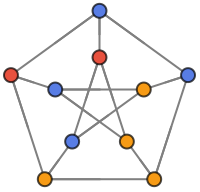
Find a vertex coloring of the Petersen graph:
FindVertexColoring[PetersenGraph[]]Assign distinct colors to adjacent vertices of a graph:
g = PetersenGraph[];FindVertexColoring[g, ColorData[106, "ColorList"]]Annotate[g, {VertexStyle -> Thread[VertexList[g] -> %]}]Scope (7)
FindVertexColoring works with undirected graphs:
FindVertexColoring[[image]]FindVertexColoring[[image]]FindVertexColoring[[image]]FindVertexColoring[[image]]Use rules to specify the graph:
FindVertexColoring[{1 -> 2, 1 -> 3, 1 -> 4, 1 -> 5, 2 -> 3, 2 -> 5, 3 -> 4, 4 -> 5}]Assign distinct colors to adjacent vertices of a graph:
FindVertexColoring[[image], ColorData[3, "ColorList"]]FindVertexColoring works with large graphs:
g = GridGraph[{10, 10, 10}];AbsoluteTiming[FindVertexColoring[g];]Options (3)
Method (3)
The method is automatically chosen, depending on input; "ILP" can be used for small graphs:
g = PetersenGraph[];FindVertexColoring[g, Method -> "ILP"]"BacktrackingDS" can be used for graphs that are not too large:
g = PetersenGraph[];FindVertexColoring[g, Method -> "BacktrackingDS"]"HybridEA" can be used for large graphs:
g = GridGraph[{10, 10, 10}];Length[FindVertexColoring[g, Method -> "HybridEA"]]Applications (5)
Basic Applications (2)
Visualize vertex colorings of parametrized graphs:
coloring[g_] := Annotate[g, {...}]Multicolumn[Table[coloring[g], {g, {...}}], 3, Spacings -> 2]Find a sequence of colors of CompleteGraph[n]:
FindSequenceFunction[FindVertexColoring[CompleteGraph[10]], n]CycleGraph[n]:
FindSequenceFunction[FindVertexColoring[CycleGraph[10]], n]Making Schedule (1)
A university has a number of different subjects. Each student is enrolled in some of these subjects. Build a graph where every vertex is a subject and an edge between two vertices means there is a common student:
g = [image];Find a exam schedule such that no two exams with a common student are scheduled at same time:
FindVertexColoring[g]Minimum time slots are needed to schedule all exams:
Max[%]Mobile Radio Frequency Assignment (1)
When frequencies are assigned to towers, frequencies assigned to all towers at the same location must be different. Build a graph where each vertex is a tower and an edge between two towers represents that they are in range of each other:
g = [image];Find the minimum number of frequencies needed:
FindVertexColoring[g]Max[%]Map Coloring (1)
Build a map where each vertex is an African country and there is an edge between two countries if they are adjacent:
g = [image];Color the map with a minimum number of colors, where any adjacent countries must be assigned different colors:
FindVertexColoring[g, ColorData[14, "ColorList"]];Annotate[g, {VertexSize -> 3, VertexStyle -> Thread[VertexList[g] -> %]}]Properties & Relations (6)
Bipartite graphs are two-colorable graphs:
graphs = {[image], [image]};Max[FindVertexColoring[#]] == 2& /@ graphsBipartiteGraphQ /@ graphsThe one-colorable graphs are empty graphs:
graphs = {[image], [image], [image], [image]};Max[FindVertexColoring[#]] == 1& /@ graphsEmptyGraphQ /@ graphsUse FindVertexColoring to compute VertexChromaticNumber:
g = PetersenGraph[];Max[FindVertexColoring[g]]VertexChromaticNumber[g]An edge coloring of a graph is just a vertex coloring of its line graph:
g = PetersenGraph[];FindVertexColoring[LineGraph[g]]FindEdgeColoring[g]A graph with  vertices, its chromatic number
  and independence number
  satisfies
  ≤
≤  :
:
g = PetersenGraph[];χ = Max@FindVertexColoring[g];α = Length[First[FindIndependentVertexSet[g]]];VertexCount[g] / α <= χA face coloring of a planar graph is a vertex coloring of its dual:
g = WheelGraph[6, VertexLabels -> Automatic]FindVertexColoring[DualPlanarGraph[g]]FindPlanarColoring[g]Text
Wolfram Research (2021), FindVertexColoring, Wolfram Language function, https://reference.wolfram.com/language/ref/FindVertexColoring.html.
CMS
Wolfram Language. 2021. "FindVertexColoring." Wolfram Language & System Documentation Center. Wolfram Research. https://reference.wolfram.com/language/ref/FindVertexColoring.html.
APA
Wolfram Language. (2021). FindVertexColoring. Wolfram Language & System Documentation Center. Retrieved from https://reference.wolfram.com/language/ref/FindVertexColoring.html