



GPUArray
GPUArray[array]
yields an array stored in memory accessible for GPU-accelerated computation.
Details
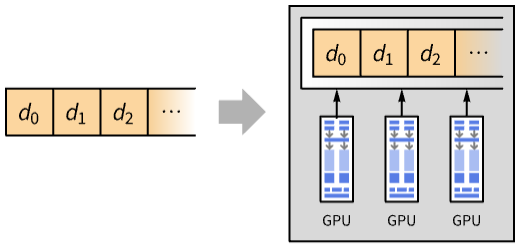
- GPUArray provides an efficient representation for storing and manipulating data accessible from a graphics processor unit (GPU).
- GPUArray is typically used to enhance speed of execution of functions by running computations on the GPU.
- GPUArray[array] creates an array in GPU memory or unified memory.
- The array can have the following forms:
-
{e1,…},{{e1,…},…},… full array of numeric elements NumericArray[…] numeric array of a specified type - Normal[GPUArray[array]] converts the GPUArray object to an ordinary list of values.
- Additional conversions include:
-
SparseArray[GPUArray[…]] sparse array with few nonzero elements NumericArray[GPUArray[…],type] numeric array of a specified type - Information for a GPUArray includes the following properties:
-
"ElementType" element native type "Dimensions" list of the dimensions - Functions such as LinearSolve, Plus and Part work on GPUArray by running the computation on the GPU.
- GPUArray is treated as a raw object by functions like AtomQ and for purposes of pattern matching.
Examples
open all close allBasic Examples (1)
Create a GPUArray object from a vector:
ga = GPUArray[{0., 0.5, 1., 1.5, 2., 2.5, 3., 3.5}]Cos[ga]Converts to an ordinary list of values:
Normal[%]Scope (27)
Basic Uses (4)
Create a GPUArray object from a vector:
GPUArray[{0., 0.5, 1., 1.5, 2., 2.5, 3., 3.5}]GPUArray[{{0., 0.5}, {1., 1.5}, {2., 2.5}, {3., 3.5}}]Use NumericArray to create a GPUArray object of a specified type:
GPUArray[NumericArray[RandomReal[1, 20], "Real32"]]GPUArray[NumericArray[RandomInteger[10, 20], "Integer64"]]Convert a GPUArray object to an ordinary list of values:
ga = GPUArray[{0., 0.5, 1., 1.5, 2., 2.5, 3., 3.5}]Normal[ga]Convert to a NumericArray object:
NumericArray[ga, "Real32"]Convert to a SparseArray:
SparseArray[ga]Get information of a GPUArray object:
ga = GPUArray[{{0., 0.5}, {1., 1.5}, {2., 2.5}, {3., 3.5}}]ga["Dimensions"]ga["ElementType"]Arrays Operations (3)
Test whether a GPUArray object is a vector:
GPUArray[{0., 0.5, 1., 1.5, 2., 2.5, 3., 3.5}]VectorQ[%]GPUArray[{{0., 0.5}, {1., 1.5}, {2., 2.5}, {3., 3.5}}]MatrixQ[%]Extract parts of a GPUArray object:
ga = GPUArray[{{0., 0.5}, {1., 1.5}, {2., 2.5}, {3., 3.5}}]Part[ga, 2]Part[ga, 1, 2]Get properties of a GPUArray object:
ga = GPUArray[{{0., 0.5}, {1., 1.5}, {2., 2.5}, {3., 3.5}}]Dimensions[ga]ArrayDepth[ga]ByteCount[ga]Mathematical Operations (6)
Apply arithmetic operations on GPUArray objects:
ga = GPUArray[{0., 0.5, 1., 1.5, 2., 2.5, 3., 3.5}];
gb = GPUArray[{1., 1.5, 1.1, 2.5, 2.3, 3.5, 4., 4.5}];ga + gbga * gbga ^ 2Evaluate numerically trigonometric functions:
ga = GPUArray[{0., 0.5, 1., 1.5, 2., 2.5, 3., 3.5}];Sin[ga]Cos[ga]ArcCos[ga]Compute transcendental functions:
ga = GPUArray[{0., 0.5, 1., 1.5, 2., 2.5, 3., 3.5}];Exp[ga]Log[ga]ga ^ 2Evaluate efficiently hyperbolic functions:
ga = GPUArray[{5., 0.5, 1., 1.5, 2., 2.5, 3., 3.5}];Sinh[ga]Cosh[ga]ArcCosh[ga]Evaluate numerically integer functions:
ga = GPUArray[{0., 0.5, 1., 1.5, 2., 2.5, 3., 3.5}];Ceiling[ga]Floor[ga]Round[ga]Compute absolute values and signs functions:
ga = GPUArray[{0., 0.5, 1., 1.5, 2., 2.5, 3., 3.5}];Abs[ga]Sign[ga]RealAbs[ga]Fourier Analysis (2)
Statistics (3)
Evaluate statistics functions on a GPUArray object:
ga = GPUArray[{0.4, 0.5, 1., 1.5, 2., 2.5, 3., 3.5}];Mean[ga]GeometricMean[ga]Variance[ga]StandardDeviation[ga]Skewness[ga]Minimum of a GPUArray object:
ga = GPUArray[{0.4, 0.5, 1., 1.5, 2., 2.5, 3., 3.5}];Min[ga]Max[ga]MinMax[ga]Sort a GPUArray object:
ga = GPUArray[{0.4, 0.5, 1., 1.5, 2., 2.5, 3., 3.5}];Sort[ga]Linear Algebra (4)
Apply matrix operations on GPUArray objects:
ga = GPUArray[{0., 0.5, 1., 1.5, 2., 2.5, 3., 3.5}];
gb = GPUArray[{1., 1.5, 1.1, 2.5, 2.3, 3.5, 4., 4.5}];ga.gbTranspose[ga]Tr[ga]Solve a matrix-vector equation:
gm = GPUArray[{{0., 0.5, 1.}, {1.5, 2., 2.5}, {3., 3.5, 4.}}];gb = GPUArray[{0.5, 1., 1.5}];LinearSolve[gm, gb]gm = GPUArray[{{0., 0.5}, {1., 1.5}}];gb = GPUArray[{{2., 2.5}, {3., 3.5}}];LinearSolve[gm, gb]Solve a matrix-vector least-squares problem:
gm = GPUArray[{{0., 0.5, 1.}, {1.5, 2., 2.5}, {3., 3.5, 4.}, {4.5, 5., 5.5}}];
gbv = GPUArray[{0.5, 1., 1.5, 2.}];
LeastSquares[gm, gbv]
Solve a matrix-matrix least-squares problem:
gbm = GPUArray[{{0.5, 1.}, {1.5, 2.}, {2.5, 3.}, {3.5, 4}}];
LeastSquares[gm, gbm]
Compute the singular value decomposition of a complex-valued matrix:
m = GPUArray[NumericArray[RandomComplex[1 + I, {3, 3}], "ComplexReal32"]];{u, σ, v} = SingularValueDecomposition[m]Up to expected precision loss, ![m=u.sigma.TemplateBox[{v}, ConjugateTranspose]](Files/GPUArray.en/2.png "m=u.sigma.TemplateBox[{v}, ConjugateTranspose]") :
:
Chop[m - u.σ.v, 10^-6] == SymbolicZerosArray[Dimensions[m]]//NormalRandom Number Generation (2)
Switch to the GPU random number generator:
SeedRandom[Method -> "GPU"]Random numbers are now generated using it:
RandomReal[1, 5]RandomInteger[10, 5]RandomComplex[1 + I, 5]A specific seed will affect the current GPU random number generator:
SeedRandom[123, Method -> "GPU"];RandomReal[1, 5]Visualization (3)
Plot a list of values from a continuous probability distribution:
GPUArray[RandomVariate[NormalDistribution[0, 1], 200]]ListPlot[%]ArrayPlot[GPUArray[RandomReal[1, {10, 10}]]]Plot a matrix as an array of colors:
MatrixPlot[GPUArray[RandomReal[1, {10, 10}]]]Properties & Relations (4)
Use GPUArrayQ to test whether an object is a valid GPUArray object:
GPUArray[{0., 0.5, 1., 1.5, 2., 2.5, 3., 3.5}]GPUArrayQ[%]Find the number of bytes used to store a GPUArray object:
GPUArray[RandomReal[1, 10 ^ 3]]ByteCount[%]Use Normal to retrieve data from GPU:
GPUArray[{1, 2, 3, 4, 5, 6, 7}]Normal[%]GPUArray preserves representation types of elements in NumericArray objects:
NumericArray[RandomReal[1, 20], "Real32"]GPUArray[%]%["ElementType"]Possible Issues (2)
GPUArray autoevaluates if no supported GPUs were detected:
GPUArray[{1, 2, 3, 4, 5}]
Operations without GPU-accelerated support fall back to CPU implementations:
ga = GPUArray[RandomReal[1, 6]];Csch[ga]Text
Wolfram Research (2025), GPUArray, Wolfram Language function, https://reference.wolfram.com/language/ref/GPUArray.html.
CMS
Wolfram Language. 2025. "GPUArray." Wolfram Language & System Documentation Center. Wolfram Research. https://reference.wolfram.com/language/ref/GPUArray.html.
APA
Wolfram Language. (2025). GPUArray. Wolfram Language & System Documentation Center. Retrieved from https://reference.wolfram.com/language/ref/GPUArray.html