

GeoVectorENU
GeoVectorENU[loc{ve,vn}]
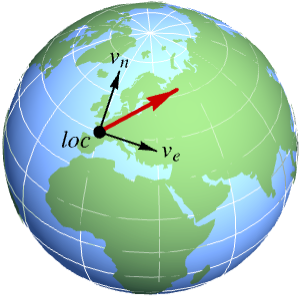
represents a horizontal two-dimensional vector of components ve and vn in an orthonormal frame tangent to the Earth at geo location loc.
GeoVectorENU[loc{ve,vn,vu}]
represents a three-dimensional vector of horizontal components ve and vn, and vertical component vu at geo location loc.
GeoVectorENU[{loc1,loc2,…}{vec1,vec2,…}]
represents a collection of vectors veci at respective geo locations loci.
GeoVectorENU[{loc1vec1,loc2vec2,…}]
represents the same collection of vectors.
GeoVectorENU[vec]
represents a geo vector whose associated location has been implicitly specified.
Details
- GeoVectorENU[…] can represent any vectorial magnitude on the surface of the Earth or any other celestial globe, like wind speed, magnetic field, scalar gradients, etc.
- GeoVectorENU describes data using an orthonormal frame tangent to the reference ellipsoid at the given location.
- In GeoVectorENU[locvec], the components of the vector vec can be quantities, but their units must be compatible.
- In GeoVectorENU[locvec], the location loc can be given as a {lat,lon} pair in degrees, a geo Entity object or any geo location object with head GeoPosition or similar.
- GeoVectorENU[GeoVector[…]] converts a vector in GeoVector form to GeoVectorENU form, and similarly for GeoVectorXYZ and GeoGridVector objects.
- GeoVectorENU[…][prop] gives the specified property of a geo vector.
- Possible properties include:
-
"Count" number of vectors in the GeoVectorENU object "Data" first argument of the GeoVectorENU object "Depth" vector depth: 0 for a single vector, 1 for a list of them, … "Location" location data of the GeoVectorENU object "LocationDimension" number of coordinates for each position "LocationPackingType" Integer or Real if positions are packed; None otherwise "Vector" vector data of the GeoVectorENU object "VectorDimension" number of components for each vector "VectorPackingType" Integer or Real if vectors are packed; None otherwise
Examples
open all close allBasic Examples (1)
Get a 3D GeoVectorENU object describing the magnetic field at your geo location:
enu = Normal@GeomagneticModelData[Here, Now, GeoVectorENU]Place a dart with such horizontal direction in a local map of your area and compare with local meridians:
GeoGraphics[GeoMarker[enu, {"Dart", "Circle"}], GeoGridLines -> {None, Automatic}, GeoGridLinesStyle -> LightOrange]To see the deviation angle, convert to polar GeoVector form:
GeoVector[enu]Show the direction in a world map with a different geo projection, using a smaller dart:
GeoGraphics[GeoMarker[enu, {"Dart", "Circle"}, "Scale" -> 0.5], GeoRange -> "World", GeoProjection -> "Bonne", GeoGridLines -> {None, Automatic}, GeoGridLinesStyle -> LightOrange, GeoBackground -> "Plain"]Scope (9)
Data Specification (4)
Specify the location of a horizontal geo vector as a {lat,lon} pair in degrees:
GeoVectorENU[{20, -50} -> {1, 2}]Construct a 3D velocity vector with three identical components at Chicago:
enu = GeoVectorENU[Entity["City", {"Chicago", "Illinois", "UnitedStates"}] -> Quantity[{10, 10, 10}, "Miles" / "Hours"]]Rewrite the location as a geo position object with any head:
GeoPosition[enu]GeoPositionXYZ[enu]GeoGridPosition[enu, "Mercator"]Anything that can be interpreted by GeoPosition can be used as a location:
GeoVectorENU["12d 3m 4.5s N, 123d 58m 3.2s W" -> {1, 2}]//GeoPositionGeoVectorENU["NullIsland" -> {2, 1}]//GeoPositionWork with horizontal 2D or 3D vectors of any unit dimension:
GeoVectorENU[{20, -50} -> {1, 1 / 2}]GeoVectorENU[{20, -50} -> Quantity[{2, 3}, "Meters" / "Seconds"]]GeoVectorENU[{20, -50} -> Quantity[{-4, 5, -1}, "Meters" / "Seconds" ^ 2]]Geo Vector Arrays (4)
Specify a GeoVectorENU object of two vectors at the given locations:
GeoVectorENU[{GeoPosition[{30, -40}] -> {0.57, -0.78, -0.57}, GeoPosition[{-20, -150}] -> {0.67, 0.43, -0.17}}]This is an alternative way to specify the same data:
GeoVectorENU[GeoPosition[{{30, -40}, {-20, -150}}] -> {{0.57, -0.78, -0.57}, {0.67, 0.43, -0.17}}]Compute gravitational field data simultaneously for several locations:
GeogravityModelData[{Entity["City", {"London", "GreaterLondon", "UnitedKingdom"}], Entity["City", {"Paris", "IleDeFrance", "France"}], Entity["City", {"Amsterdam", "NoordHolland", "Netherlands"}], Entity["City", {"Berlin", "Berlin", "Germany"}]}, GeoVectorENU]//NormalConvert it to a single geo vector array:
GeoVectorENU[%]Represent the relative sizes and directions of the small horizontal components:
GeoGraphics[GeoMarker[%, {"Dart", "Circle"}], GeoRange -> {{47, 54}, {-2, 16}}]Generate a million random Cartesian vectors at respective random locations:
gvenu = GeoVectorENU[RandomGeoPosition[10 ^ 6] -> QuantityArray[RandomReal[{-1, 1}, {10 ^ 6, 2}], "Meters"]]AbsoluteTiming[gv = GeoVector[gvenu]]Use GeoVectorENU to transform them back to their Cartesian form:
AbsoluteTiming[newgvenu = GeoVectorENU[gv]]Check that the difference is just numerical error:
CoordinateBounds[newgvenu["Vector"] - gvenu["Vector"]]Take the locations of the capital cities of the UN countries:
capitals = GeoPosition[EntityClass["Country", "UnitedNations"]["CapitalCity"]]Construct random vectors at those locations:
vecs = QuantityArray[RandomReal[360, {193, 2}], {"Meters" / "Seconds", "AngularDegrees"}]gv = GeoVector[capitals -> vecs]Convert to local Cartesian form:
GeoVectorENU[gv]GeoVector[%]Data Extraction (1)
A horizontal velocity vector at Chicago:
enu = GeoVectorENU[Entity["City", {"Chicago", "Illinois", "UnitedStates"}] -> Quantity[{10, 20}, "Miles" / "Hours"]]Extract the location of the geo vector:
enu["Location"]Extract the vector data from the geo vector:
enu["Vector"]enu["LocationVectorRule"]enu["Properties"]AssociationMap[enu, %]//Normal//ColumnProperties & Relations (1)
Download information about the geomagnetic field at your current geo location:
geomag = GeomagneticModelData[Here, Now]Request the information in the form of a GeoVectorENU object:
enu = Normal@GeomagneticModelData[Here, Now, GeoVectorENU]The original association contains those vector components, with reversed sign in the vertical direction:
Lookup[geomag, {"EastComponent", "NorthComponent", "DownComponent"}]Convert the horizontal components of the vector into modulus and declination angle:
GeoVector[enu]Lookup[geomag, {"HorizontalComponent", "Declination", "DownComponent"}]Text
Wolfram Research (2019), GeoVectorENU, Wolfram Language function, https://reference.wolfram.com/language/ref/GeoVectorENU.html.
CMS
Wolfram Language. 2019. "GeoVectorENU." Wolfram Language & System Documentation Center. Wolfram Research. https://reference.wolfram.com/language/ref/GeoVectorENU.html.
APA
Wolfram Language. (2019). GeoVectorENU. Wolfram Language & System Documentation Center. Retrieved from https://reference.wolfram.com/language/ref/GeoVectorENU.html