

ImageDistance
ImageDistance[image1,image2]
returns a distance measure between image1 and image2.
ImageDistance[image1,image2,pos]
places the center of image2 at position pos in image1.
ImageDistance[image1,image2,pos1,pos2]
places the point pos2 of image2 at position pos1 in image1.
Details and Options
- ImageDistance[image1,image2] centers image2 in image1 and returns the distance between the overlapping regions in the two images.
- ImageDistance works with arbitrary 2D and 3D images.
- Images should either have the same number of channels or one should be a single-channel image. If either of image1 or image2 is a single-channel image, the channel is replicated to match the number of channels in the other image.
- Position specification pos can be of the form:
-
{x,y} or {x,y,z} absolute pixel position Scaled[{sx,…}] scaled position from 0 to 1 across the object Center center alignment Left,Right  axis in both 2D and 3D
Bottom,Top  axis in 2D,
  axis in 3D
Front,Back  axis in 3D
{posx,…} a list of named positions - If alignment along each axis is not given, it is assumed to be Center.
- The following options can be given:
-
DistanceFunction EuclideanDistance distance function to use Masking All region of interest - Some typical distance function settings include:
-
EuclideanDistance Euclidean distance (default) SquaredEuclideanDistance squared Euclidean distance NormalizedSquaredEuclideanDistance normalized squared Euclidean distance ManhattanDistance Manhattan or "city block" distance CosineDistance angular cosine distance CorrelationDistance correlation coefficient distance f function f that is given the overlapping regions of the two images as arguments - The following special distance functions are also supported:
-
"MeanEuclideanDistance" mean Euclidean distance "MeanSquaredEuclideanDistance" mean squared Euclidean distance "RootMeanSquare" mean squared root distance {"MeanReciprocalSquaredEuclideanDistance",λ} one minus the mean of the robust distances 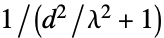 , where
  is the Euclidean distance of corresponding pixels (default
  )
){"MutualInformationVariation",n} joint entropy minus mutual information using n-bin histogram (default  )
){"NormalizedMutualInformationVariation",n} the mutual information variation divided by the joint entropy using n-bin histogram (default  )
) {"DifferenceNormalizedEntropy",n} entropy of the difference image using n-bin histogram (default  )
) "MeanPatternIntensity" mean local pattern intensity difference "GradientCorrelation" mean of the correlation distances between the spatial derivatives "MeanReciprocalGradientDistance" one minus the mean of the distances  , with values
  and variances
  of the spatial derivatives along dimension s of imagei
{"EarthMoverDistance",n} earth mover distance using n-bin histogram - Using Masking->roi, a region of interest in image1 is specified. With Masking->{roi1,roi2}, the intersection of roi1 and roi2 on the overlapped images is used.
- Predefined ImageDistance metrics are symmetric and non-negative. However, some distances may not satisfy the triangle inequality. The distance between two images can be 0 with some methods, even if they are not identical. User-defined functions might break these properties.
- If there are no overlapping regions or the measure cannot be determined, Indeterminate is returned. »
Examples
open all close allBasic Examples (2)
Scope (2)
By default, images are center aligned:
{i1, i2} = {[image], [image]};ImageDistance[i1, i2]Align the top-left corner of the first image with the center of the second image:
ImageDistance[i1, i2, {Left, Top}]Align the center top of the first image and right center of the second image:
ImageDistance[i1, i2, Top, Right]Specify positions using the standard coordinate system:
ImageDistance[i1, i2, {66.5, 6}, {21.5, 2}]Specify positions using scaled coordinates:
ImageDistance[i1, i2, Scaled[{0, 1 / 2}], Scaled[{.2, 1 / 2}]]Specify the alignment position for 3D images:
ImageDistance[[image], [image], {Right, Front, Top}]Options (8)
DistanceFunction (5)
Use a custom distance function:
f[i1_, i2_] := Abs[Mean@Flatten@ImageData[i1] - Mean@Flatten@ImageData@i2];
ImageDistance[[image], [image], DistanceFunction -> f]
Use a custom distance function with masks:
f[i1_, i2_, mask_] := With[{pos = PixelValuePositions[mask, 1]}, Abs[Mean@Flatten@PixelValue[i1, pos] - Mean@Flatten@PixelValue[i2, pos]]
	];
ImageDistance[[image], [image], DistanceFunction -> f, Masking -> {[image], [image]}]ImageDistance[[image], [image], DistanceFunction -> "EarthMoverDistance"]Use histograms with four bins per channel:
ImageDistance[[image], [image], DistanceFunction -> {"EarthMoverDistance", 4}]Compare different distance measures:
flist = {EuclideanDistance, SquaredEuclideanDistance, NormalizedSquaredEuclideanDistance, ManhattanDistance, CosineDistance, CorrelationDistance, "MeanEuclideanDistance", "MeanSquaredEuclideanDistance", "RootMeanSquare", "MeanReciprocalSquaredEuclideanDistance", {"MeanReciprocalSquaredEuclideanDistance", .3}, "MutualInformationVariation", {"MutualInformationVariation", 32}, "NormalizedMutualInformationVariation", {"NormalizedMutualInformationVariation", 32}, "DifferenceNormalizedEntropy", {"DifferenceNormalizedEntropy", 32}, "MeanPatternIntensity", {"MeanPatternIntensity", .1, 3}, "GradientCorrelation", "MeanReciprocalGradientDistance", "EarthMoverDistance", {"EarthMoverDistance", 8}};
Grid[Table[{f, ImageDistance[[image], [image], DistanceFunction -> f]},
	{f, flist}], Alignment -> {{Right, Left}, Center}]
Compute the root mean square distance of approximate perceptual distances between pixels:
f[image1_, image2_] := RootMeanSquare[Flatten@ImageData@ColorDistance[image1, image2]];
ImageDistance[[image], [image], DistanceFunction -> f]
Masking (3)
Use a mask to specify the region of interest in the first image:
ImageDistance[[image], [image], Masking -> [image]]Use a mask to specify the region of interest in the second image:
ImageDistance[[image], [image], Masking -> {All, Graphics[Disk[]]}]ImageDistance[[image], [image], Masking -> {[image], Graphics[Disk[]]}]Applications (2)
Construct a similarity graph of a set of images based on the earth mover distance:
l = {[image], [image], [image], [image], [image], [image], [image], [image]};Compute a matrix of distances for all image pairs:
distances = Table[ImageDistance[l[[i]], l[[j]], DistanceFunction -> "EarthMoverDistance"], {i, Length[l]}, {j, i + 1, Length[l]}];
With[{mtemp = PadLeft[#, Length[l]]& /@ distances},
distmatrix = mtemp + Transpose[mtemp]];
NumberForm[distmatrix, 3]
Threshold the distances to construct an adjacency matrix and visualize using a graph:
adjmatrix = 1 - Unitize[Threshold[distmatrix, Quantile[Flatten[distances], 1 / 3]]];
GraphPlot[adjmatrix, VertexShapeFunction -> (Inset[l[[#2]], #, Center, .5]&), SelfLoopStyle -> None, Method -> "SpringEmbedding", ImageSize -> 500]
Register two images related by a translation and a rotation:
moving = [image];
fixed = [image];
{w, h} = ImageDimensions[fixed];objfun[θ_Real, tx_Real, ty_Real] :=
ImageDistance[
fixed,
ImagePerspectiveTransformation[moving, TransformationFunction[(| | | |
| ------ | ------- | -- |
| Cos[θ] | -Sin[θ] | tx |
| Sin[θ] | Cos[θ] | ty |
| 0 | 0 | 1 |)], DataRange -> Full, PlotRange -> {{0, w}, {0, h}}, Padding -> 0]
];NMinimize[
{objfun[θ, tx, ty], 0 ≤ θ < 2 * Pi && 0 ≤ tx ≤ 100 && 0 ≤ ty ≤ 100}, {{θ, Pi / 7, Pi / 5}, {tx, 50, 80}, {ty, 0, 10}},
MaxIterations -> 50,
WorkingPrecision -> 3
]ImagePerspectiveTransformation[moving, TransformationFunction[(| | | |
| ------ | ------- | -- |
| Cos[θ] | -Sin[θ] | tx |
| Sin[θ] | Cos[θ] | ty |
| 0 | 0 | 1 |)] /. %[[2]], DataRange -> Full, PlotRange -> {{0, w}, {0, h}}, Padding -> 0]ImageDifference[%, fixed]Properties & Relations (8)
The distance between an image and itself is always zero:
img = [image];
ImageDistance[img, img]
The distance between two different images may be 0:
ImageDistance[[image], [image], DistanceFunction -> CorrelationDistance]ImageDistance[[image], [image]]The distance between two images is symmetric:
i1 = RandomImage[1, {100, 200}];
i2 = RandomImage[1, {50, 100}];
ImageDistance[i1, i2] == ImageDistance[i2, i1]
The distance may not be symmetric with masks:
ImageDistance[i1, i2, Masking -> Graphics[Disk[]]]ImageDistance[i2, i1, Masking -> Graphics[Disk[]]]When the images have no overlap, the distance is indeterminate:
img = [image];
ImageDistance[img, img, {Right, Bottom}, {Left, Top}]
The distance between an image and its rotations:
i = [image];
t = Table[ImageDistance[i, ImageRotate[i, θ, Full]], {θ, 0, 2Pi, Pi / 20}];
ListLinePlot[t, DataRange -> {0, 2Pi}, Ticks -> {{0, π / 2, π, 3π / 2, 2π}, Automatic}]
Normalized mutual information variation of an MRI and a translated PET image:
ListLinePlot[
	Table[
	{x, ImageDistance[
	[image], ImagePerspectiveTransformation[[image], TranslationTransform[{x, 0}]], DistanceFunction -> "NormalizedMutualInformationVariation"
	]},
	{x, -0.2, 0.2, 0.01}]]
Correcting for overall change in brightness is a typical preprocessing with some distances:
img1 = [image];
img2 = [image];ImageDistance[img1, ImageMultiply[img2, .8], DistanceFunction -> #]& /@ {"DifferenceNormalizedEntropy", "MeanPatternIntensity"}
Without correction, it is less apparent that the two images are aligned:
ImageDistance[img1, img2, DistanceFunction -> #]& /@ {"DifferenceNormalizedEntropy", "MeanPatternIntensity"}Some distance measures are effectively invariant to specific transformations.
ImageDistance[[image], [image], DistanceFunction -> "EarthMoverDistance"]img = [image];
ImageDistance[img, ColorNegate[img], DistanceFunction -> #]& /@ {"MutualInformationVariation", "NormalizedMutualInformationVariation"}img = RandomImage[{.2, .7}, {100, 100}];
ImageDistance[img, ImageAdd[img, .25], DistanceFunction -> #]& /@ {NormalizedSquaredEuclideanDistance, CorrelationDistance, "MutualInformationVariation", "NormalizedMutualInformationVariation", "DifferenceNormalizedEntropy", "MeanPatternIntensity", "GradientCorrelation", "MeanReciprocalGradientDistance"}Pointwise multiplication by a positive number:
img = RandomImage[1, {100, 100}];
ImageDistance[img, ImageMultiply[img, .4], DistanceFunction -> #]& /@ {CosineDistance, CorrelationDistance, "GradientCorrelation"}
Pointwise affine transformation with positive slope coefficient:
img = RandomImage[{.2, .7}, {100, 100}];
ImageDistance[img, ImageApply[.3 * # - .2&, img], DistanceFunction -> #]& /@ {CorrelationDistance, "GradientCorrelation"}
For a rectangular mask, image distance is equal to the distance of the trimmed images:
i1 = [image];i2 = [image];mask = [image];ImageDistance[i1, i2, Masking -> mask]ImageDistance[ImageTrim[i1, ImageValuePositions[mask, 1]], ImageTrim[i2, ImageValuePositions[mask, 1]]]Text
Wolfram Research (2012), ImageDistance, Wolfram Language function, https://reference.wolfram.com/language/ref/ImageDistance.html (updated 2016).
CMS
Wolfram Language. 2012. "ImageDistance." Wolfram Language & System Documentation Center. Wolfram Research. Last Modified 2016. https://reference.wolfram.com/language/ref/ImageDistance.html.
APA
Wolfram Language. (2012). ImageDistance. Wolfram Language & System Documentation Center. Retrieved from https://reference.wolfram.com/language/ref/ImageDistance.html