

ImageValue
ImageValue[image,pos]
gives the interpolated value of image at position pos.
ImageValue[image,pos,"type"]
gives the value converted to the specified type.
Details and Options
- ImageValue is used to extract interpolated values of a 2D or 3D image and is typically used for sampling the image.
- Pixel positions pos can be in one of the following forms:
-
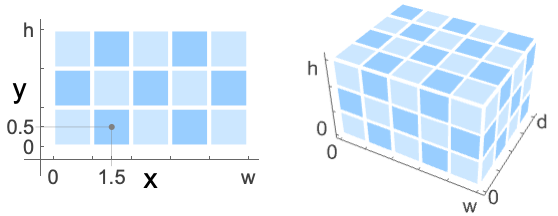
{x,y} or {x,y,z} single position in 2D or 3D {xmin;;xmax,…} span of positions {xmin;;xmax;;xstep,…} span of positions with steps {pos1,pos2,…} a list of position specifications markerimage a marker image - ImageValue assumes the standard image coordinate system.
- Use PixelValue to use integer indices for extracting exact pixel values of the image.
- ImageValue[image,pos] by default returns values between 0 and 1.
- ImageValue[image,pos,"type"] returns a pixel value in the range specified by "type". Possible settings for "type" include:
-
Automatic using data type of image "Bit" integer 0 or 1 "Byte" integer 0 through 255 "Bit16" integer 0 through 65535 "Real32" single-precision real (32 bit) "Real64" double-precision real (64 bit) - The following options can be given:
-
DataRange Full range of image coordinates Padding 0 padding method to use Resampling "Linear" interpolation method to use - Possible settings for DataRange include:
-
Automatic {{0,1},{0,h/w}} in 2D, {{0,1},{0,d/w},{0,h/w}} in 3D Full {{0,w},{0,h}} in 2D, {{0,1},{0,d},{0,h}} in 3D (default) {{left,right},{bottom,top}} explicit coordinate ranges in 2D {{left,right},{front,back},{bottom,top}} explicit coordinate ranges in 3D - With Resampling->"Nearest", when the position pos lies on a boundary between pixels, the average of the pixels surrounding pos is returned. »
Examples
open all close allBasic Examples (2)
Scope (12)
Data (4)
A single value of a grayscale image:
ImageValue[Image[(| | |
| -- | -- |
| 0 | .2 |
| .4 | 1 |)], {0.5, 0.5}]ImageValue typically returns interpolated values:
ImageValue[Image[(| | |
| -- | -- |
| 0 | .2 |
| .4 | 1 |)], {1.0, 0.5}]A single value of a color image:
ImageValue[[image], {0.5, 0.5}]ImageValue[[image], {2.5, 0.5, 2.5}]Position (5)
ImageValue[[image], {50.3, 33.5}]ImageValue[[image], {{86.5, 53.3}, {11.8, 1.9}, {59.6, 52.1}}]Image values at a range of positions:
ImageValue[[image], {33.3 ;; 38.6, 50. ;; 55.5}]Use All to extract all values in one dimension:
ImageValue[[image], {40.5, All}]Image values at positions specified by a marker image:
ImageValue[[image], [image]]Type (3)
By default, image values are returned in "Real" type:
ImageValue[[image], {50.3, 33.5}]ImageValue[[image], {50.3, 33.5}, "Byte"]Use Automatic to return values in the original image data type:
ImageValue[[image], {50.3, 33.5}, Automatic]Options (3)
DataRange (1)
By default, image value assumes a data range of {{0,width},{0,height}}:
i = [image];ImageValue[i, ImageDimensions[i] / 2]Pixel value at the center of an image using a normalized data range:
ImageValue[i, {1 / 2, 1 / 2}, DataRange -> {{0, 1}, {0, 1}}]Padding (1)
Resampling (1)
By default, the linear resampling is used:
ImageValue[Image[{{0, .1}, {.2, .3}}], {.9, .9}]ImageValue[Image[{{0, .1}, {.2, .3}}], {1.5, 1.5}]Specify a different resampling:
ImageValue[Image[{{0, .1}, {.2, .3}}], {.9, .9}, Resampling -> "Cubic"]Use the nearest value to avoid resampling:
ImageValue[Image[{{0, .1}, {.2, .3}}], {.9, .9}, Resampling -> "Nearest"]Applications (4)
Compute mean image value of a region of interest:
ImageValue[[image], [image]]//MeanRGBColor@%Image values along a path defined in a marker image:
ImageValue[[image], [image]]Intensity profile of the path:
ListLinePlot[%]Plot the distribution of image values in a region of interest:
Histogram[ImageValue[[image], [image]], {0, 1, 0.1}]Extract image values where corners are detected:
i = [image];corners = ImageCorners[i, 4, 0.001, 3, MaxFeatureDisplacement -> 7]HighlightImage[i, {PointSize[Large], corners}]ImageValue[i, corners]Possible Issues (3)
With Resampling->"Nearest" and integer coordinates, the average of the pixels surrounding the specified coordinate is returned:
ImageValue[[image], {1, 1}, Resampling -> "Nearest"]When converting to "Bit" type, pixel values will get rounded:
ImageValue[[image], {1.5, 1.5}]ImageValue[[image], {1.5, 1.5}, "Bit"]Extracting value at multiple positions is much faster if done at once rather than extracting one at a time:
img = [image];
coordinates = ImageValuePositions[img, Green, 0.6];AbsoluteTiming[r1 = ImageValue[img, coordinates];]AbsoluteTiming[r2 = Table[ImageValue[img, point], {point, coordinates}];]r1 === r2Text
Wolfram Research (2010), ImageValue, Wolfram Language function, https://reference.wolfram.com/language/ref/ImageValue.html (updated 2014).
CMS
Wolfram Language. 2010. "ImageValue." Wolfram Language & System Documentation Center. Wolfram Research. Last Modified 2014. https://reference.wolfram.com/language/ref/ImageValue.html.
APA
Wolfram Language. (2010). ImageValue. Wolfram Language & System Documentation Center. Retrieved from https://reference.wolfram.com/language/ref/ImageValue.html