

LinearGradientImage
LinearGradientImage[gcol]
returns an image with values linearly changing from left to right based on gradient color gcol.
LinearGradientImage[{pos1,pos2}gcol]
returns an image where the gradient starts at pos1 and ends at pos2.
LinearGradientImage[…,size]
returns a linear gradient image of the specified size.
LinearGradientImage[…,size,"type"]
gives an image converted to the specified type.
Details and Options
- LinearGradientImage constructs a 2D or 3D image with constant gradient along a direction derived from the input specification.
- Color scheme specification gcol can be any of the following:
-
{col1,col2,…} blend of multiple color directives coli "name" ColorData["name"] f function f that returns a color based on a scalar distance - The argument passed to the function f is by default the normalized distance between a pixel and the line going through pos1, perpendicular to pos2-pos1.
- Position specification posi can be any of the following:
-
{x,y} or {x,y,z} absolute pixel position Left,Right  axis in 2D and 3D
Bottom,Top  axis in 2D,
  axis in 3D
Front,Back  axis in 3D
Center center alignment {posx,…} a list of named positions - Positions that are not constrained are taken to be centered.
- By default, positions are assumed to be in the standard image coordinate system.
- The size specification can be one of the following:
-
side 2D image of size {side,side} {width,height} 2D image size specification {width,depth,height} 3D image size specification - The default size is {150,150} for 2D images and {64,64,64} for 3D images.
- LinearGradientImage[] is equivalent to LinearGradientImage[{Black,White}].
- LinearGradientImage accepts all Image and Image3D options with the following additions and changes:
-
ColorFunction Automatic how each pixel should be colored ColorFunctionScaling True whether to scale the argument to ColorFunction DataRange Full range of coordinates in the original image Padding "Fixed" padding scheme - Possible settings for DataRange include:
-
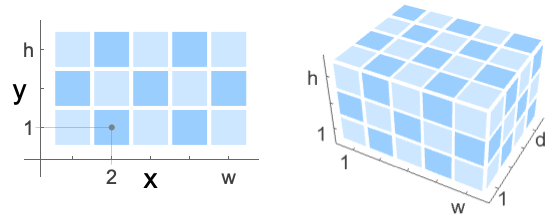
Automatic {{0,1},{0,h/w}} in 2D, {{0,1},{0,d/w},{0,h/w}} in 3D Full {{0,w},{0,h}} in 2D, {{0,w},{0,d},{0,h}} in 3D (default) {{left,right},{bottom,top}} explicit coordinate ranges in 2D {{left,right},{front,back},{bottom,top}} explicit coordinate ranges in 3D
Examples
open all close allBasic Examples (4)
Linear grayscale gradient from left to right:
LinearGradientImage[]Linear blend of colors from left to right:
LinearGradientImage[{Blue, Yellow, Red}]Linear gradient image along a given direction:
LinearGradientImage[{{Left, Bottom}, {Right, Top}} -> {Blue, Yellow, Red}]LinearGradientImage[{Blue, Yellow, Red}, {150, 50}]Scope (14)
Color Schemes (5)
LinearGradientImage[{Red, Yellow}]Linear blend of multiple colors:
LinearGradientImage[{Red, Blue, Green, Yellow}]LinearGradientImage["Rainbow"]Use hue as the coloring function:
LinearGradientImage[Hue]Specify a custom color function:
LinearGradientImage[RGBColor[#, 1 - #, # / 2]&]Positions (6)
By default, a linear gradient image from left to right is generated:
LinearGradientImage[ColorData["Rainbow"]]A top-to-bottom gradient image:
LinearGradientImage[{Top, Bottom} -> ColorData["Rainbow"]]LinearGradientImage[{{Left, Bottom}, {Right, Top}} -> ColorData["Rainbow"]]If position along one dimension is not given, center alignment is used for that dimension:
LinearGradientImage[{Left, Top} -> ColorData["Rainbow"]]Left-to-right 3D gradient image:
LinearGradientImage[{Left, Right} -> ColorData["Rainbow"], {7, 7, 7}]LinearGradientImage[{{Left, Front, Top}, {Right, Back, Bottom}} -> ColorData["Rainbow"], {8, 5, 3}]Size (3)
By default, a 2D image of size  is generated:
LinearGradientImage[Hue]If absolute pixel positions are given, the minimum image dimensions containing the positions are returned:
LinearGradientImage[{{0, 0}, {100, 100}} -> Hue]Specify a different output size:
LinearGradientImage[{{0, 0}, {100, 100}} -> Hue, {150, 150}]By default, a 3D image of size  is generated:
LinearGradientImage[{{Left, Front, Bottom}, {Right, Back, Top}} -> "Rainbow"]LinearGradientImage[{{Left, Front, Bottom}, {Right, Back, Top}} -> ColorData["Rainbow"], {40, 30, 20}]Options (8)
ColorFunction (3)
With no color specification, GrayLevel is the default color function:
LinearGradientImage[{{0, 0}, {100, 100}}, {100, 100}]Specify a different color function:
LinearGradientImage[{{0, 0}, {100, 100}}, {100, 100}, ColorFunction -> Hue]Use a built-in color gradient:
LinearGradientImage[{{0, 0}, {100, 100}}, {100, 100}, ColorFunction -> ColorData["Rainbow"]]Use Blend to specify a color function that is a blend of multiple colors:
LinearGradientImage[{{0, 0}, {100, 100}}, {100, 100}, ColorFunction -> (Blend[{Blue, Yellow, Green}, #]&)]When grayscale 3D images are produced, ColorFunction->"GrayLevelOpacity" is used in Image3D:
LinearGradientImage[{Left, Right}, {10, 10, 10}]With both ColorFunction and end point colors specified, color function is ignored:
LinearGradientImage[{Left -> Green, Right -> Red}, ColorFunction -> GrayLevel]ColorFunctionScaling (2)
By default, the color function parameters are rescaled between 0 and 1:
LinearGradientImage[(Blend[{{0, Red}, {1, Yellow}}, #]&), {200, 20}]Scaled values might not be suitable for some color functions:
Image[LinearGradientImage[ColorData[2], {20, 5}], ImageSize -> 100]Use ColorFunctionScaling->False:
Image[LinearGradientImage[ColorData[2], {20, 5}, ColorFunctionScaling -> False], ImageSize -> 100]DataRange (2)
The default DataRange is the size of the image:
LinearGradientImage[{{0, 0}, {50, 50}} -> Hue, {100, 100}]Specify a different data range:
LinearGradientImage[{{0, 0}, {50, 50}} -> Hue, {100, 100}, DataRange -> {{0, 50}, {0, 50}}]Use a normalized data range to get the same effect, regardless of the image dimensions:
LinearGradientImage[{{1 / 2, 1 / 2}, {1, 1}} -> Hue, {50, 50}, DataRange -> {{0, 1}, {0, 1}}]LinearGradientImage[{{1 / 2, 1 / 2}, {1, 1}} -> Hue, {100, 50}, DataRange -> {{0, 1}, {0, 1}}]Padding (1)
By default, "Fixed" padding is used:
LinearGradientImage[{{20, 20}, {80, 80}}, {100, 100}]LinearGradientImage[{{20, 20}, {80, 80}}, {100, 100}, Padding -> Red]LinearGradientImage[{{20, 20}, {80, 80}}, {100, 100}, Padding -> "Periodic"]Applications (2)
Apply Bayer's 4×4 dispersed-dot dither matrix to a gradient image:
B4 = {{8, 136, 40, 168}, {200, 72, 232, 104}, {56, 184, 24, 152}, {248, 120, 216, 88}} / 255i = LinearGradientImage[GrayLevel, {250, 50}]Binarize[i + Image[N@PadRight[B4, {50, 250}, B4]], 1]Apply different gradient effects to an image:
img = [image];
{g1, g2} = LinearGradientImage[{Bottom, {Center, 1 / 3}} -> #, ImageDimensions[img], DataRange -> {0, 1}]& /@ {"SandyTerrain", "GreenBrownTerrain"}Blend[{img, #}]& /@ {g1, g2}Text
Wolfram Research (2014), LinearGradientImage, Wolfram Language function, https://reference.wolfram.com/language/ref/LinearGradientImage.html (updated 2020).
CMS
Wolfram Language. 2014. "LinearGradientImage." Wolfram Language & System Documentation Center. Wolfram Research. Last Modified 2020. https://reference.wolfram.com/language/ref/LinearGradientImage.html.
APA
Wolfram Language. (2014). LinearGradientImage. Wolfram Language & System Documentation Center. Retrieved from https://reference.wolfram.com/language/ref/LinearGradientImage.html