



Blend
Blend[{col1,col2},x]
gives a color obtained by blending a fraction  of color col1 and
  of color col2.
Blend[{col1,col2,col3,…},x]
linearly interpolates between colors coli as x varies from 0 to 1.
Blend[{{x1,col1},{x2,col2},…},x]
interpolates to give coli when x=xi.
Blend[{col1,col2,…},{u1,u2,…}]
blends all the coli, using fraction ui of color coli.
Blend[{image1,image2,…},…]
blends pixel values of 2D or 3D images imagei.
Details
- Blend implements additive color mixing as appropriate for colored light sources or light‐generating displays.
- In Blend[{col1,…,coln},{u1,…,un}], the ui are normalized to have total 1. »
- Blend[{col1,col2,…}] blends equal fractions of all the coli.
- In Blend[{image1,image2},x], if image1 and image2 are of different dimensions, linear interpolation of the dimensions is used.
- Blend[{image,col},x] blends every pixel of image with the color col.
- In Blend[{image1,col1,…,coln,image2},x], coli is interpreted as an image whose dimensions are taken from a linear interpolation between dimensions of image1 and image2.
Examples
open all close allBasic Examples (4)
Blend two colors by fractions:
Blend[{Red, Blue}, 1 / 3]Generate an array of blended colors ranging from red to blue:
Graphics[Table[{Blend[{Red, Blue}, x], Disk[{8x, 0}]}, {x, 0, 1, 1 / 8}]]Represent the height as a blend from yellow to purple:
Plot3D[Sin[x + y ^ 2], {x, -3, 3}, {y, -2, 2}, ColorFunction -> (Blend[{Yellow, Purple}, #3]&)]Blend pixels of an image with a color:
Blend[{[image], Magenta}]Scope (12)
Colors (6)
Blend[{Red, Green}]Graphics[{Blend[{Red, Green}], Disk[]}]Linear interpolation between two colors:
Graphics[Table[{Blend[{Red, Green}, x], Disk[{8x, 0}]}, {x, 0, 1, 1 / 8}]]Linear interpolation between colors with opacity:
Blend[{RGBColor[1, 0, 0, 1], RGBColor[0, 1, 0, 0]}]Graphics[Table[{Blend[{RGBColor[1, 0, 0, 1], RGBColor[0, 1, 0, 0]}, x], Disk[{8x, 0}]}, {x, 0, 1, 1 / 8}]]Linear interpolation between multiple colors uniformly:
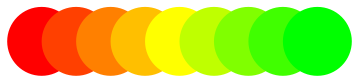
Graphics[Table[{Blend[{Red, Yellow, Green}, x], Disk[{8x, 0}]}, {x, 0, 1, 1 / 8}]]Linear interpolation between colors at specific values:
Graphics[Table[{Blend[{{1, Red}, {3, Yellow}, {10, Green}}, x], Disk[{x, 0}]}, {x, 1, 10}]]Blending colors with equal weights:
Blend[{RGBColor[1, 0, 0], RGBColor[0, 1, 0], RGBColor[0, 0, 1]}]Blending colors with specified weights:
Blend[{RGBColor[1, 0, 0], RGBColor[0, 1, 0], RGBColor[0, 0, 1]}, {1 / 8, 1 / 2, 3 / 8}]ParametricPlot[{x, y}, {x, 0, 1}, {y, 0, 1 - x}, ColorFunction -> Function[{x, y}, Blend[{Red, Green, Blue}, {x, y, 1 - x - y}]]]Images (6)
Linear interpolation between pixels of an image and a color:
Blend[{[image], Yellow}]Linear interpolation of an image and a color at a specific value:
Blend[{[image], Yellow}, .2]Linear interpolation of two images:
Blend[{[image], [image]}]Linear interpolation of two images of different dimensions:
Blend[{[image], [image]}]Blend images and their alpha channels:
Blend[{[image], [image]}]Blend[{\!\(\*Graphics3DBox[«8»]\), \!\(\*Graphics3DBox[«8»]\)}]Applications (2)
Use Blend to construct a ColorFunction from base colors:
Plot[1 / x Sin[x ^ 2], {x, 0, 6}, ColorFunction -> (Blend[{LightBlue, Blue}, #2]&), PlotStyle -> Thick]Plot3D[ x y / (x ^ 2 + y ^ 2), {x, -2, 2}, {y, -2, 2}, RegionFunction -> Function[{x, y, z}, x^2 + y^2 > 0.1], ColorFunction -> (Blend[{Lighter[Yellow, .8], Orange, Red}, #3]&), Mesh -> None]ContourPlot3D[x ^ 2 + y ^ 2 - z ^ 4 + z ^ 5 == 0, {x, -1, 1}, {y, -1, 1}, {z, -1, 1}, ColorFunction -> (Blend[{Cyan, Magenta, Yellow}, {#1, #2, #3}]&), Mesh -> None, ContourStyle -> Opacity[0.7]]Combine multiple images with different exposures into one image:
Blend[{[image], [image], [image], [image], [image]}]Properties & Relations (7)
The weights are always normalized, so that the sum becomes 1:
Blend[{Red, Green, Blue}, {1, 2, 3}]%//InputFormThe position values are always sorted:
Graphics[Raster[{Range[100] / 100}, ColorFunction -> (Blend[{{0, Red}, {1, Green}, {2 / 3, Yellow}, {1 / 3, Blue}}, #]&)], AspectRatio -> .3]When colors are specified using the same color space, that space is used for interpolation:
Column[Labeled[ArrayPlot[{Table[Blend[ColorConvert[{Blue, Red}, #], n], {n, 0, 1, .01}]}, AspectRatio -> .25], #]& /@ {RGBColor, Hue, XYZColor, LCHColor}]When colors are specified using different color spaces, interpolation happens in the RGB space:
ArrayPlot[{Table[Blend[{Red, Hue[2 / 3]}, n], {n, 0, 1, .01}]}, AspectRatio -> .25]Lighter is a special case of Blend:
{Lighter[Blue, 1 / 3], Blend[{Blue, White}, 1 / 3]}Darker is a special case of Blend:
{Darker[Blue, 1 / 3], Blend[{Blue, Black}, 1 / 3]}ColorData contains a large number of predefined Blend colors called "Gradients":
ColorData["Gradients"]//ShortColorData["TemperatureMap", "Image"]DensityPlot[x, {x, 0, 1}, {y, 0, 1}, ColorFunction -> (ColorData["SunsetColors"][#]&)]Gradients can be called by their names only:
DensityPlot[x, {x, 0, 1}, {y, 0, 1}, ColorFunction -> "SunsetColors"]Polygon supports equal-weight blending of VertexColors:
Graphics[Polygon[{{0, 0}, {1, 0}, {0, 1}}, VertexColors -> {Blue, Red, Green}]]ParametricPlot[{x, y}, {x, 0, 1}, {y, 0, 1 - x}, ColorFunction -> Function[{x, y}, Blend[{Red, Green, Blue}, {x, y, 1 - x - y}]], Frame -> False, Axes -> False]Possible Issues (2)
Values outside of the 0, 1 range will be clipped:
Graphics[Table[{Blend[{Red, Green}, i], EdgeForm[Gray], Rectangle[{4i, 0}]}, {i, 0 - 1 / 4, 1 + 1 / 4, 1 / 4}]]In plot functions, use ColorFunctionScaling to control global scaling of variables:
Table[DensityPlot[x, {x, -2, 3}, {y, 0, 1}, FrameTicks -> None, ColorFunction -> (Blend[{Red, Green}, #]&), ColorFunctionScaling -> t], {t, {False, True}}]Different colors can be given at a single position to generate discontinuities:
Graphics[Raster[{Range[100] / 100}, ColorFunction -> (Blend[{{0, Red}, {1 / 2, Yellow}, {1 / 2, Green}, {1, Blue}}, #]&)], AspectRatio -> .3]Interactive Examples (4)
Continuous blend between two images:
Manipulate[Blend[{[image], [image]}, a], {a, 0, 1}]Linear interpolation of two images with different dimensions:
Manipulate[Blend[{[image], [image]}, a], {a, 0, 1}]Blend of multiple images while going through a white background between each two images:
Manipulate[Blend[Riffle[{[image], [image], [image]}, RGBColor[1, 1, 1]], a], {a, 0, 1}]Interactive representation of the linear interpolation of multiple colors:
Manipulate[Show[{ParametricPlot3D[List@@f[x], {x, 0, 1}, AxesLabel -> (Style[#, ToExpression@#]& /@ {"Red", "Green", "Blue"}), ColorFunction -> (RGBColor[#1, #2, #3]&), PlotStyle -> AbsoluteThickness[5]], Graphics3D[{f[u], AbsolutePointSize[20], Point[List@@f[u]]}]}], {u, 0, 1, Appearance -> "Labeled"}, Initialization :> (f[x_ ? NumericQ] := Blend[{Red, Blue, Yellow, Green}, x])]Neat Examples (2)
Use Blend with plots to generate synthesized textures:
ArrayPlot[Table[Evaluate[Sum[Sin[RandomReal[5, 2].{x, y}], {10}]], {x, 0, 10, .05}, {y, 0, 10, .05}], ColorFunction -> (Blend[{Black, Red, Yellow, Black}, #]&)]ReliefPlot[Table[Evaluate[Sum[Sin[RandomReal[5, 2].{x, y}], {10}]], {x, 0, 10, .05}, {y, 0, 10, .05}], ColorFunction -> (Blend[{Darker[Green, .8], Lighter[Brown, .2], White}, #]&)]Graphics3D[Table[{Specularity[White, 100], Blend[{Red, Orange, Lighter[Gray, 1 / 3], Lighter[Blue, 2 / 3]}, i / 15], Sphere[{i Sin[2Pi i / 15], i Cos[2Pi i / 15], i}, i / 6]}, {i, 15}], Lighting -> "Neutral", ViewPoint -> Top, Boxed -> False, Background -> GrayLevel[.15]]
 An Elementary Introduction to the Wolfram Language
 An Elementary Introduction to the Wolfram Language
 An Elementary Introduction to the Wolfram Language
Text
Wolfram Research (2007), Blend, Wolfram Language function, https://reference.wolfram.com/language/ref/Blend.html (updated 2014).
CMS
Wolfram Language. 2007. "Blend." Wolfram Language & System Documentation Center. Wolfram Research. Last Modified 2014. https://reference.wolfram.com/language/ref/Blend.html.
APA
Wolfram Language. (2007). Blend. Wolfram Language & System Documentation Center. Retrieved from https://reference.wolfram.com/language/ref/Blend.html