

ParzenWindow
ParzenWindow[x]
represents a Parzen window function of x.
Details
- ParzenWindow is a window function typically used for antialiasing and resampling.
- Window functions are used in applications where data is processed in short segments and have a smoothing effect by gradually tapering data values to zero at the ends of each segment.
- ParzenWindow[x] is equal to
![ -2 (2 x-1)^3 1/4<x<=1/2; 2 (2 x+1)^3 -1/2<=x<-1/4; -48 x^3-24 x^2+1 -1/4<=x<0; 48 x^3-24 x^2+1 0<=x<=1/4; 0 TemplateBox[{x}, Abs]>1/2;](Files/ParzenWindow.en/2.png " -2 (2 x-1)^3 1/4<x<=1/2; 2 (2 x+1)^3 -1/2<=x<-1/4; -48 x^3-24 x^2+1 -1/4<=x<0; 48 x^3-24 x^2+1 0<=x<=1/4; 0 TemplateBox[{x}, Abs]>1/2;") .
. - ParzenWindow automatically threads over lists.
Examples
open all close allBasic Examples (3)
Scope (4)
ParzenWindow[0.1]Translated and dilated Parzen window:
Plot[ParzenWindow[(x - 1) / 2], {x, -1, 3}]2D Parzen window with a circular support:
Plot3D[ParzenWindow[Sqrt[x ^ 2 + y ^ 2]], {x, -1, 1}, {y, -1, 1}, PlotRange -> All, Exclusions -> None]Discrete Parzen window of length 15:
ListPlot[Array[ParzenWindow, 15, {-1 / 2, 1 / 2}], Filling -> Axis]Discrete 15×11 2D Parzen window:
ListPointPlot3D[Array[ParzenWindow[#1] ParzenWindow[#2]&, {15, 11}, {{-1 / 2, 1 / 2}}], Filling -> Axis, PlotRange -> All]Applications (4)
Decrease the size of an image by a factor of 5 using the Parzen method:
Image[ImageResize[[image], Scaled[1 / 5], Resampling -> "Parzen"], Magnification -> 5]Create a moving-average filter of length 21:
h = ConstantArray[1 / 21., 21]Taper the filter using a Parzen window:
w = Array[ParzenWindow, Length[h], {-1 / 2, 1 / 2}];
fir = w h / Total[w h];
Log-magnitude plot of the power spectra of the filters:
Plot[Evaluate[20Log10[Abs@ListFourierSequenceTransform[#, ω]]& /@ {h, fir}], {ω, 0.1, Pi}, GridLines -> Automatic]Use a window specification to calculate sample PowerSpectralDensity:
proc = ARMAProcess[1, {.5}, {.3}, 1];
data = RandomFunction[proc, {50}];spec = PowerSpectralDensity[data, w, ParzenWindow];Compare to spectral density calculated without a windowing function:
sd = PowerSpectralDensity[data, w];sd === specThe plot shows that window smooths the spectral density:
Plot[{sd, spec}, {w, -π, π}, PlotRange -> All, PlotLegends -> {"no window", "with window"}]Compare to the theoretical spectral density of the process:
Plot[{spec, Evaluate@PowerSpectralDensity[proc, w]}, {w, -π, π}, PlotLegends -> {"data", "process"}]Use a window specification for time series estimation:
data = RandomFunction[ARMAProcess[1, {.3}, {.4}, 1], {300}];Specify window for spectral estimator:
EstimatedProcess[data, ARMAProcess[1, 1], ProcessEstimator -> {"SpectralEstimator", "Window" -> ParzenWindow}]Properties & Relations (2)
The area under the Parzen window:
area = Integrate[ParzenWindow[x], {x, -∞, ∞}]Normalize to create a window with unit area:
Plot[{ParzenWindow[x], ParzenWindow[x] / area}, {x, -1, 1}, PlotRange -> All]Fourier transform of the Parzen window:
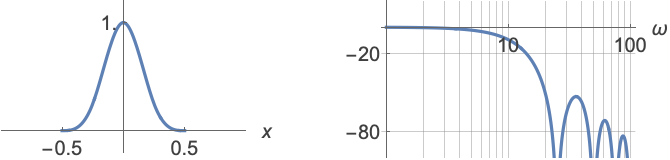
f = FourierTransform[ParzenWindow[x], x, w]Power spectrum of the Parzen window:
LogLinearPlot[20 Log[10, Abs[f]], {w, .1, 100}]Text
Wolfram Research (2012), ParzenWindow, Wolfram Language function, https://reference.wolfram.com/language/ref/ParzenWindow.html.
CMS
Wolfram Language. 2012. "ParzenWindow." Wolfram Language & System Documentation Center. Wolfram Research. https://reference.wolfram.com/language/ref/ParzenWindow.html.
APA
Wolfram Language. (2012). ParzenWindow. Wolfram Language & System Documentation Center. Retrieved from https://reference.wolfram.com/language/ref/ParzenWindow.html