

PeriodicModel
represents a sinusoidal function in one variable.
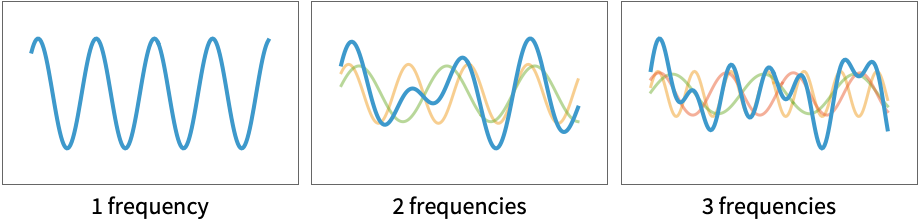
represents a sum of n different sinusoidal functions with different frequencies.
PeriodicModel[hpars,vars]
uses custom hyperparameters hpars and variable specification vars.
PeriodicModel[hpars,pars,vars]
uses explicit parameter values and names pars.
Details
- PeriodicModel represents a sinusoidal function in the given variable in a format suitable for symbolic or numerical evaluation and fitting.
- Periodic models describe repeating phenomena such as oscillations, wave motion, alternating currents and seasonal or cyclic variations.
- PeriodicModel[n] is parametrized as
![sum_(i=1)^nTemplateBox[{i}, CTraditional] sin(x TemplateBox[{{i, +, 1}}, CTraditional]+TemplateBox[{{i, +, 2}}, CTraditional])+TemplateBox[{0}, CTraditional]](Files/PeriodicModel.en/2.png "sum_(i=1)^nTemplateBox[{i}, CTraditional] sin(x TemplateBox[{{i, +, 1}}, CTraditional]+TemplateBox[{{i, +, 2}}, CTraditional])+TemplateBox[{0}, CTraditional]") . The number of parameters is therefore equal to
. The number of parameters is therefore equal to  .
. - When used in ModelFit, the coefficients of the n periodic functions are first estimated individually to obtain starting values for FindFit.
- The following hyperparameters may be specified to control the fit:
-
"FrequencyCount" 1 number of frequencies n "SamplePoints" 10 initial number of search points for each frequency - Possible settings for the number of frequencies include:
-
i number of frequencies to fit UpTo[n] all i up to and including n n;;m all i between n and m inclusive n;;m;;s all i between n and m in steps of s - When not specified, variables will automatically be enumerated using x[i].
- Valid variable specifications vars include:
-
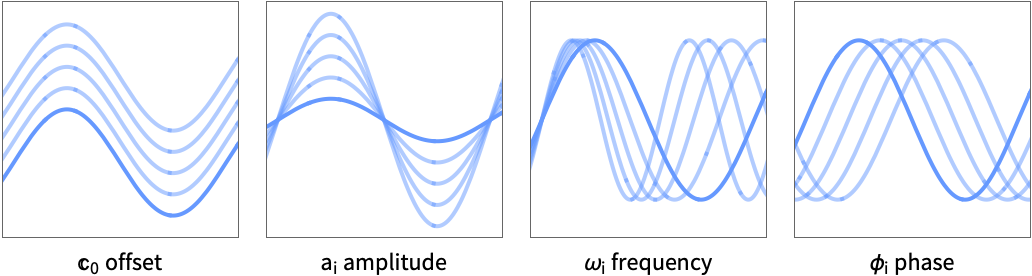
n the number of variables symb a symbolic representation of a single variable - When not specified, parameters will automatically be enumerated using C[0] for the constant offset, a[i] for the amplitudes, k[i] for the frequencies and ϕ[i] for the phase offsets.
- Valid parameter pars specifications in the form {par1,…} include:
-
val a fixed parameter value val par a symbolic parameter name par parval a symbolic name par set to a fixed value val {par,val0} a symbolic parameter named par with the initial value val0 - Model properties can be extracted using Information[PowerModel[…],prop].
- Valid basic properties include:
-
"BaseType" model base type "Name" model name "ShortName" short identifier to use as label "InputType" supported input types "OutputType" supported output types - Valid data-related properties include:
-
"ColumnNames" names of the input features "ColumnVariableMap" map between column names and model variables "InputSize" dimensionality of the input "OutputSize" dimensionality of the output "Trainable" whether the model is fully specified and can be trained "Trained" whether the model can be evaluated numerically "VariableColumnMap" map between model variables and column names "Variables" name of the model variables - Best model-related properties include:
-
"Expression" model expression "Function" model as a pure function "SymbolicExpression" model expression with symbolic parameters "TabularFunction" pure function suitable to work on a tabular row - Parameter-related properties include:
-
"Constraints" parameter constraints "ParameterAssociation" association of parameter names and values "ParameterCount" the number of parameters "ParameterInitialValues" initial values for the fit "ParameterNames" parameter names "ParameterRules" list of rules with parameter names and values "Parameters" parameter values if present; names otherwise "ParameterValues" parameter values - Hyperparameter-related properties include:
-
"HyperparameterDefaultDomain" default hyperparameter search domain "HyperparameterDomain" specified hyperparameter search domain "Hyperparameters" hyperparameter values
Hyperparameters
Variables
Parameters
Properties
Examples
open all close allBasic Examples (3)
Specify a generic periodic model:
PeriodicModel[]Specify the number of frequencies:
PeriodicModel[2]A model with a single frequency and t as the independent variable:
PeriodicModel[1, t]Use custom names for the symbolic parameters:
PeriodicModel[1, {c, a, ω, ϕ}, t]Plot over a variety of frequencies using constant parameters:
Plot[Evaluate@{PeriodicModel[1, {c -> 0, a -> 1, ω -> 1, ϕ -> 0}, 1][x], PeriodicModel[1, {c -> 1, a -> 1, ω -> 1.5, ϕ -> -1}, 1][x], PeriodicModel[1, {c -> 2, a -> 1, ω -> 2, ϕ -> -2}, 1][x]},
	{x, -2Pi, 2Pi}]
Scope (19)
Hyperparameters (4)
FrequencyCount (3)
Specify the number of frequencies of the model:
PeriodicModel[2][x]Use the name of the hyperparameter explicitly:
PeriodicModel[<|"FrequencyCount" -> 2|>][x]Specify a family of models with the maximum given number of frequencies:
model = PeriodicModel[UpTo[2]]Use ModelFit to find the best periodic model up to this maximum number of frequencies:
ModelFit[1. + Sin[Range[10] + 0.1] + 0.5Cos[1.5 * Range[10]], model]The number of frequencies is assumed to be one:
ModelFit[1. + Sin[Range[10] + 0.1] + 0.5Cos[1.5 * Range[10]], PeriodicModel[]]Variables (2)
Specify a PeriodicModel by degree alone:
PeriodicModel[1]Periodic models are always functions of a single variable:
PeriodicModel[1][x]PeriodicModel[1][{x}]Give the variable a custom symbolic representation:
PeriodicModel[1, t]PeriodicModel[1, {t}]These names are overwritten when the model is evaluated symbolically:
PeriodicModel[1, t][a]PeriodicModel[1, {t}][{a}]Parameters (3)
Parameter names are assigned automatically:
PeriodicModel[3]Specify custom parameter names:
PeriodicModel[2, {c, a1, ω1, ϕ1, a2, ω2, ϕ2}, t]The parameter list must have the correct length for the given number of frequencies:
PeriodicModel[2, {c, a1, ω1, ϕ1, a2}, t]Set a parameter to a specific value:
PeriodicModel[1, {0, a, ω, ϕ}, t]Specify a parameter name and set it to a constant value:
PeriodicModel[1, {c -> 0, a, ω, ϕ}, t]Information[%, {"ParameterNames", "ParameterValues"}]Evaluation (2)
Information (4)
View general information about a model:
Information[PeriodicModel[UpTo[2]]]Some information is only available when variables or parameters are fully specified:
Information[PeriodicModel[1, x]]Information[PeriodicModel[1, x], "Variables"]View the available properties:
Information[PeriodicModel[1, x], "Properties"]Information[PeriodicModel[2, x], {"Variables", "Parameters", "AngularFrequencies", "Frequencies", "PeriodLengths"}]Fitting (4)
Fit a periodic model with a single Sin function:
ModelFit[{...}, PeriodicModel[2]]Attempt to fit up to three frequencies:
ModelFit[{...}, PeriodicModel[UpTo[3]]]View the report to compare the fits:
ModelFit[{...}, PeriodicModel[UpTo[3]], "Report"]Numerical parameter values are considered fixed during fitting:
Information[ModelFit[{...}, PeriodicModel[1, {0, A, k, ϕ}, 1]], "ParameterValues"]Fixing all the parameters will result in a model equivalent to the input:
ModelFit[{...}, PeriodicModel[1, {0, 1, 2, 0}, 1], "ParameterValues"]Compare the performance of a previously trained model with one trained on the actual data:
report = ModelFit[{...}, {PeriodicModel[1, {0, 1, 2, 0}, 1], PeriodicModel[1]}, "Report"]Compare the validation errors:
report["ValidationLoss" -> All]Extract the parameters for both models:
report["ParameterValues" -> All]Applications (2)
Monthly Temperature Variation (1)
Retrieve the daily temperature across five years:
temperatures = WeatherData["KMDZ", "MeanTemperature", {{2015}, {2020}, "Day"}]model = ModelFit[temperatures, PeriodicModel[]]DateListPlot[{temperatures, AssociationMap[model[#]&, Normal@temperatures["Dates"]]}]Sunspot Cycle (1)
To determine the cycle of the Wolf sunspot numbers, retrieve historical data:
sunspotCount = ResourceData["Sample Data: Wolf Sunspot Numbers"]Attempt a naive fit to the sunspot data:
ModelFit[sunspotCount, PeriodicModel[]]
The fit fails because the frequencies present in the data are outside the normal search range. Increase the number of search points to search a wider range:
defaultModel = ModelFit[sunspotCount, PeriodicModel[<|"SamplePoints" -> 20|>]]DateListPlot[{sunspotCount, AssociationMap[defaultModel, sunspotCount["Dates"]]}, PlotRange -> All]The default model has found the the single long period variation in the data, approximating the approximately 80-year Gleissberg cycle. Retrieve the frequency:
frequency = Information[defaultModel, "Parameters"][[3]]Fitting is performed on the renormalized dates; calculate the normalization factor:
normalization = sunspotCount["LastDate"] - sunspotCount["FirstDate"]And calculate the time period:
timePeriod = UnitConvert[normalization * 2Pi / frequency, "Years"]This is a little short for the Gleissberg cycle, potentially due to the short sampling period for such a low frequency, and any noise from the 11-year sunspot cycle. Fit additional sin waves to attempt to account for the shorter period:
twoFrequencyModel = ModelFit[sunspotCount, PeriodicModel[2]]DateListPlot[{sunspotCount, AssociationMap[defaultModel, sunspotCount["Dates"]], AssociationMap[twoFrequencyModel, sunspotCount["Dates"]]}, PlotRange -> All, PlotLegends -> {"Data", "Default", "2 frequency"}]Calculate the frequencies of this plot:
frequencies = Information[twoFrequencyModel, "Parameters"][[{3, 6}]]You can see the 11-year sunspot cycle and a 68-year approximation to the Gleissberg cycle. These are the traditional components of the cycle:
UnitConvert[normalization * 2Pi / frequencies, "Years"]Possible Issues (1)
Data with low-frequency components may not be found in the default search:
sunspotCount = ResourceData["Sample Data: Wolf Sunspot Numbers"]ModelFit[sunspotCount, PeriodicModel[]]
Increase the number of frequencies searched:
ModelFit[sunspotCount, PeriodicModel[<|"SamplePoints" -> 20|>]]Text
Wolfram Research (2026), PeriodicModel, Wolfram Language function, https://reference.wolfram.com/language/ref/PeriodicModel.html.
CMS
Wolfram Language. 2026. "PeriodicModel." Wolfram Language & System Documentation Center. Wolfram Research. https://reference.wolfram.com/language/ref/PeriodicModel.html.
APA
Wolfram Language. (2026). PeriodicModel. Wolfram Language & System Documentation Center. Retrieved from https://reference.wolfram.com/language/ref/PeriodicModel.html