

ModelFit
Details and Options
- ModelFit fits and selects the best model from one or more candidates, returning a fitted model or a detailed report.
- Model fitting can be used to predict values for unseen data, understand the relationships between variables, support decision-making and summarize patterns in complex datasets.
- The value of a fitted model at a particular point {x1,…} can be found using model[{x1,…}].
- Possible forms of data are:
-
{y1,y2,…} equivalent to the form {{1,y1},{2,y2},…} {{x11,x12,…,y1},…} a list of independent values xij and the responses yi {{x11,x12,…}y1,…} a list of rules between input values and responses {{x11,x12,…},…}{y1,y2,…} a rule between a list of input values and responses {{x11,…,y1,…},…}n fit the n  column of a matrix
Tabular[…]cspec fit the columns cspec in a tabular object - The following forms of column specifications cspec are allowed for fitting tabular data:
-
ycol fit the response column ycol {xcol,ycol} fit column ycol against column xcol {xcol1,… ,ycol} specify multiple predictor columns xcoli {{xcol1,…},ycol} also specify multiple predictor columns xcoli - Possible model specifications include:
-
"name" fit a named model model fit model on data {model1, model2, …} fit all the modeli and select the best one - Named models include:
-
"Linear" PolynomialModel[1] 
"Quadratic" PolynomialModel[2] 
"Cubic" PolynomialModel[3] 
"Exponential" ExponentialModel[] 
- Valid model specifications include:
-
DecisionTreeModel[] decision tree ExponentialModel[] product of 
FormulaModel[expr,…] generic expression expr LinearModel[basis,…] linear combination of the terms in basis LogModel[] sum of 
NearestModel[] nearest neighbor model PerceptronModel[] multilayer perceptron PeriodicModel[] sum of 
PolynomialModel[d] polynomial of degree d PowerModel[] product of ![alpha_i TemplateBox[{x, i, {beta, _, i}}, Subsuperscript]](Files/ModelFit.en/10.png "alpha_i TemplateBox[{x, i, {beta, _, i}}, Subsuperscript]")
- When specifying more then one model, ModelFit selects the best using cross validation. The best model is then trained on the full data.
- Available properties props include:
-
"Expression" the model mathematical expression, when applicable "FittedModel" a FittedModel object, when applicable "FittedModelList" a list of FittedModel objects "Function" the model as  -ary pure function, when applicable
"Model" the best fitted model (default) "ModelList" all the fitted models "ParameterAssociation" association of parameter names and fitted values "ParameterRules" list of parameter names and fitted values "Parameters" fitted parameter values "Report" a ModelFitReport object that can be queried "TabularFunction" the model as function that applies on a row "Variables" list of used variable names - Additionally, props can be any property of the models and the fit report.
- ModelFit takes the following options:
-
CriterionFunction "RootMeanSquareError" method of loss calcuation RandomSeeding 1234 internal seeding of pseudorandom generators ValidationSet Automatic data used to measure the trained models - The CriterionFunction option controls the function used to select the best model during cross validation.
- In a regression task, the function is applied on the fit residuals ri=yi-
 .
. - In a classification task, the function compares a list of class probabilities {<"class1"p1,…,>,…} and a list of target classes {y1,…}.
- Possible settings for CriterionFunction include:
-
"RootMeanSquaredError" Sqrt[Mean[r^2]] "MeanSquaredError" Mean[r^2] "MeanAbsoluteError" Mean[Abs[r]] "MedianAbsoluteError" Median[Abs[r]] "CrossEntropy" -1/n Sum[Log[p〚i,y〚i〛〛],{i,n}] - Possible settings for RandomSeeding include:
-
Automatic automatically reseed every time the function is called Inherited use externally seeded random numbers seed use an explicit integer or strings as a seed - Possible settings for ValidationSet include:
-
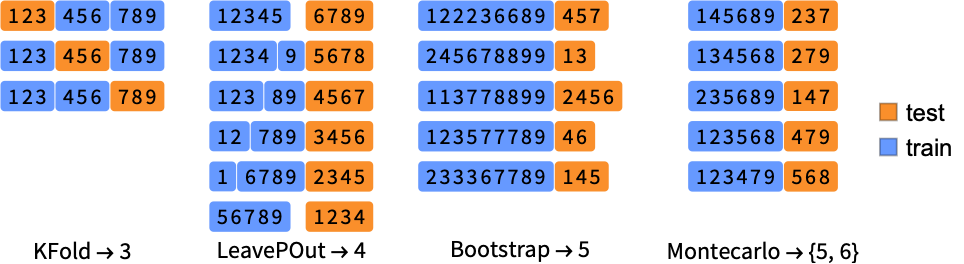
Automatic equivalent to "KFold"5 "KFold"k split data in k subsets, train on k-1 "LeavePOut"p test on p examples and train on the rest "LeaveOneOut" equivalent to "LeavePOut"1 "Montecarlo"{k,n} random sampling k subsets without replacement "Bootstrap"k random sampling k subsets with replacement Scaled[f] use a fraction f of the input data
Data
Model
Properties
Options
Examples
open all close allBasic Examples (3)
Fit a polynomial expression to a list of values:
ModelFit[{-4, -1, 4, 10, 20}, "Quadratic"]Fit a regression line model to tabular data:
ModelFit[ResourceData["Sample Data: Old Faithful Eruptions"], "Linear"]Find the best fit among different models:
ModelFit[ResourceData["Sample Data: Old Faithful Eruptions"], {PolynomialModel[], PowerModel[{0, a, b}, 1]}, "Report"]Scope (18)
Data Specification (5)
Fit a list of values, assuming they are at integer spacing starting from one:
ModelFit[{-4, -1, 4, 10, 20}, "Quadratic"]ModelFit[{{1, -4}, {2, -1}, {3, 4}, {4, 10}, {5, 20}}, "Quadratic"]Specify the data as a list of rules
ModelFit[{1 -> -4, 2 -> -1, 3 -> 4, 4 -> 10, 5 -> 20}, "Quadratic"]
 column of a matrix:
ModelFit[(| | | |
| ---- | --- | ---- |
| 1.3 | "P" | 1 |
| 1.8 | "Q" | 2.5 |
| 1.9 | "Q" | 3 |
| 0.2 | "P" | 1 |
| -3.2 | "P" | -4.2 |
| 0.3 | "Q" | 2 |) -> 2, DecisionTreeModel[]]data = Tabular[Association["RawSchema" -> Association["ColumnProperties" ->
Association["A" -> Association["ElementType" -> "Real64"],
"B" -> Association["ElementType" -> "Real64"]], "KeyColumns" -> None,
"Backend" -> "WolframKernel"], "Options" -> {AppearanceElements -> {"ColumnHeaders"}},
"BackendData" -> Association["ColumnData" -> DataStructure["ColumnTable",
{{TabularColumn[Association["Data" -> {{0.7532169851483861, 0.04392850040375418,
-0.8275531460917351, -0.2441740913902284, -0.9767108540615066}, {}, None},
"ElementType" -> "Real64"]], TabularColumn[Association[
"Data" -> {{0.09726870121287412, -1.0066910140236667, 0.3732317268915213,
-0.7595363493288183, 0.9817034793118677}, {}, None}, "ElementType" -> "Real64"]]}}]]]];ModelFit[data -> "A", "Quadratic"]By default, the final column is considered the response:
ModelFit[data, "Quadratic"] == ModelFit[data -> "B", "Quadratic"]Select both the input columns and the response:
tabular = ResourceData["Sample Data: Fisher's Irises"];ModelFit[tabular -> {"PetalLength", "PetalWidth"}, "Linear"]Specify multiple dependent variables:
ModelFit[tabular -> {{"SepalLength", "SepalWidth"}, "PetalLength"}, "Linear"]Model Specification (5)
ModelFit[{...}, PolynomialModel[2]]ModelFit[{...}, PolynomialModel[2, myvar], "Expression"]Find the best model to fit the data:
ModelFit[{...}, {PolynomialModel[2], ExponentialModel[]}]Find the best model in a family:
ModelFit[{...}, PolynomialModel[UpTo[4]]]Use Span to specify the hyperparameter range:
ModelFit[{...}, PolynomialModel[2 ;; 10 ;; 2]]Specify a model with numerical parameter value:
model = PolynomialModel[2, {5, a, b}, 1]The parameter is considered fixed during fitting:
ModelFit[{{0, 3}, {1, 4}, {2, 5}}, model]Properties (8)
By default, the model is returned with the fitted parameters:
ModelFit[{{1, 1}, {2, 4}, {2.5, 6}, {3, 9}}, PolynomialModel[2, {x}]]This is the equivalent to the "Model" output:
model = ModelFit[{{1, 1}, {2, 4}, {2.5, 6}, {3, 9}}, PolynomialModel[2, {x}], "Model"]Get multiple properties from a fit:
ModelFit[{{1, 1}, {2, 4}, {2.5, 6}, {3, 9}}, PolynomialModel[2, {x}], {"Model", "Function"}]Use "Function" to get a variadic function:
ModelFit[{{1, 1}, {2, 4}, {2.5, 6}, {3, 9}}, PolynomialModel[2, {x}], "Function"]Use "TabularFunction" to get a function that works on a table row:
ModelFit[{{1, 1}, {2, 4}, {2.5, 6}, {3, 9}}, PolynomialModel[2, {x}], "TabularFunction"]Get a FittedModel object:
ModelFit[ResourceData["Sample Data: Fisher's Irises"] -> {"PetalLength", "PetalWidth"}, PolynomialModel[4], "FittedModel"]Get a ModelFitReport for a single model:
ModelFit[ResourceData["Sample Data: Old Faithful Eruptions"], PolynomialModel[4], "Report"]Get a report for the cross-validation results and the best model found:
report = ModelFit[ResourceData["Sample Data: Old Faithful Eruptions"], PolynomialModel[], "Report"]Retrieve information from the report:
report["CrossValidationChart"]Get a list of the cross-validated models:
ModelFit[ResourceData["Sample Data: Fisher's Irises"] -> {"PetalLength", "PetalWidth"}, PolynomialModel[UpTo[5]], "ModelList"]Options (5)
CriterionFunction (2)
Change the CriterionFunction to use a median absolute deviation:
data = ResourceData["Sample Data: Old Faithful Eruptions"];medianModel = ModelFit[data, PolynomialModel[UpTo[3]], "FittedModel", CriterionFunction -> "MedianAbsoluteError" ]ListPlot[ data, PlotFit -> medianModel]Compare to result using the default "RootMeanSquaredError":
ListPlot[ data, PlotFit -> ModelFit[data, PolynomialModel[UpTo[3]], "FittedModel", CriterionFunction -> "RootMeanSquaredError" ]]Examine the ModelFitReport for comparison of model performance:
report = ModelFit[{...}, PolynomialModel[], "Report", CriterionFunction -> "RootMeanSquaredError"]Compare the losses of all input models on a single graph:
report["CrossValidationChart"]See a side-by-side comparison with a different method of loss calculation:
ModelFit[{...}, PolynomialModel[], "CrossValidationChart", CriterionFunction -> #]& /@ {"RootMeanSquaredError", "MedianAbsoluteError"}ValidationSet (3)
Specify how the data is split during the cross validation:
ModelFit[ResourceData["Sample Data: Old Faithful Eruptions"], PolynomialModel[2 | 3 | 4], ValidationSet -> "LeavePOut" -> 10 ]The default setting is "KFold" 5:
ModelFit[ResourceData["Sample Data: Old Faithful Eruptions"], PolynomialModel[2 | 3 | 4], ValidationSet -> "KFold" -> 5 ] === ModelFit[ResourceData["Sample Data: Old Faithful Eruptions"], PolynomialModel[2 | 3 | 4] ]Small sets of data may suffer with the default K-fold of 5:
data = {0.85, 0.3, 4.5, 2.91, 17.69, 25.9, 20.7, 20.11, 17.29, 5.54, 7.52, 7.72};The default setting is keeping the model variance low:
ListPlot[data, PlotFit -> PolynomialModel[UpTo[Length[data]]]]Use a different validation setting to improve accuracy:
ListPlot[data, PlotFit -> ModelFit[data, PolynomialModel[UpTo[Length[data]]], ValidationSet -> "LeaveOneOut"]]Turning off validation typically results in a model that is overfitting the data:
ListPlot[data, PlotFit -> ModelFit[data, PolynomialModel[UpTo[Length[data]]], ValidationSet -> None]]The cross validation type is stated in the fit report:
ModelFit[{...}, PolynomialModel[], "Report"]Applications (1)
Brain to Body Size (1)
To compare brain sizes, retrieve data on the brain to body ratio:
tab = ToTabular@ResourceData["Sample Data: Animal Weights"]plainData = Values@Normal@tab[[All, {"BodyWeight", "BrainWeight"}]] -> Normal@tab[[All, "Species"]];graph = ListLogLogPlot[plainData, LabelingFunction -> Tooltip, AxesLabel -> {"Body", "Brain"}]Remove the three dinosaurs from the dataset:
mammals = Discard[tab, MatchQ[#Species, "Triceratops" | "Diplodocus" | "Brachiosaurus"]&]Due to the data range, use the logarithm of the data:
logMammal = ConstructColumns[mammals, {"Species", "LogBodyWeight" -> Function[Log[QuantityMagnitude[#BodyWeight]]], "LogBrainWeight" -> Function[Log[QuantityMagnitude[#BrainWeight]]]}]Fit a linear model to the mammals:
model = ModelFit[logMammal -> {"LogBodyWeight", "LogBrainWeight"}, "Linear"]Compare the fit to the entire dataset (note the three outliers; these are the three dinosaurs):
Show[
	graph,
	ListLogLogPlot[Table[{Exp[x], Exp[model[x]]}, {x, -4, 12}], Joined -> True, PlotHighlighting -> None]
	]
Properties & Relations (3)
Use the "FittedModel" property in the PlotFit option of ListPlot:
ListPlot[{...}, PlotFit -> ModelFit[{...}, PowerModel[], "FittedModel"]]Use Information to review details of a model after fitting:
Information[ModelFit[{...}, PolynomialModel[2]]]Information[ModelFit[{...}, PolynomialModel[2]], "Variables"]Retrieve multiple properties simultaneously:
Information[ModelFit[{...}, PolynomialModel[2]], {"Hyperparameters", "Parameters"}]Static and initial values for parameters are typically determined by model specifications; for example, specify a PolynomialModel with a fixed intercept:
ModelFit[{...}, PolynomialModel[2, {a -> 1, b, c}, 1]]Use a PowerModel with an initial value for the power:
ModelFit[{...}, PowerModel[{a, b, {c, -1}}, 1]]Possible Issues (1)
Outliers or bad data can cause the fit to fail:
data = ResourceData["Sample Data: Abalone Measurements"];Attempt to fit a power law to the data:
ModelFit[data -> {{"Diameter", "Height"}, "WholeWeight"}, PowerModel[]]
ListPointPlot3D[data[[All, {"Diameter", "Height", "ShuckedWeight"}]], AxesLabel -> Automatic]Discard the nonsensical  -high crab from the dataset:
cleanData = Discard[data, #["Height"] == Quantity[0, "Millimeters"]&];ModelFit[cleanData -> {{"Diameter", "Height"}, "WholeWeight"}, PowerModel[]]Text
Wolfram Research (2026), ModelFit, Wolfram Language function, https://reference.wolfram.com/language/ref/ModelFit.html.
CMS
Wolfram Language. 2026. "ModelFit." Wolfram Language & System Documentation Center. Wolfram Research. https://reference.wolfram.com/language/ref/ModelFit.html.
APA
Wolfram Language. (2026). ModelFit. Wolfram Language & System Documentation Center. Retrieved from https://reference.wolfram.com/language/ref/ModelFit.html