

SystemModelLinearize
SystemModelLinearize[model]
gives a linearized StateSpaceModel for model at an equilibrium.
SystemModelLinearize[model,op]
linearizes at the operating point op.
Details and Options
- SystemModelLinearize gives a linear approximation of model near an operating point.
- A linear model is typically used for control design, optimization and frequency analysis.
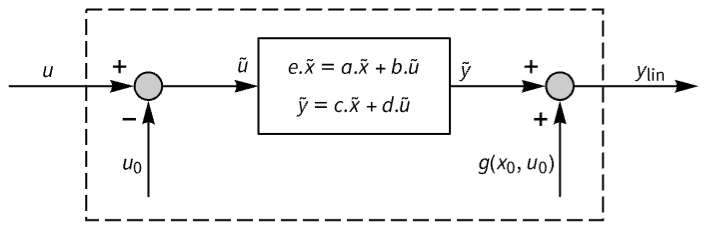
- A system with equations
 and output equations
  is linearized at an operating point
  and
and  that should satisfy f(0,x0,u0)0.
 - The returned linear StateSpaceModel has state
 , input
  and output
  , with state equations
  and output equation
  . The matrices are given by
  ,
,  ,
,  ,
,  and
and  , all evaluated at
  ,
,  and
and  .
. - SystemModelLinearize[model] is equivalent to SystemModelLinearize[model,"EquilibriumValues"].
- Specifications for op use the following values for the operating point:
-
"InitialValues" initial values from model "EquilibriumValues" FindSystemModelEquilibrium[model] sim or {sim,"StopTime"} final values from SystemModelSimulationData sim {sim,"StartTime"} initial values of sim {sim,time} values at time from sim {{{x1,x10},…},{{u1,u10},…}} state values xi0 and input values ui0 - The simulation sim can be obtained using SystemModelSimulate[model,All,…].
- SystemModelLinearize linearizes a system of DAEs symbolically, or first reduces it to a system of ODEs and linearizes the resulting ODEs numerically.
- The following options can be given:
-
Method Automatic methods for linearization algorithm ProgressReporting $ProgressReporting control display of progress - The option Method has the following possible settings:
-
"NumericDerivative" reduces to ODEs and then linearizes numerically "SymbolicDerivative" linearizes symbolically from a system of DAEs - Method{"SymbolicDerivative","ReduceIndex"False} turns off index reduction.

Examples
open all close allBasic Examples (3)
Linearize a DC-motor model around an equilibrium:
SystemModelLinearize[[image]]Linearize a mixing tank model around equilibrium with given state and input constraints:
SystemModelLinearize[[image], {{{"H", 0.75}}, {{"u1", 5.23}}}]Linearize one of the included introductory hierarchical examples:
model = Last@SystemModelExamples["Models", "IntroductoryExamples.Hierarchical.*"]SystemModelLinearize[model]Scope (19)
Model Types (5)
Linearize a textual RLC circuit model:
SystemModelLinearize[[image]]Linearize an RLC circuit block diagram model:
SystemModelLinearize[[image]]Linearize an acausal RLC circuit:
SystemModelLinearize[[image]]SystemModelLinearize[\!\(\*GraphicsBox[«8»]\)]Linearize a DAE model symbolically:
SystemModelLinearize[\!\(\*GraphicsBox[«8»]\), Method -> {"SymbolicDerivative", "SymbolicParameters" -> {"R1", "R2", "L"}}]Limiting Cases (3)
Linearization Values (5)
Linearize around an equilibrium:
SystemModelLinearize[[image], "EquilibriumValues"]Linearize around initial values:
SystemModelLinearize[[image], "InitialValues"]Linearize around equilibrium with given state and input constraints:
SystemModelLinearize[[image], {{{"H1", 2.03}, {"T1", 318.15}, {"T2", 318.15}}, {{"u1", 5}, {"u2", 5}}}, "EquilibriumValues"]Linearize around equilibrium with state constraints:
SystemModelLinearize[[image], {{{"H1", 5}, {"T1", 318.15}, {"T2", 318.15}}, {}}, "EquilibriumValues"]Linearize around given partial states and inputs, using initial values for remaining values:
SystemModelLinearize[[image], {{{"H1", 3.03}, {"T1", 318.15}, {"T2", 318.15}}, {{"u1", 5}, {"u2", 5}}}, "InitialValues"]Operating Point (6)
Linearize around an equilibrium:
SystemModelLinearize[[image], "EquilibriumValues"]Linearize around initial values:
SystemModelLinearize[[image], "InitialValues"]Linearize around equilibrium with given state and input constraints:
SystemModelLinearize[[image], {{{"H1", 2.03}, {"T1", 318.15}, {"T2", 318.15}}, {{"u1", 5}, {"u2", 5}}}, "EquilibriumValues"]Linearize around initial values from a simulation:
sim = SystemModelSimulate[[image], All, {0, 0}]SystemModelLinearize[[image], {sim, "StartTime"}]Linearize around final values from a simulation:
sim = SystemModelSimulate[[image], All]SystemModelLinearize[[image], {sim, "StopTime"}]Linearize around final values from a simulation run to steady state:
sim = SystemModelSimulate[[image], All, Method -> {"StopAtSteadyState" -> True}]
SystemModelLinearize[[image], {sim, "StopTime"}]Generalizations & Extensions (1)
Hide labels in the resulting StateSpaceModel:
SystemModelLinearize[[image], SystemsModelLabels -> None]Options (5)
Method (4)
The "SymbolicDerivative" method uses a fully specified operating point from a simulation:
sim = SystemModelSimulate[[image], All, {0, 0}]SystemModelLinearize[[image], sim, Method -> "SymbolicDerivative"]The "NumericDerivative" method uses an operating point specified by state and input values:
SystemModelLinearize[[image], {{{"capacitor.v", 0.}, {"inductor.i", 0.}}, {{"v", 0.}}}, Method -> "NumericDerivative"]Linearizing symbolically allows keeping some parameters symbolic:
SystemModelLinearize[[image], Method -> {"SymbolicDerivative", "SymbolicParameters" -> {"R", "L", "C"}}]Use "ReduceIndex" to turn off index reduction when linearizing symbolically:
sim = SystemModelSimulate[[image], All, {0, 0}];Turning off index reduction results in a descriptor StateSpaceModel:
SystemModelLinearize[[image], sim, Method -> {"SymbolicDerivative", "ReduceIndex" -> False}]ProgressReporting (1)
Control progress reporting with ProgressReporting:
SystemModelLinearize[[image], ProgressReporting -> False]Applications (10)
Analyzing Linearized System (5)
Compare responses from a model and its linearization at an equilibrium point:
model = [image];{Subscript[x, 0], Subscript[u, 0], Subscript[y, 0]} = FindSystemModelEquilibrium[model];Linearize around the equilibrium point:
ss = SystemModelLinearize[model, "EquilibriumValues"];Compare the stationary output response with a nonlinear model:
{linY1, linY2} = OutputResponse[ss, {UnitStep[t], UnitStep[t]}, {t, 0, 300}];nonLin = SystemModelSimulate[model, {0, 300}, <|"InitialValues" -> Rule@@@Subscript[x, 0], "Inputs" -> {"u1" -> Function[t, Subscript[u, 0][[1, 2]] + UnitStep[t]], "u2" -> Function[t, Subscript[u, 0][[2, 2]] + UnitStep[t]]}|>];Show[SystemModelPlot[nonLin, {"y1"}], Plot[Tooltip[Subscript[y, 0][[1, 2]] + linY1, "linear y1"], {t, 0, 300}]]Test the stability of a linearized system from eigenvalues of the system matrix:
ss = SystemModelLinearize[[image], "InitialValues"]Since there is an eigenvalue with a positive real part, the system is unstable:
{a, b, c, d} = Normal[ss];Re@Eigenvalues[a]Plotting the output response also indicates an unstable system:
Plot[Evaluate[OutputResponse[ss, UnitStep[t], {t, 1}]], {t, 0, 1}]Test the stability of a linearized system from poles of the transfer function:
tf = TransferFunctionModel@SystemModelLinearize[[image]];Since there is a pole with a positive real part, the system is unstable:
TransferFunctionPoles[tf]Do a frequency analysis using a linear model:
model = \!\(\*GraphicsBox[«8»]\);By plotting ![TemplateBox[{{H, (, {ⅈ, , omega}, )}}, Abs]](Files/SystemModelLinearize.en/21.png "TemplateBox[{{H, (, {ⅈ, , omega}, )}}, Abs]") for the linearized transfer function
for the linearized transfer function  :
:
ss = SystemModelLinearize[model];BodePlot[ss, {0.5, 3}, PlotLayout -> "Magnitude"]Verify the result using Fourier on simulated data:
nonLin = SystemModelSimulate[model, {0, 200}, <|"Inputs" -> {"u" -> Function[t, UnitStep[t] - UnitStep[t - 2]]}|>];![TemplateBox[{{H, (, {ⅈ, , omega}, )}}, Abs]](Files/SystemModelLinearize.en/23.png "TemplateBox[{{H, (, {ⅈ, , omega}, )}}, Abs]")

odata = Abs@Fourier@Table[nonLin[{"inertia3.w"}, t][[1]], {t, 0, 200, 0.25}];
idata = Abs@Fourier@Table[UnitStep[t] - UnitStep[t - 2], {t, 0, 200, 0.25}];ListLogLinearPlot[odata[[1 ;; 200]] / idata[[1 ;; 200]], Joined -> True, DataRange -> {0, 2Pi}, PlotRange -> {{0.5, 3}, {0, 50}}]Alternatively, the imaginary parts of the eigenvalues give the resonance peaks:
{a, b, c, d} = Normal[ss];Im[Eigenvalues[a]]Linearization takes place at time 0:
model = [image];Linearize with the switch connecting at time 0:
model2 = SystemModel[model, {"t" -> 0}];rlc = SystemModelLinearize[model2]If the switch is not connected at time 0, the result is different:
model3 = SystemModel[model2, {"t" -> 1}];rl = SystemModelLinearize[model3]Controller Design for Linearized System (5)
Design a PID controller using a linearized model:
tf = TransferFunctionModel@SystemModelLinearize[[image]];Define a PID controller and closed-loop transfer function:
pidTf = TransferFunctionModel[kp (1 + 1 / (τi ) + τd ), ];cltf = SystemsModelFeedbackConnect[SystemsModelSeriesConnect[pidTf, tf]];Select PID parameters for appropriate step response:
Manipulate[
Plot[OutputResponse[cltf /. {kp -> gain, τi -> iTime, τd -> dTime}, UnitStep[t], {t, 20}]//Evaluate, {t, 0, 20}, PlotStyle -> Thick, GridLines -> Automatic, Frame -> True, PlotRange -> {0, 1.2}],
{{gain, 1, "SubscriptBox[k, p]"}, 0.01, 10}, {{dTime, 0.01, "SubscriptBox[τ, d]"}, 0.01, 10}, {{iTime, 1.9, "SubscriptBox[τ, i]"}, 0.01, 10}, SaveDefinitions -> True]Design a lead-based controller for a DC motor based on its linearization:
tf = TransferFunctionModel@SystemModelLinearize[[image]];Define a PI-lead controller transfer function:
piLeadTf = TransferFunctionModel[kp (1 + 1 / τi (τd + 1) / (α τd + 1)), ];optf = SystemsModelSeriesConnect[piLeadTf, tf];Manipulate[BodePlot[newOptf = optf /. {kp -> Kp, τi -> Τi, τd -> Τd, α -> Α}, StabilityMargins -> True, PlotLayout -> "List"],
{{Kp, 4.5, "SubscriptBox[k, p]"}, 0.01, 10}, {{Τi, 2, "τi"}, 0.01, 10}, {{Τd, 0.01, "τd"}, 0.01, 10}, {{Α, 0.07, "α"}, 0.01, 0.9}, SaveDefinitions -> True]Use selected parameters and close the loop with the PI-lead controller:
cltf = SystemsModelFeedbackConnect[SystemsModelSeriesConnect[newOptf, tf]];Plot[OutputResponse[cltf, UnitStep[t], {t, 20}]//Evaluate, {t, 0, 20}, PlotStyle -> Thick, GridLines -> Automatic, Frame -> True, PlotRange -> All]Design a controller using pole placement:
ss = SystemModelLinearize[[image]];k = StateFeedbackGains[ss, {-0.251, -0.222, -0.222}]Compute the closed-loop state-space model:
clss = SystemsModelStateFeedbackConnect[ss, k];Plot[OutputResponse[clss, {UnitStep[t], UnitStep[t]}, {t, 100}]//Evaluate, {t, 0, 100}, PlotRange -> All]ss = SystemModelLinearize[[image]];Define state and input weight matrices:
{q1, q2} = {DiagonalMatrix[{1, 6 10^-4, 6 10^-4}], DiagonalMatrix[{0.0002, 0.0002}]};k = LQRegulatorGains[ss, {q1, q2}]Closed-loop state-space model:
clss = SystemsModelStateFeedbackConnect[ss, k];Plot[OutputResponse[clss, {UnitStep[t], UnitStep[t]}, {t, 100}]//Evaluate, {t, 0, 100}, PlotRange -> All]model = [image];ss = SystemModelLinearize[model];Compute estimator gains and the estimator state-space model:
l = EstimatorGains[ss, {-0.6020, -0.5856, -0.5697}]{a, b, c, d} = Normal[ss];ssobsv = StateSpaceModel[{a - l.c, ArrayFlatten[{{b - l.d, l}}], IdentityMatrix[3]}];The state and output response to a unit step on the inputs:
sresp = StateResponse[ss, {UnitStep[t], UnitStep[t]}, {t, 200}];y = OutputResponse[ss, {UnitStep[t], UnitStep[t]}, {t, 200}];oresp = OutputResponse[ssobsv, {UnitStep[t], UnitStep[t], y[[1]], y[[2]]}, {t, 200}];Compare each state and its estimate:
states = model["StateVariables"];Table[Plot[{sresp[[i]], oresp[[i]]}, {t, 0, 200}, PlotLabel -> states[[i]]], {i, 3}]Properties & Relations (7)
Linearize around initial values using properties from SystemModel:
model = [image];ival = model["GroupedInitialValues"]SystemModelLinearize[model, ival, "InitialValues"] == SystemModelLinearize[model, "InitialValues"]Linearize around equilibrium using FindSystemModelEquilibrium:
model = [image];eqval = FindSystemModelEquilibrium[model];SystemModelLinearize[model, eqval] == SystemModelLinearize[model, "EquilibriumValues"]Compare responses from a model and its linearization at an equilibrium point:
model = [image];{Subscript[x, 0], Subscript[u, 0], Subscript[y, 0]} = FindSystemModelEquilibrium[model, {"H" == 0.85, "Tu" == 38, "Tx" == 38}]Linearize around the equilibrium point:
ss = SystemModelLinearize[model, {{{"H", 0.85}, {"Tu", 38}, {"Tx", 38}}, {}}, "EquilibriumValues"]Compare the stationary output response with a nonlinear model:
{linY1, linY2} = OutputResponse[ss, {UnitStep[t], UnitStep[t]}, {t, 0, 300}];nonLin = SystemModelSimulate[model, {0, 300}, <|"InitialValues" -> Rule@@@Subscript[x, 0], "Inputs" -> {"u1" -> Function[t, Subscript[u, 0][[1, 2]] + UnitStep[t]], "u2" -> Function[t, Subscript[u, 0][[2, 2]] + UnitStep[t]]}|>];Show[SystemModelPlot[nonLin, {"y1"}], Plot[Evaluate@Tooltip[Subscript[y, 0][[1, 2]] + linY1, "linear y1"], {t, 0, 300}]]Use TransferFunctionModel to convert to a transfer function representation:
SystemModelLinearize[[image]]TransferFunctionModel[%]Use ToDiscreteTimeModel to discretize a linearized model:
SystemModelLinearize[[image]]Discretize using sample time  :
:
ToDiscreteTimeModel[%, 0.10, z]The linearized state-space model is not unique:
linearize1 = [image];linearize1["ModelicaDisplay"]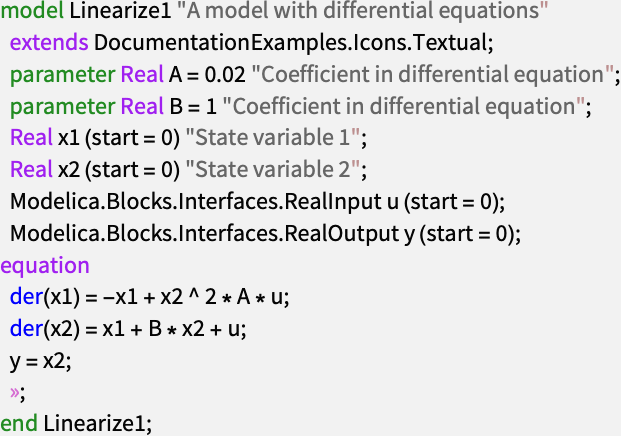
ss1 = SystemModelLinearize[linearize1]Change the order in which the variables x1 and x2 are declared:
linearize2 = [image];linearize2["ModelicaDisplay"]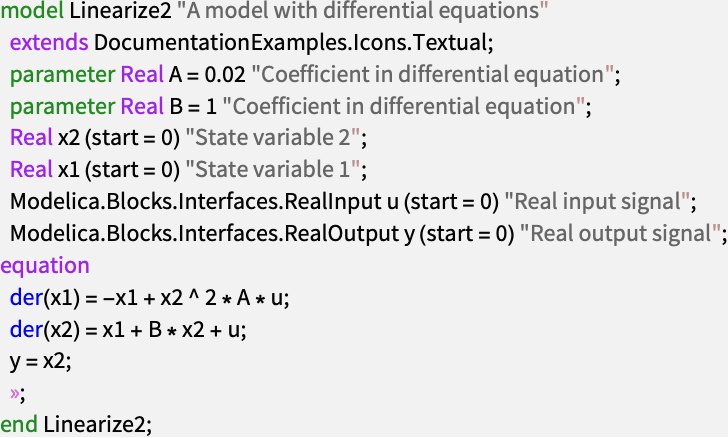
ss2 = SystemModelLinearize[linearize2]The models are equivalent and have identical transfer functions:
TransferFunctionModel[ss1] == TransferFunctionModel[ss2]StateSpaceModel can linearize systems of ordinary differential equations:
ClearAll[t, x, θ, i, vin, g, r, lin, mc, mp, l, k, dc, dp, a];eqs = {(mc + mp)x''[t] - mp l Cos[θ[t]] θ''[t] + mp l Sin[θ[t]] θ'[t]^2 == k i[t] - dc x'[t], θ''[t]mp (4l^2 / 3 + a^2 / 4) - mp l x''[t] Cos[θ[t]] == mp g l Sin[θ[t]] - dp θ'[t], 0 == vin[t] - r i[t] - lin i'[t] - k x'[t]};opssm = Sequence[{{i[t], 0}, {θ[t], 0}, {θ'[t], 0}, {x[t], 0}, {x'[t], 0}}, {{vin[t], 0}}];outputs = {θ[t], x[t]};ssm = StateSpaceModel[eqs, opssm, outputs, t]//SimplifyUse approximate numeric parameter values:
parVals = {g -> 9.80665, r -> 13, lin -> 1, mc -> 445 * 0.1^3, mp -> 7700 * π * 0.005^2 * 0.61, l -> 0.61 / 2, a -> 0.005, k -> 3.7 * 157.48 * 1.6, dc -> 2, dp -> 0.01};ssm /. parValsUse SystemModelLinearize to linearize a SystemModel of the same system:
model = SystemModel[[image], <|"ParameterValues" -> {"electricalMotor.J" -> 0}|>];op = FindSystemModelEquilibrium[model]SystemModelLinearize[model, op]Create a NonlinearStateSpaceModel from the equations and compare with the SystemModel:
nssm = NonlinearStateSpaceModel[eqs, opssm, outputs, t]//SimplifyplotComparison[nssmVar_, smVar_] := Show[SystemModelPlot[nssm, {nssmVar}, 20, <|"ParameterValues" -> parVals, "Inputs" -> {vin -> UnitBox}|>, PlotLabel -> nssmVar, ...], SystemModelPlot[model, {smVar}, 20, <|"Inputs" -> {"V" -> UnitBox}|>, TargetUnits -> "Unit", ...]];plotComparison[θ, "pendulum.pendulumDamper.phi_rel"]plotComparison[x, "pendulum.sliderConstraint.s"]Possible Issues (1)
Some models cannot be linearized symbolically:
SystemModelLinearize["DocumentationExamples.Modeling.ElectricCircuit.CircuitWithEvent", Method -> "SymbolicDerivative"]
SystemModelLinearize["DocumentationExamples.Basic.StateOut", Method -> "SymbolicDerivative"]
SystemModelLinearize["DocumentationExamples.Basic.InOutNoState", Method -> "SymbolicDerivative"]
Use "NumericDerivative" to linearize numerically:
SystemModelLinearize["DocumentationExamples.Modeling.ElectricCircuit.CircuitWithEvent", Method -> "NumericDerivative"]Related Links

 Wolfram System Modeler Documentation
Text
Wolfram Research (2018), SystemModelLinearize, Wolfram Language function, https://reference.wolfram.com/language/ref/SystemModelLinearize.html (updated 2020).
CMS
Wolfram Language. 2018. "SystemModelLinearize." Wolfram Language & System Documentation Center. Wolfram Research. Last Modified 2020. https://reference.wolfram.com/language/ref/SystemModelLinearize.html.
APA
Wolfram Language. (2018). SystemModelLinearize. Wolfram Language & System Documentation Center. Retrieved from https://reference.wolfram.com/language/ref/SystemModelLinearize.html