

WriteLine
Examples
open all close allBasic Examples (2)
Write a string to a temporary file:
file = CreateFile[];WriteLine[file, "hello world"]FilePrint[file]
DeleteFile[file]Start the system shell process:
process = StartProcess[$SystemShell]Write a command into the shell process:
WriteLine[process, "echo example line"];Read one line from the shell output:
ReadLine[process]Scope (2)
str = OpenWrite[];WriteLine[str, "1234"];Close[str];Print the contents that were written:
FilePrint[First[str]]
file = File[CreateFile[]]WriteLine[file, "this is some text"]WriteLine[file, "this is more text"]Close[file]FilePrint[file]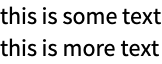
DeleteFile[file]Properties & Relations (1)
WriteLine inserts line breaks after each string it writes:
file = File[CreateFile[]]WriteLine[file, "this is some text"];
WriteLine[file, "this is more text"];
Close[file]FilePrint[file]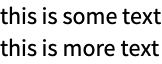
WriteString does not insert line breaks automatically:
WriteString[file, "this is some text"];
WriteString[file, "this is more text"];
Close[file]FilePrint[file]
DeleteFile[file]Text
Wolfram Research (2014), WriteLine, Wolfram Language function, https://reference.wolfram.com/language/ref/WriteLine.html (updated 2016).
CMS
Wolfram Language. 2014. "WriteLine." Wolfram Language & System Documentation Center. Wolfram Research. Last Modified 2016. https://reference.wolfram.com/language/ref/WriteLine.html.
APA
Wolfram Language. (2014). WriteLine. Wolfram Language & System Documentation Center. Retrieved from https://reference.wolfram.com/language/ref/WriteLine.html