

Export
Listing of Formats »Export["dest.ext",expr]
exports data to a file, converting it to the format corresponding to the file extension ext.
Export[dest,expr,"fmt"]
exports data in the specified format "fmt".
Export[dest,exprs,elements]
exports data by treating exprs as elements.
Export[dest,exprs,elements,options]
uses the specified options.
Details
- Export handles a large number of formats, each typically with many different possible elements. The possible formats are given in the list $ExportFormats, and in the "Listing of All Formats".
- By default, Export creates a file in the current directory given by Directory[].
- In Export[dest,…], dest can be any of the following:
-
"file" or File["file"] explicit file name "!prog" export data to a pipe CloudObject[…] a cloud object LocalObject[…] a local object - The following combinations of exprs and elements can be given:
-
expr elem export expr as elem {expr1,expr2,…} {{elem1,elem2,…}} export expri as elemi {expr1,expr2,…} {elem1,subelem1,…} export expri as sublement subelemi of elem1 rules "Rules" export elements and expressions rules - When specifying the format, the following elements specifications can be given:
-
{"format",elem} a single element {"format",{elem1,elem2,…}} multiple elements {"format",elem1,sublelem1,…} subelements of subelements of elem1 {"format",rules} export elements and expressions rules - When exporting using the "Rules" element, rules can have the following forms:
-
elem->val a value for a single element {elem1->val1,elem2->val2,…} values for several elements elem1->val1,elem2->val2,… an association for several elements elem1->{elem11->val11,…} values for subelements - Export takes an OverwriteTarget option for all formats. Possible settings include:
-
False do not overwrite an existing file True overwrite an existing file (default) "KeepBoth" keep the existing file, automatically choosing a name for the new file - Use Export[dest,…,options] to provide format-specific options that control the behavior of the export.
- Export[file,NotebookObject[…],…] when possible exports the content of the notebook referenced by the NotebookObject.
- New formats can be manually registered in the Wolfram Language. See the tutorial for "Developing an Export Converter".
Examples
open all close allBasic Examples (4)
Export["landscape.jpg", [image]]Export["test.gif", Plot[Sin[x], {x, 0, 10}]]Export["test.gif", Integrate[1 / (x ^ 4 - 1), x]]Import[%]Export a sound as a MIDI file:
Export["middlec.mid", Sound[{SoundNote["C"], SoundNote["G"]}]]Scope (13)
Basic Uses (5)
Export a SparseArray to a Matrix Market file:
s = SparseArray[{{1, 1} -> 1, {2, 2} -> 2, {3, 3} -> 3, {1, 3} -> 4}]Export["file.mtx", s]Export a Dataset to a "JSONLines" file:
ds = Dataset[Table[<|"a" -> 3i, "b" -> 3i + 2, "c" -> 3i + 5|>, {i, 3}]]Export["file.jsonl", ds]Export a Tabular object to a "Parquet" file:
tabular = Import["ExampleData/USstates.orc"]Export["file.parquet", tabular]Export "MP3" data to a "WAV" file:
Export["file", \!\(\*AudioBox[""]\), "WAV"]Verify the format of the resulting file:
FileFormat["file"]Export data using an option in "MP3" to exclude metadata:
Export["car.mp3", \!\(\*AudioBox[""]\), "MP3", IncludeMetaInformation -> False]Verify that there is no metadata in the resulting file:
Import["car.mp3", "MetaInformation"]Types of Formats (8)
Audio (1)
Graphics (1)

3D Graphics (1)
Export a 3D model to an "X3D" file:
Export["model.x3d", [image]]FilePrint[%]
Image (1)
Spreadsheet (1)
Text (2)
Export some text to a text file:
(text = Import["ExampleData/USConstitution.txt"])//SnippetExport["file.txt", text]Export a matrix to a "Markdown" file:
matrix = {{a, b}, {c, d}, {e, f}}Export["file.md", matrix]//FilePrint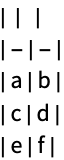
Video (1)
Export an animation to an "MP4" file:
animation = Manipulate[Plot[Sin[a x], {x, 0, 10}], {a, 1, 5}]Export["file.mp4", animation]Generalizations & Extensions (2)
Local objects can be used with Export and Import to store data persistently:
Export[LocalObject["plot"], Plot[Sin[x], {x, 0, 10}], "PNG"]Import[%]Cloud objects can be used with Export and Import to store data persistently:
Export[CloudObject["plot"], Plot[Sin[x], {x, 0, 10}], "PNG"]Import[%]Options (1)
OverwriteTarget (1)
Export["file.png", RandomImage[]]By default, Export overwrites an existing file:
Export["file.png", RandomImage[]]Use OverwriteTargetFalse to avoid overwriting:
Export["file.png", RandomImage[], OverwriteTarget -> False]
Properties & Relations (1)
The first format returned by FileNameToFormatList is used by default in Export:
FileNameToFormatList["file.cdf"]Export["data.cdf", RandomInteger[100, 10]]FileFormat[%]Specify a different export format:
Export["data.cdf", RandomInteger[100, 10], "NASACDF"]FileFormat[%]
 Fast Introduction for Programmers: External Connections
 An Elementary Introduction to the Wolfram Language
 NKS|Online
Text
Wolfram Research (1999), Export, Wolfram Language function, https://reference.wolfram.com/language/ref/Export.html (updated 2019).
CMS
Wolfram Language. 1999. "Export." Wolfram Language & System Documentation Center. Wolfram Research. Last Modified 2019. https://reference.wolfram.com/language/ref/Export.html.
APA
Wolfram Language. (1999). Export. Wolfram Language & System Documentation Center. Retrieved from https://reference.wolfram.com/language/ref/Export.html