"Number" (Comparison Method)
Details
- The number comparison method considers two numeric quantities to be equivalent if they do not differ numerically beyond a given tolerance.
- The numeric tolerance should usually be set using the Tolerance option in AssessmentFunction. The default value of 0 allows only machine precision differences.
- By default, the tolerance is compared to the absolute difference between the answer key value and the answer. The DistanceFunction option can be used to specify a different distance metric.
- When multiple values in the answer key are within the tolerance range of an answer, the closest value is selected.
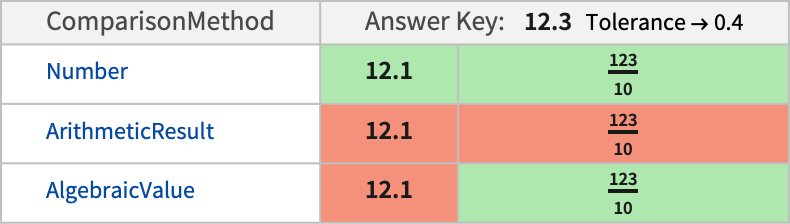
- The following table shows a comparison of "Number" with other comparison methods for a typical answer key and two possible submitted answers:
Examples
open all close allBasic Examples (3)
Create an AssessmentFunction for a number comparison question:
numberaf = AssessmentFunction[2024, "Number"]numberaf[2024]Numerically, approximation is always performed and equivalence is tested by default at machine precision level:
numberaf[2024.0]Create a check for an approximate number:
tolerancetest = AssessmentFunction[1.414, "Number", Tolerance -> 0.01]Answers within the tolerance range are correct:
tolerancetest[1.415]Any other value is marked incorrect:
tolerancetest[1.4]"Number" is chosen automatically when all values in the answer key are numeric. Define assessment for a problem with multiple correct answers:
numberaf = AssessmentFunction[{1, Pi, Pi ^ 2}]numberaf[Pi]numberaf[1.0]With no Tolerance specified, values not in the key are incorrect:
numberaf[3.14]Scope (5)
Create an assessment for a list of answers, with each element assessed individually:
ewAF = AssessmentFunction[{2, 3, 5, 7, 11, 13, 17, 19, 23, 29}, <|"ListAssessment" -> "SeparatelyScoreElements"|>]assessment = ewAF[{44, 17, 23}]Each answer is assessed and scored separately. By default, any incorrect answer gives an overall incorrect result:
assessment[All]Use "ListAssessment""AllElementsOrdered" to create an assessment function for an ordered list of numbers, where all values must be included in the answer:
orderedAF = AssessmentFunction[{{1, 2, 3}}, <|"ListAssessment" -> "AllElementsOrdered"|>, Tolerance -> 0.2]orderedAF[{1.1, 2.1, 2.9}]orderedAF[{1.1, 2.9, 2.1}]Use "ListAssessment""AllElementsOrderless" to create an assessment function for a list of numbers, where all values must be included in the answer but the order does not matter:
anyorder = AssessmentFunction[{{1, 2, 3}}, <|"ListAssessment" -> "AllElementsOrderless"|>, Tolerance -> 0.2]Apply the function to an answer:
anyorder[{1.1, 2.9, 2.1}]Use "Number" comparison in a QuestionObject:
QuestionObject[QuestionInterface["NumericRange", <|"Prompt" -> "Approximately how many ounces are in a cup?", "Range" -> {1, 10}|>], AssessmentFunction[8.0 -> 3, "Number", Tolerance -> 0.5]]Use "Number" comparison in a QuestionGenerator:
g7pool = QuestionSelector@KeyValueMap[QuestionObject[
	QuestionInterface["NumericRange", <|"Prompt" -> Row[{"In millions, what is the approximate population of ", #1, "?"}], "Range" -> {5, 500}|>],
	AssessmentFunction[{QuantityMagnitude@#2 / 10 ^ 6 -> 1}, Tolerance -> 20]
]&, EntityValue[EntityClass["Country", "GroupOf7"], "Population", "EntityAssociation"]]g7pool[]Applications (1)
Create a QuestionGenerator for reading values from a plot of a random polynomial:
qg = QuestionGenerator[{"poly" :> 3 + 3 x + RandomReal[{1, 3}] * x ^ 2 - RandomReal[{1, 3}] x ^ 3 - x ^ 4},
	With[{max = NMaximize[#poly, x], roots = NSolveValues[#poly == 0, x, Reals],
	plot = Plot[#poly, ...]},
	QuestionObject[QuestionInterface["TextCompletion", <|"Prompt" -> Column[{"Estimate the values below based on the plot:", plot}, Alignment -> Center], "Template" -> "The maximum value is `` and occurs at ``.
The roots occur at `` and ``.", "Interpreter" -> "Number"|>], AssessmentFunction[{{First@max, max[[2, 1, 2]], roots[[1]], roots[[2]]}}, <|"ComparisonMethod" -> "Number", "ListAssessment" -> "AllElementsOrdered"|>, Tolerance -> .2]]]&
	]
Generate a random instance of the question:
qg[]Properties & Relations (4)
Specify an answer key containing values that differ by less than the tolerance:
overlaps = AssessmentFunction[{ 1 -> 1 , 3.1 -> 2, Pi -> 5}, Tolerance -> 0.1]The closest value to the answer is chosen:
overlaps[3.14][All]Assessment will match exact and inexact values, even with zero tolerance:
AssessmentFunction[8, "Number"][8.]For an exact match, without numerical approximation applied, consider "ArithmeticResult" or "Expression":
AssessmentFunction[8, "Expression"][8.]AssessmentFunction[8, "ArithmeticResult"][3 + 5.]With no Tolerance specified, the tolerance is effectively based on $MachinePrecision:
AssessmentFunction[1][1 + 10 ^ -($MachinePrecision - 1)]AssessmentFunction[1][1 + 10 ^ -($MachinePrecision + 1)]