"ArithmeticResult" (Comparison Method)
Details
- The arithmetic comparison method considers two mathematical expressions to be equivalent if they match without doing any arithmetic operations, e.g. 1 + 1 2.
- Answers are considered correct when the only differences are ordering of terms inside orderless operations like addition and multiplication.
- The values of the key and answer can both be specified as held expressions Hold[expr] to prevent evaluation. Even when the values are held, reordering transformations are performed to determine equivalence during assessment. It is recommended to always hold the answer.
- To require the order of terms in orderless operations to match the order of the answer key, use the "OrderlessMatch" setting: AssessmentFunction[key,<"ComparisonMethod""ArithmeticResult","OrderlessMatch"False>].
- Values in "ArithmeticResult" answer keys are patterns and support Blank expressions.
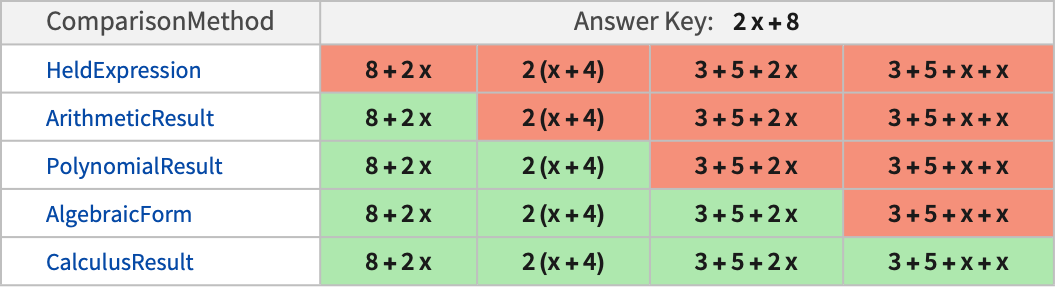
- The following table shows a comparison of "ArithmeticResult" with other comparison methods for a typical answer key of 2x+8 and several possible submitted answers:
Examples
open all close allBasic Examples (1)
Create an AssessmentFunction for an arithmetic question:
af = AssessmentFunction[Hold[1 + Sqrt[2]], "ArithmeticResult"]Non-computed addition is considered inequivalent and incorrect:
af[Hold[1 + Sqrt[1 + 1]]]Reordered terms are considered equivalent and correct:
af[Hold[Sqrt[2] + 1]]Scope (3)
Create a simple addition question without holding the answer key:
arithmetic = AssessmentFunction[1 + 2 + 3, "ArithmeticResult"]The original question is not accepted as an answer:
arithmetic[Hold[1 + 2 + 3]]The computed result is correct:
arithmetic[Hold[6]]Create a radical simplification question:
QuestionObject[StringForm["Simplify the expression `` so that no radicals are in the denominator", HoldForm[1 / Sqrt[2]]], AssessmentFunction[Hold[Sqrt[2] / 2], "ArithmeticResult"]
	]
Require addition terms to have the same order as the answer key:
ordered = AssessmentFunction[{Hold[a + b]}, <|"ComparisonMethod" -> "ArithmeticResult", "OrderlessMatch" -> False|>]ordered[Hold[b + a]]ordered[Hold[a + b]]Properties & Relations (1)
Create an assessment function for an addition pattern with the order specified:
asmf = AssessmentFunction[Hold[1 + 2 + _], <|"ComparisonMethod" -> "ArithmeticResult", "OrderlessMatch" -> False|>]Answers must match the pattern, including the order of terms:
asmf[Hold[1 + 2 + a]]asmf[Hold[3 + 1 + 2]]With the "HeldExpression" comparison method, this is not possible. Using Hold in the answer key does not support patterns:
AssessmentFunction[Hold[1 + 2 + _], <|"ComparisonMethod" -> "HeldExpression"|>][Hold[3 + 1 + 2]]AssessmentFunction[Hold[1 + 2 + _], <|"ComparisonMethod" -> "HeldExpression"|>][Hold[1 + 2 + 3]]Using HoldPattern supports pattern matching but allows reordering:
AssessmentFunction[HoldPattern[1 + 2 + _], <|"ComparisonMethod" -> "HeldExpression"|>][Hold[1 + 2 + 3]]AssessmentFunction[HoldPattern[1 + 2 + _], <|"ComparisonMethod" -> "HeldExpression"|>][Hold[3 + 1 + 2]]