GeoJSON (.geojson)
Background & Context
-
- MIME type: application/geo+json.
- GeoJSON GIS format.
- Geospatial data interchange format based on JavaScript Object Notation (JSON).
- Open standard format for representing simple geographical features.
- GeoJSON identifies GeoJSON objects with list of rules in the Wolfram Language.
- GeoJSON is specified by RFC 7946.
Import
- Import["file.geojson"] imports a GeoJSON file and renders it as a GeoGraphics object.
- Import["file.geojson","elem"] imports the specified element from a GeoJSON file.
- Import["file.geojson",{{"elem1","elem2",…}}] imports multiple elements.
- Export["file.geojson",expr] exports a GeoGraphics or DynamicGeoGraphics expression to a GeoJSON file.
- Coordinate numbers where scientific notation is used are given in JSON in E notation.
- See the following reference pages for full general information:
-
Import, Export import from or export to a file CloudImport, CloudExport import from or export to a cloud object ImportString, ExportString import from or export to a string ImportByteArray, ExportByteArray import from or export to a byte array
Import Elements
- General Import elements:
-
"Elements" list of elements and options available in this file "Summary" summary of the file "Rules" list of rules for all available elements - Data representation elements:
-
"Data" rule-based representation for each feature of the GeoJSON archive "Graphics" all geometric features combined into a single GeoGraphics object "GraphicsList" list of graphics representing the geometric features of a GeoJSON archive - Import by default uses the "Graphics" element for the GeoJSON format.
- Spatial information elements:
-
"CoordinateSystem" name of the coordinate reference system "SpatialRange" range of geographic coordinates, typically given in decimal degrees - Low-level meta-information from the file:
-
"CoordinateSystemInformation" raw parameters of the coordinate reference system
Examples
open all close allBasic Examples (3)
Import the contents of a GeoJSON file:
Import["ExampleData/newyork.geojson"]Export a GeoGraphics object as a GeoJSON file:
file = FileNameJoin[{$TemporaryDirectory, "marker.geojson"}]Export[file, GeoGraphics[GeoMarker[Entity["City", {"Boston", "Massachusetts", "UnitedStates"}]]]]Import[file]FilePrint[file]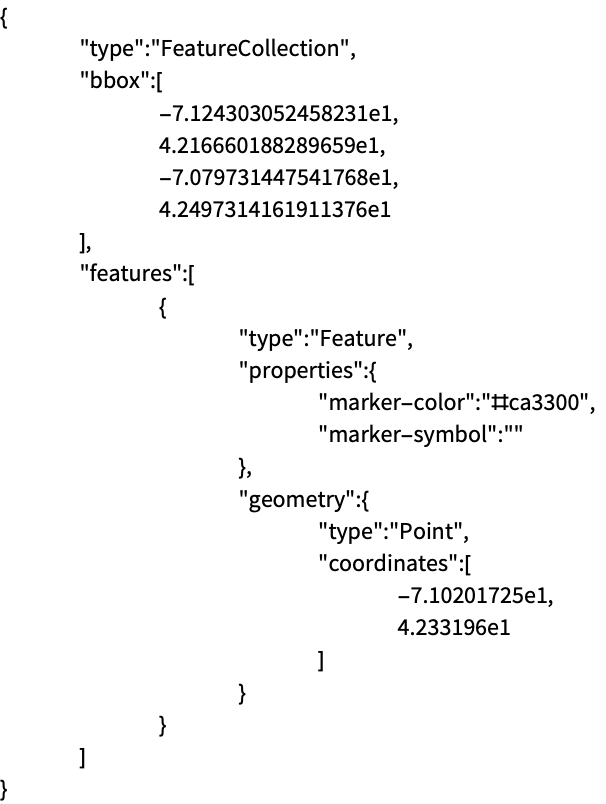
Read a GeoJSON file as a string:
Import["ExampleData/lineNYCtoBoston.geojson", "String"]Import the string and interpret it as a GeoGraphics object:
ImportString[%, "GeoJSON"]Scope (6)
Export a GeoGraphics map as a GeoJSON file:
file = FileNameJoin[{$TemporaryDirectory, "polygonBoston.geojson"}]Export[file, GeoGraphics[Polygon[Entity["City", {"Boston", "Massachusetts", "UnitedStates"}]]]]Import[file]Export a GeoGraphics object as a string using the GeoJSON format:
ExportString[GeoGraphics[GeoMarker[Entity["City", {"Boston", "Massachusetts", "UnitedStates"}]]], "GeoJSON"]Specify explicitly the GeoJSON format to export a GeoGraphics object to a JSON file:
file = FileNameJoin[{$TemporaryDirectory, "marker.json"}]Export[file, GeoGraphics[GeoMarker[Entity["City", {"Boston", "Massachusetts", "UnitedStates"}]]], "GeoJSON"]Import[file]Import[file, "GeoJSON"]Export a GeoGraphics expression containing graphical directives, encoded as GeoJSON properties:
file = FileNameJoin[{$TemporaryDirectory, "polygonWithDirectives.geojson"}]Export[file, GeoGraphics[{FaceForm[Blue], EdgeForm[Red], Polygon[Entity["City", {"Boston", "Massachusetts", "UnitedStates"}]]}]]Import back the GeoGraphics data:
Import[file]Import a particular element from a GeoJSON file:
Import[file, "Data"]Export GeoGraphics primitives and directives of different types:
file = FileNameJoin[{$TemporaryDirectory, "geopath.json"}]Export[file, GeoGraphics[{Red, Opacity[0.5], Thickness[Large], GeoPath[{Entity["City", {"NewYork", "NewYork", "UnitedStates"}], Entity["City", {"Boston", "Massachusetts", "UnitedStates"}]}], Blue, Point[Entity["City", {"NewYork", "NewYork", "UnitedStates"}]], FaceForm[{Blue, Opacity[0.7]}], EdgeForm[{Red, Dashed, Thickness[Medium]}], Polygon[Entity["City", {"NewYork", "NewYork", "UnitedStates"}]], Red, Point[Entity["City", {"Boston", "Massachusetts", "UnitedStates"}]], FaceForm[{Red, Opacity[0.7]}], EdgeForm[{Blue, Dashed, Thickness[Medium]}], Polygon[Entity["City", {"Boston", "Massachusetts", "UnitedStates"}]]}], "GeoJSON"]Import[file, "GeoJSON"]Give the list of possible elements to import from a GeoJSON file:
Import["ExampleData/map.geojson", "Elements"]Import["ExampleData/map.geojson", "SpatialRange"]Import["ExampleData/map.geojson", {{"Graphics", "SpatialRange"}}]Import Elements (4)
"Data" (1)
"Graphics" (1)
Import the GeoGraphics version of a GeoJSON file:
Import["ExampleData/newyork.geojson", "Graphics"]"GraphicsList" (1)
Import a GeoJSON file as a complete GeoGraphics object:
Import["ExampleData/disks.geojson"]Import a list of GeoGraphics objects for the respective geo primitives:
Import["ExampleData/disks.geojson", "GraphicsList"]"SpatialRange" (1)
Get the spatial range used in a GeoJSON file:
Import["ExampleData/boston.geojson", "SpatialRange"]Compare to the GeoJSON specification of that geo range:
FilePrint["ExampleData/boston.geojson"]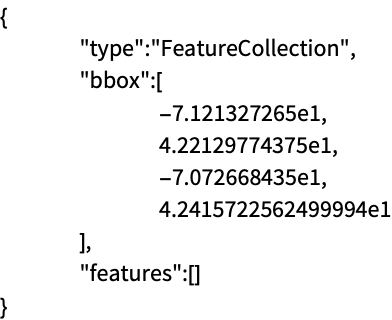
That GeoJSON file contains only bounding box information, which is used when importing to GeoGraphics:
Import["ExampleData/boston.geojson"]Export Options (1)
Applications (1)
Download earthquake data for the East Coast of the US:
earthquakes = EarthquakeData[GeoDisk[Entity["City", {"Sacramento", "California", "UnitedStates"}], Quantity[600, "Kilometers"]], 4, {{1972, 1, 1}, {2012, 12, 31}}, "Position"]["Values"];Export a GeoGraphics map of the data as a GeoJSON file, so that it can be used in other applications:
file = FileNameJoin[{$TemporaryDirectory, "earthquakes.geojson"}]Export[file, GeoGraphics[{Red, PointSize[.015], Point[earthquakes]}]]Verify the result, importing the "Data" element of the GeoJSON file:
Import[file, "Data"]Import the GeoJSON file using a relief geo background, to show correlation with the topography:
Import[file, GeoBackground -> "ReliefMap"]