



CloudExport
CloudExport[expr,"format"]
exports expr to a new anonymous cloud object in the specified format.
CloudExport[expr,"format","uri"]
exports to a cloud object at a given URI.
CloudExport[expr,"format",CloudObject["uri"]]
exports to a given cloud object.
Details and Options
- CloudExport exports raw content to cloud objects. Unlike CloudDeploy, it does not set up active executable structures in the cloud.
- CloudExport returns the CloudObject to which it saves.
- CloudExport[expr,"format",URL["uri"]] is also supported.
- To copy an existing local file to the cloud, use CopyFile.
- CloudExport allows the following options:
-
AutoCopy False whether to make a copy when opened AutoRemove False whether to schedule the object for deletion CachePersistence Automatic controls the time duration for which an object will be cached by a client CloudBase Automatic what cloud to export to CloudObjectNameFormat $CloudObjectNameFormat format to use for the name portion of the URL CloudObjectURLType $CloudObjectURLType base type of URL to use (obj, env, ...) IconRules Automatic icons to use for the exported object MetaInformation {} metainformation for the exported object Permissions Automatic permissions for the exported object SourceLink Automatic object to be linked as the source - With the default setting PermissionsAutomatic, CloudExport creates a cloud object with permissions set to $Permissions, which is usually "Private".
Examples
open all close allBasic Examples (2)
Scope (1)
Export to a named cloud object specified by a string:
CloudExport[Plot[Sin[x], {x, 0, 10}], "GIF", "plot"]Export to a named cloud object specified by a CloudObject:
CloudExport[Plot[Sin[x], {x, 0, 10}], "GIF", CloudObject["plot"]]Export to a named cloud object specified by a URL:
CloudExport[Plot[Sin[x], {x, 0, 10}], "GIF", URL["https://www.wolframcloud.com/obj/documentation/plot"]]Options (13)
AppearanceElements (1)
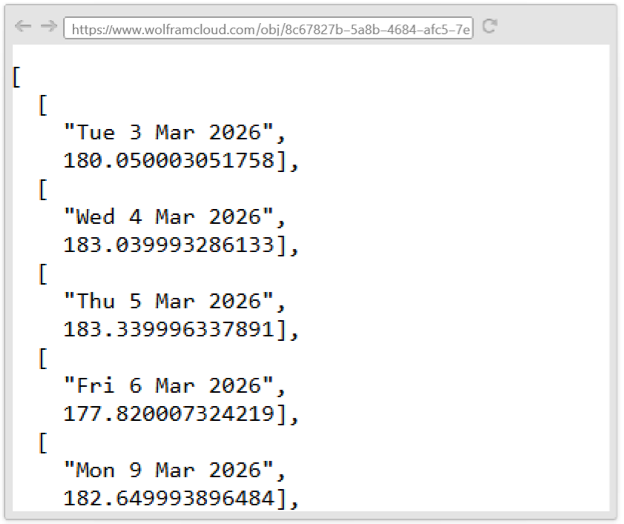
Export a CSV file with no appearance elements:
data = Map[{DateString[#[[1]]], QuantityMagnitude[#[[2]]]}&, Normal[FinancialData["NVDA", Today - Quantity[1, "Month"]]]];
CloudExport[data, "JSON", AppearanceElements -> None]
When viewing the object on the web, only the content is shown with no header or footer:
AutoCopy (1)
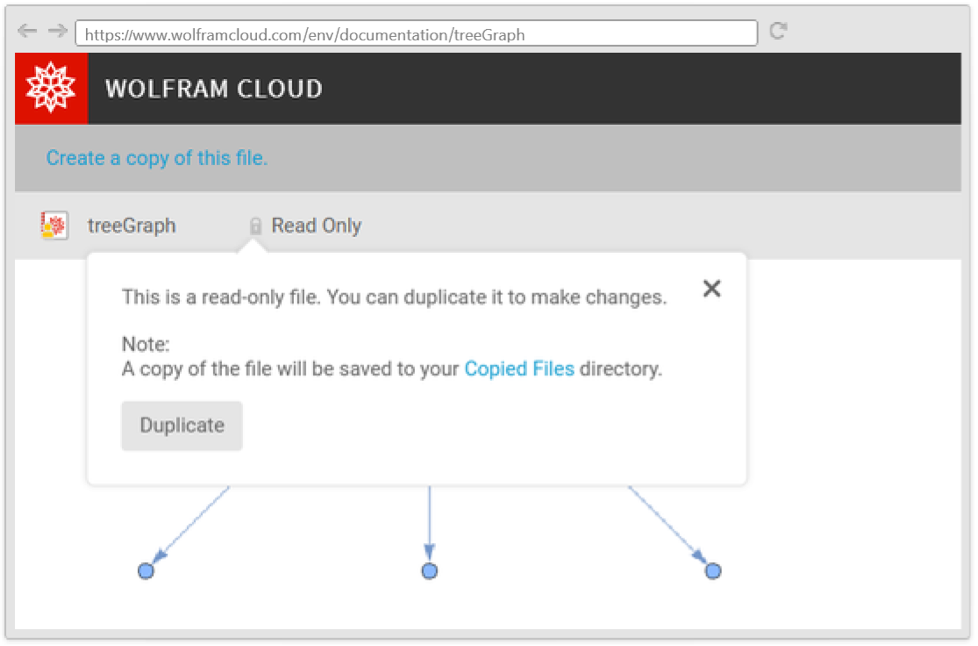
Export an expression with AutoCopy enabled:
obj = CloudExport[TreeGraph[{12, 13, 14}], "NB", "treeGraph", AutoCopy -> True]Construct a CloudObject with the environment view URL:
CloudObject[obj, CloudObjectURLType -> "Environment"]Click the URL to open the notebook, and click the link "Create a copy of this file" to make a copy:
AutoRemove (1)
CachePersistence (1)
Export an image that will be cached in the browser with a cache timeout of 1 day:
obj = CloudExport[RandomImage[1, {250, 250}, ColorSpace -> "RGB"], "PNG", CachePersistence -> Quantity[1, "Days"]]Check the value of the "cache-control" header from the response:
Lookup[URLRead[obj]["Headers"], "cache-control"]CloudBase (1)
CloudObjectNameFormat (1)
CloudObjectURLType (1)
CloudRenderingMethod (1)
Export a notebook with CloudRenderingMethod"InteractiveBoxes" to ensure it is rendered interactively, even if the automatic choice would be "Bitmap":
CloudExport[
	Notebook[{Cell[BoxData[ToBoxes[DynamicModule[{x = 0}, Table[Slider[Dynamic[x]], 2]]]], "Output"]}],
	"NB", CloudRenderingMethod -> "InteractiveBoxes"]
IconRules (1)
Magnification (1)
MetaInformation (1)
Export a web search of current events, saving the current geolocated city in metainformation:
obj = CloudExport[WebSearch["events near " <> CommonName[$GeoLocationCity]], "WL", MetaInformation -> {"City" -> $GeoLocationCity}]Retrieve the metainformation later:
Options[obj, MetaInformation]Permissions (1)
SourceLink (1)
Applications (1)
Export a list of all countries as a CSV file on the Wolfram Cloud:
CloudExport[EntityClass["Country", "Countries"][{"Name", "Population"}] /. q_Quantity :> QuantityMagnitude[q], "CSV", "countriespopulation.csv"]The data can be imported using CloudImport:
CloudImport["countriespopulation.csv"]//ShortPossible Issues (1)
Using CloudExport for expressions like APIFunction that have special behavior in the cloud does not activate their special behavior:
api = CloudExport[APIFunction[{"P" -> Number, "r" -> Number, "t" -> Number}, #P(1 + #r * #t)&], "WL"]Calling the cloud object does not do any computation since an expression is simply displayed using text, which happens to be imported as something readable by URLExecute:
URLExecute[api, {"P" -> 1000, "r" -> 2.3, "t" -> 72}]In order to create a usable APIFunction, it must be deployed with CloudDeploy or CloudPublish:
api = CloudDeploy[APIFunction[{"P" -> Number, "r" -> Number, "t" -> Number}, #P(1 + #r * #t)&]]Now it reads the parameters and evaluates the function when invoked, as intended:
URLExecute[api, {"P" -> 1000, "r" -> 2.3, "t" -> 72}]
 Fast Introduction for Programmers: Cloud Deployment
 An Elementary Introduction to the Wolfram Language
Text
Wolfram Research (2014), CloudExport, Wolfram Language function, https://reference.wolfram.com/language/ref/CloudExport.html (updated 2019).
CMS
Wolfram Language. 2014. "CloudExport." Wolfram Language & System Documentation Center. Wolfram Research. Last Modified 2019. https://reference.wolfram.com/language/ref/CloudExport.html.
APA
Wolfram Language. (2014). CloudExport. Wolfram Language & System Documentation Center. Retrieved from https://reference.wolfram.com/language/ref/CloudExport.html