"SpringElectricalEmbedding" (Graph Layout Method)
"SpringElectricalEmbedding" (Graph Layout Method)
- Vertex layout for GraphLayout.
- Use spring electrical embedding to lay out vertices of a graph.
Details & Options
- The spring electrical embedding is a graph-drawing technique to position vertices of a graph so that they minimize mechanical and electrical energy when each vertex has a charge and each edge corresponds to a spring.
- The spring electrical embedding is typically used to lay out complex large graphs.
- The layout xi of the vertices vi of the graph is calculated by minimizing the energy function
 with
with -
 .
.  is a constant that regulates the relative strength of the repulsive force and
  is the relative spring length.
- Vertices can be embedded in
 .
. - The following model parameters can be given:
-
"RepulsiveForcePower" repulsive force constant 
"SpringConstant" spring constant 
- The following graph parameters can be given:
-
"EdgeWeighted" whether to use edge weights "VertexWeighted" whether to use vertex weights - Possible settings to control the energy minimization process include:
-
"EnergyControl" how the energy function is controlled during minimization "InferentialDistance" cutoff distance for inference from faraway vertices "MaxIterations" maximum number of iterations "RandomSeed" seed for the random generator for initial vertex placement "StepControl" how step lengths are modified during energy minimization "StepLength" initial step length used in moving the vertices "Tolerance" tolerance used in terminating the process - Possible settings to control the layout include:
-
"Rotation" Automatic layout rotation
Examples
open all close allBasic Examples (2)
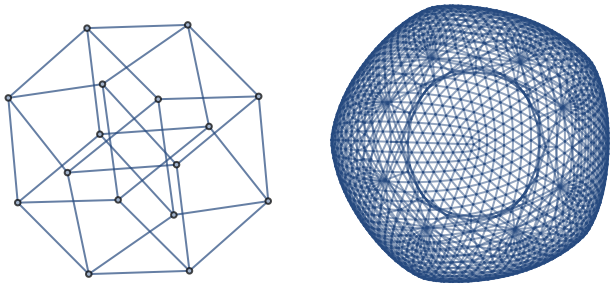
Graph[{12, 13, 15, 19, 24, 26, 210, 34, 37, 311, 48, 412, 56, 57, 513, 68, 614, 78, 715, 816, 910, 911, 913, 1012, 1014, 1112, 1115, 1216, 1314, 1315, 1416, 1516}, GraphLayout -> "SpringElectricalEmbedding"]"SpringElectricalEmbedding" works best for most graphs:
KnightTourGraph[10, 10, GraphLayout -> "SpringElectricalEmbedding"]Options (11)
"EdgeWeighted" (1)
With the setting "EdgeWeighted"True, edge weights are used:
edge = RandomInteger[#]# + 1& /@ Range[0, 10];
weight = RandomInteger[{1, 5}, 11];Graph[edge, EdgeWeight -> weight, GraphLayout -> {"SpringElectricalEmbedding", "EdgeWeighted" -> #}]& /@ {True, False}"EnergyControl" (1)
Use the option "EnergyControl"e to specify limitations on the total energy of the system during minimization:
edge = RandomInteger[#]# + 1& /@ Range[0, 20];Graph[edge, {GraphLayout -> {"SpringElectricalEmbedding", "EnergyControl" -> #, "StepControl" -> "Monotonic"}}]& /@ {Automatic, "Monotonic", "NonMonotonic"}"InferentialDistance" (1)
Use "InferentialDistance"d to specify a cutoff distance beyond which the interaction between vertices is assumed to be nonexistent:
edge = RandomInteger[#]# + 1& /@ Range[0, 20];Graph[edge, GraphLayout -> {"SpringElectricalEmbedding", "InferentialDistance" -> #}]& /@ {Automatic, .1, .5}"MaxIteration" (1)
Use "MaxIteration"it to specify a maximum number of iterations to be used in attempting to minimize the energy:
edge = RandomInteger[#]# + 1& /@ Range[0, 20];Graph[edge, GraphLayout -> {"SpringElectricalEmbedding", "MaxIteration" -> #}]& /@ {Automatic, 1, 2}"RandomSeed" (1)
"RepulsiveForcePower" (1)
"SpringConstant" (1)
"StepControl" (1)
Use "StepControl"method to define how step length is modified during energy minimization:
edge = RandomInteger[#]# + 1& /@ Range[0, 20];Graph[edge, GraphLayout -> {"SpringElectricalEmbedding", "StepControl" -> #}]& /@ {Automatic, "Monotonic", "NonMonotonic", "StrictlyMonotonic"}